AI automation for commercial real estate firms starts with a document nobody enjoys: the signed lease. A single lease can run to dozens of pages, and the handful of facts that matter, such as who the tenant is, when they can leave and how rent steps up, are scattered across the body and the exhibits. Someone has to find them, type them into a tracker, and keep them right.
We build small AI tools and internal tools around the documents, trackers and inboxes your brokers already use. A broker or an analyst checks every figure before it is relied on.
Lease abstracts, with the page number attached
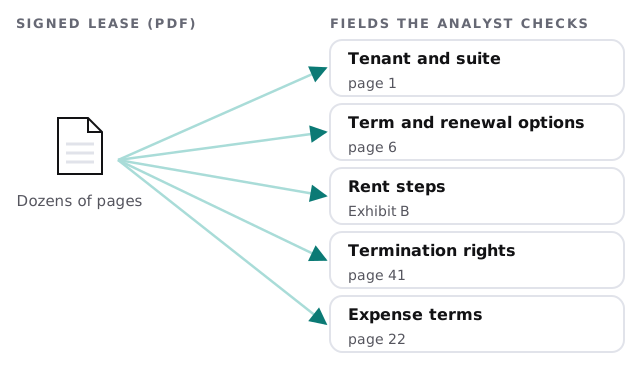
An analyst uploads the lease. The tool returns a draft abstract: tenant, premises, term, renewal and termination options, rent schedule and expense terms. It also flags clauses that are unusual compared with your standard forms. The analyst corrects what is wrong and confirms the rest into the tracker. Amendments and side letters matter as much as the original, so the tool reads the whole file for a tenant, not just the first document, and says when two documents disagree.
Seeing expirations before the tenant calls
Most firms track lease dates in a spreadsheet that gets stale. A better habit is a standing view that sorts every lease by how close a decision point is.
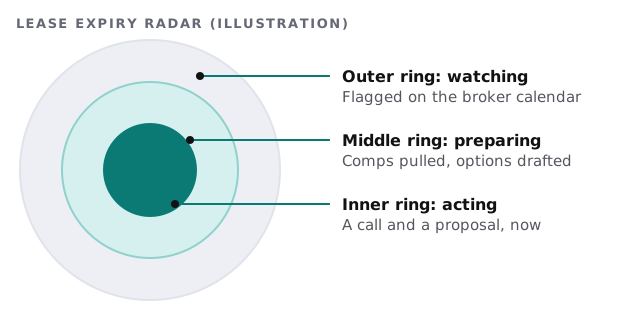
When a lease crosses into the middle ring, the tool pulls the comps you already have for that submarket and drafts a short brief for the broker. In the inner ring, it drafts the outreach. The broker decides whether to make the call.
What else is repetitive
- Offering memoranda and broker opinions of value. A first draft assembled from the property file, the rent roll and your standard language, with every number tied to a source for the broker to verify.
- Rent roll clean-up. Mismatched suite names and dates between the rent roll and the leases are listed, not silently fixed.
- Deal checklists. Letter of intent through closing, with documents and deadlines tracked per deal.
- Meeting notes. Calls with owners and tenants turned into action items.
- Market updates. A quarterly summary drafted from your own deal activity.
Your software, by category
| Category | Typical examples | What a tool adds |
|---|---|---|
| CRM and deal tracking | A real estate CRM or a spreadsheet | Reads deals, drafts follow-ups |
| Market data | Listings and comps subscriptions | Stays with you; the tool organizes the output |
| Document storage | Shared drives, a data room | Finds the right lease or exhibit |
| Property management | Lease and accounting platforms | Cross-checks dates and amounts |
| Marketing | Brochure and email tools | Drafts the first pass |
We make no claim of having integrated any named product. If you want to try something small yourself, setting up Zapier for your team shows how to pass a form into a tracker.
A Thursday before quarter-end
A broker is chasing a closing and a tenant’s renewal on the same afternoon. The analyst uploads the new lease. By the time the broker is off the phone, the abstract is in the tracker, flagged for a termination right on page 41, and the renewal brief for the other tenant is waiting. She edits two lines and sends it. The day’s work was judgment calls, not retyping.
What we’d put in writing
- Every figure shown carries its source page.
- Nothing leaves the firm without a broker’s approval.
- Documents stay in systems you control, with access limited to the deal team.
- You can see a log of what the tool read.
Starting out
Pick the pain: leases, the offering memo or deal checklists. Give us a few anonymized samples and tell us where the data lives today. We return a plan and a fixed quote after the free IT check. A real person replies within 1 business hour, Monday to Friday, 9am to 5pm Pacific.
In commercial real estate, the date you didn’t see costs more than the document you didn’t read. Make the dates impossible to miss.