AI automation for HVAC companies is about two things: speed on a hot day and steadiness on a mild one. In July, the problem is phones, dispatch and a quote that’s late. In April and October, the problem is that the phones go quiet and the schedule has holes.
We build small AI tools and internal tools for both ends of that curve. Your office approves anything a customer sees.
Your year has a shape
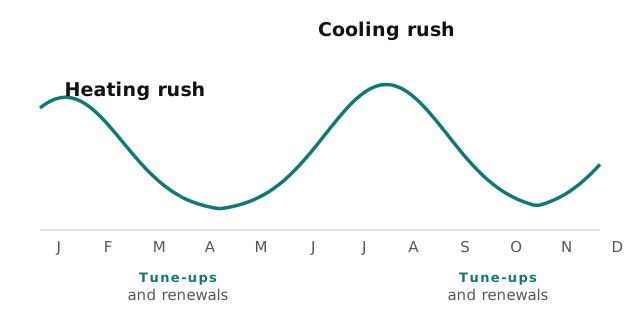
In the rush
Phones, dispatch and fast quotes. The dispatcher sees triage answers in one place, technicians are matched by skill and location, and customers get honest arrival windows.
In the valley
Maintenance agreements, tune-up reminders and past customers whose equipment is getting old. A tool reads your job history, finds who’s due and drafts the outreach. It fills the schedule when there’s room.
From the unit to the quote
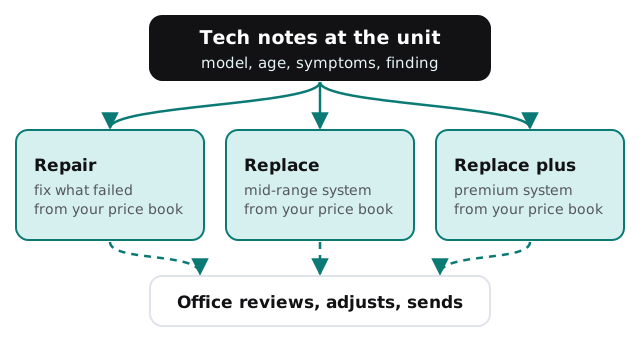
A technician finishes a diagnosis and leaves a few lines: model, age, symptoms, what’s failing. A tool turns those into a clear summary and drafts options from your price book, such as repair, mid-range replacement and premium replacement. The comfort advisor or owner reviews, adjusts and sends. The customer gets it while they’re still deciding.
What the dispatcher stops doing by hand
- Asking the same triage questions. Captured at first contact and shown on the job.
- Matching technicians. A shortlist by skill, certification on file and location.
- Texting arrival windows. Drafted from the live schedule.
- Chasing parts. Jobs waiting on a part are listed with the supplier’s latest note.
- Closing callbacks. A job that needed a return visit stays on a list until it’s done.
The software around a shop
| Category | What you may already run | What a tool adds |
|---|---|---|
| Field service and dispatch | Jobs, customers, schedule, invoices | Drafts summaries and quotes beside them |
| Price book | Your repair and replacement options | The source for every drafted quote |
| Phones and texting | Calls, voicemail, customer messages | Triage notes and drafted replies |
| Accounting | Invoices and payments | Flags unpaid jobs |
| Reviews | Google and similar | Asks after good visits, drafts replies |
A July afternoon
It’s 97 degrees and the phones haven’t stopped. A caller says the unit is blowing warm air. Your dispatcher sees the triage answers appear on the job as the call ends, a shortlist of two technicians and a drafted arrival window. She picks one, sends the text and takes the next call. Nobody keeps a sticky note.
Questions to ask any provider
- Does it quote from my price book, or does it invent numbers?
- Can it see customer addresses and gate codes, and does it need to?
- What does a technician see on a phone, and how long does it take?
- Who gets the log when a quote goes out wrong?
Signs it’s time
- Quotes go out the next day, or after the customer has called someone else.
- Maintenance customers are renewed only when someone remembers.
- Your best comfort advisor is the only person who can price a replacement.
- You can’t say how many past customers have systems over ten years old.
What we need from you
Your price book, a few anonymized technician notes, the field service software you use and your triage questions. We return a plan and a fixed quote after the free IT check. A real person replies within 1 business hour, Monday to Friday, 9am to 5pm Pacific. If you want to start with a form-to-reply flow yourself, setting up Zapier for your team is a gentle first project.
A customer without heat remembers who answered quickly and who quoted clearly. Make both easy and the rest follows.