AI automation for operations teams is mostly about plumbing. You sit between sales, stock, the people who do the work and the people who pay for it, and most of your week is spent moving facts from one of those to another.
The tools are not mysterious. They read, compare, draft and nudge. What matters is choosing which of your processes deserve one.
Three signs your ops runs on spreadsheet glue
- There’s a Friday ritual. Someone pulls numbers from four places into one sheet, and if they’re out, nobody knows how.
- Exceptions are found by accident. A late shipment, a stockout or an unanswered request comes to light when a customer calls.
- The same question gets asked in chat every day. “Where’s order 4417?” has an answer in a system, and a person fetches it.
If you nodded at two of those, there’s a build here.
One map, many systems
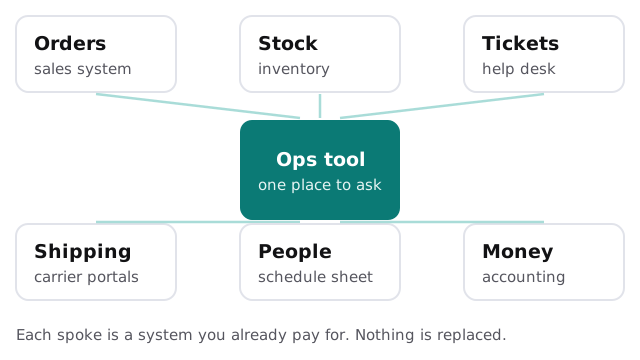
A question like “Which orders due Thursday are short on stock and have no carrier booked?” touches sales, inventory and shipping. Today it takes three tabs and a person who knows what to look for. With the right connections, you ask it in a sentence and get a list, along with the records it came from.
The Monday report, without the Sunday night
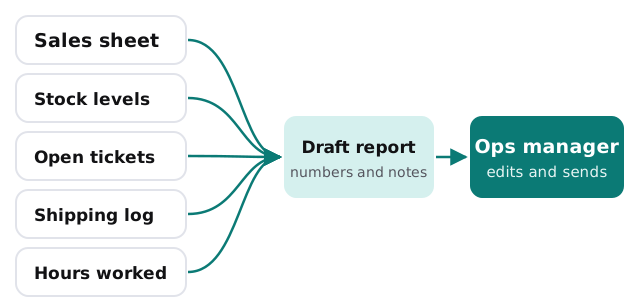
A drafted report lists what moved since last week, names the three biggest changes, and points to the rows behind each. You rewrite the summary in your own voice and send it. Whether it goes to your team or your boss, it’s yours.
Where to start, by process
| Process | The repeated work | What a tool does |
|---|---|---|
| Order handling | Checking each order against stock | Flags orders that can’t be filled |
| Vendor follow-up | Emailing for late deliveries | Drafts the nudge, you send it |
| Scheduling | Rebuilding the week after a call-out | Suggests coverage from the schedule |
| Intake forms | Retyping requests into the system | Reads the form and pre-fills the record |
| Month-end checks | Reviewing the same ten things | Runs the checks and lists failures |
Exceptions are the point
Routine work that goes right needs no attention. A good operations tool is quiet most days and loud only when something is off: a number outside its usual range, a task overdue, a request waiting too long. You decide what counts as unusual, in plain terms, and change it when the business changes.
A warehouse supervisor might set it to speak up when a pick list is still open an hour after its cutoff. A property operations lead might set it to speak up when a work order has no vendor assigned by end of day. The rule is a sentence, not a project.
If you’d rather start small
Much of this can begin without a custom build. Setting up Zapier for your team walks through connecting the apps you already use, and Make is a good alternative if your flows branch a lot. Come to us when the process crosses systems that off-the-shelf connectors don’t reach, or when you want a single place to ask questions.
What we ask before we build
- Who owns the process today, and who signs off on changes to it?
- Which systems hold the facts, and who administers each?
- What would a mistake cost, and who would notice first?
The free IT check covers those, and then you get a plan and a fixed quote. A real person replies within 1 business hour, Monday to Friday, 9am to 5pm Pacific.
Operations is the job of making sure nothing falls between the cracks. Let the software watch the cracks.