AI automation for senior living communities starts with a fact about the buyer. The person who makes the first call is often not the person who will live there. It is a daughter or son, writing at night after a hard week, who wants to know whether you have an opening, what a tour looks like and whether anyone will respond. We build small AI tools and internal tools that make sure someone does, and that take routine office work off the people who are better used with residents.
The decision takes a while
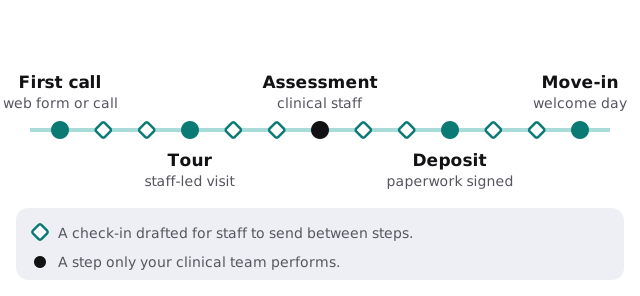
A family may weigh several communities over weeks. A tool can note when an inquiry arrived, which questions the family asked and what happened at the tour, then draft a short, specific check-in: the answer to the question they raised, the lunch they enjoyed or the paperwork still waiting. A sales counselor edits and sends it. The assessment stays with your clinical team, as the diagram shows.
Questions at ten at night
Families ask the same dozen things: what levels of care you offer, how visiting works, what a typical day looks like, how to tour. A tool can answer from a page of facts you write and approve, and hand anything about cost, availability or a specific person’s needs to a staff member. We would not let it quote a price or promise a room.
One update, four places
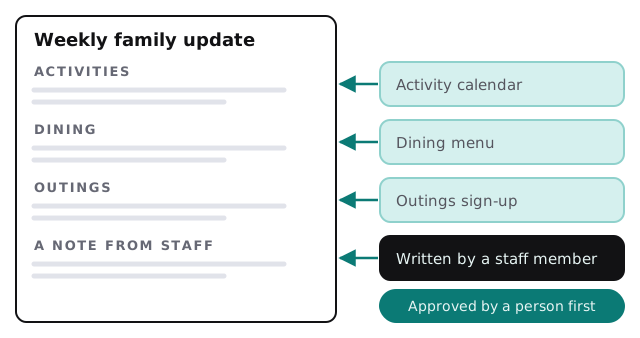
Activities, dining and outings are usually typed into a flyer, an email, a website post and a whiteboard. A tool can build all four from one calendar, so a person only proofreads.
Who does what
| Role | Office-side load | A tool’s draft |
|---|---|---|
| Sales counselor | Follow-ups and tour notes | Check-ins and a summary after each visit |
| Executive director | Reports, incident paperwork, staffing gaps | A weekly digest of open items |
| Activities director | Calendar, sign-ups, outings | The posted calendar and a printable version |
| Maintenance lead | Requests from rooms and common areas | A sorted work-order list with the oldest first |
| Business office | Move-in forms, billing questions | A checklist of what is still missing |
Staffing is a schedule puzzle
Shift coverage, call-outs and overtime are a daily puzzle. A tool can list who is qualified, who is available and who is close to overtime, then draft a message for the scheduler to send. The scheduler picks.
Lines we would draw
- A tool does not make care decisions or change a care plan.
- A tool does not message a resident’s family about a health event. A staff member does.
- Resident information goes only to tools you have approved, and nothing goes into a public chatbot.
- Rules differ by state and level of care. We ask for yours before we build.
The software around a community
Most communities run a CRM for sales inquiries, a resident record or care-management system, billing, an activity and dining system, a work-order tool and a scheduling system for staff. The sales and office tools are usually the easiest to connect. Clinical systems are handled much more carefully, and we may recommend leaving them alone.
The calendar
Inquiries tend to rise around holidays, when families see a parent in person, and after a hospital stay, when a decision has a deadline. Plan the follow-up work for those weeks before they arrive, not during them.
What we need from you
A list of the systems you use, the questions your sales team hears most and a sample weekly calendar. After the free IT check you get a plan and a fixed quote. A real person replies within 1 business hour, Monday to Friday, 9am to 5pm Pacific. For the family-update idea, recording and summarizing meetings with AI shows a way to start with meeting notes.
A move-in is a family’s hardest decision. The tool’s job is to make sure nobody on your team forgot to call back.