Most small business owners sign contracts the same way: skim the first page, trust the second, and hope the fourth doesn’t matter. AI contract review for small business doesn’t make you a lawyer. It does something more modest and genuinely useful: it reads the whole thing, tells you what it says in ordinary words, and points at the parts that deserve a second look.
What it is, and what it isn’t
- It is a fast, consistent first read of every contract that crosses your desk.
- It is a way to compare a new agreement with ones you’ve signed before.
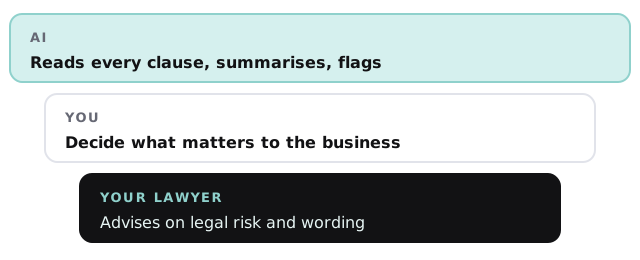
- It isn’t legal advice, and it won’t tell you whether to sign.
- It isn’t a replacement for a lawyer on anything with real money or risk in it.
That boundary is what keeps the tool honest, and it’s written into how we build it: the output says what the clause says and why it might matter, never “this is safe”.
What gets pulled out
| Clause | What you see | The question it prompts |
|---|---|---|
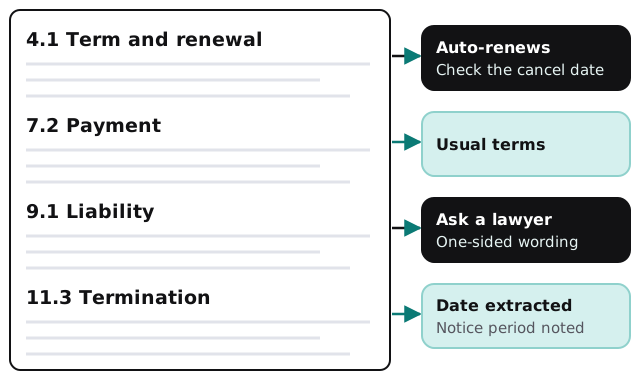
| Term and renewal | Start date, length, whether it renews itself | Do I have a reminder before the cancel date? |
| Payment | When money is due, late terms | Does this match what we discussed? |
| Termination | Who can leave, how, with what notice | Can I get out if it isn’t working? |
| Liability and indemnity | Who pays when something goes wrong | Is this one-sided? |
| Scope and changes | What’s included, how changes are handled | Who decides what counts as extra? |
| Confidentiality and IP | What stays private, who owns the work | Do I keep what I paid for? |
A review in four steps
- Upload. A PDF or Word file goes in. Scans are read too, though clean originals work best.
- Read. The tool breaks the contract into clauses and classifies each one.
- Compare. It sets the result next to your usual terms or a template you’ve provided and notes the differences.
- Hand over. You get the summary, the flagged clauses and a short list of questions, with page references.
Who does what
Where it helps most
- Renewals you forgot. Auto-renew dates pulled into a calendar reminder weeks ahead.
- Supplier terms. The standard agreements nobody reads that bind you for a year.
- Client agreements. Checking your own paperwork against what you promised.
- Leases and vendor contracts. Where one odd clause can matter more than the rest.
Keeping contracts confidential
Contracts often include names, prices and terms that someone else considers private. We use business-grade accounts with the AI provider, restrict who can open the results, and keep a log of which documents were processed. If a contract has a confidentiality clause that limits sharing it with outside services, the tool should flag that before it’s uploaded, and a person decides what to do.
If your team doesn’t yet have rules about what goes into AI tools, our guide to writing an AI use policy for your small business is the place to begin, and choosing an AI assistant for your team covers picking a tool.
What we need from you
Five or six contracts you’ve signed before, along with the ones you wish you’d read more closely, plus a list of the terms you always want to check. We build the summary format around your questions, test it on contracts you already understand, and a person approves how it behaves before it’s used on a live deal.
Use it to understand the contract faster. Use a lawyer to decide whether to sign it.