Open a job post for a receptionist, a bookkeeper or a technician and you’ll often get a hundred applications before lunch. Reading them properly takes a day you don’t have. AI resume screening for small business is a way to get that day back, provided it’s used as a reader and not as a judge. Think of an AI candidate screening tool as a tireless assistant who tells you what’s in each CV, and who never gets to say no.
The line we draw
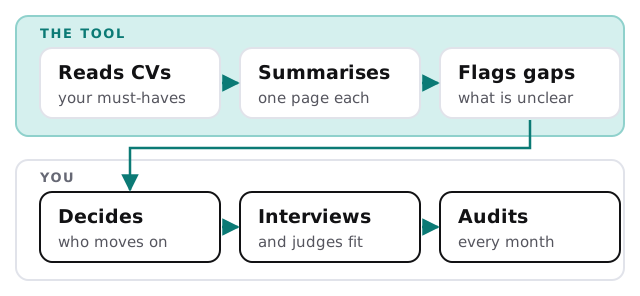
Screening tools can help with volume. They can also quietly make bad decisions at volume, which is worse than making a few slow ones. So we separate two jobs:
- Reading. Fine to automate. What does this CV say, and does it show what you asked for?
- Deciding. Stays with a person. Who goes forward, and who doesn’t.
What a good summary looks like
Each applicant gets one short page, written the same way every time:
- The must-haves, one by one. Met, not met, or “not stated”. Not stated is not the same as no.
- Relevant experience, in plain words. What they did, where, and for how long, as written.
- Questions to ask. Gaps or unclear dates to raise at interview, phrased neutrally.
- The source. Which line of the CV each point came from, so you can check.
It leaves out guesses about age, background, family plans or “personality”. Those aren’t things a CV can honestly tell you, and they’re where the trouble starts.
Safer and riskier uses
| Safer | Riskier |
|---|---|
| Summarise against written must-haves | Rank people with a single “fit score” |
| Flag missing information for a person | Auto-reject anyone below a score |
| Same questions, same format for everyone | Judge writing style or photo |
| Show which line of the CV drove each point | Use criteria nobody can explain |
| Keep a record you can audit | Accept a vendor’s word that it’s fair |
Your responsibility, even with a vendor’s tool
US federal guidelines on employee selection say that a selection rate for any group under four-fifths, or 80 percent, of the highest group’s rate will generally be regarded by enforcement agencies as evidence of adverse impact. They also call it a rule of thumb and not a strict cutoff. Put simply, if one group moves forward at a clearly lower rate than another, you should be able to explain why.
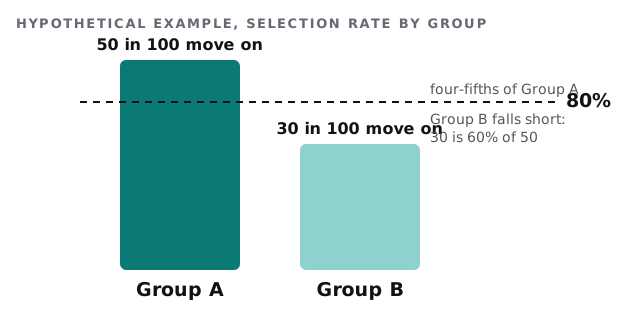
That check is cheap to run when you’re recording who applies and who moves on at each stage. It doesn’t prove anything on its own, and a small applicant pool can make the numbers jump around. It’s a prompt to look closer. Your rules may differ by state or city, so check with your own adviser before you rely on any tool for hiring decisions.
Questions to ask any provider
- What exactly is the tool allowed to decide, and what must a person confirm?
- Can I see why it said “not met” for a given applicant?
- Has it been checked for different outcomes across groups, and how?
- Where are the CVs stored, who can read them, and for how long?
- Can I switch off any feature that scores or ranks people?
Rather build it yourself?
A general assistant can summarise a single CV if you paste it in. Our guide to writing an AI use policy for your small business is a good first step either way, because it settles what staff may feed into AI tools. For anything that touches applicants at volume, a built tool with a record of what it did is safer.
What we need from you
- The written must-haves for one role, as a start.
- A few past CVs, with identifying details removed, to test on.
- Who reads the summaries, and who makes the call.
We begin with a plan and a fixed quote. A person approves the must-have list and the summary format before any real applicant is processed.
Let the tool read faster than you can. Keep the decision, and the responsibility, with a person.