Employee time tracking app development usually starts with a complaint rather than a plan. Someone is retyping paper timesheets on Sunday night. A supervisor texts hours from a job site. A custom time tracking app replaces that with a short routine every employee can follow in seconds, and it earns its cost when the stock options fail: when you need hours split by job, or approvals by site, or an export that matches the way your payroll provider wants it.
Start with the records you must keep
Before features, know the baseline. The US Department of Labor’s recordkeeping fact sheet says employers covered by the federal wage law must record the day and time each workweek begins, the hours each employee works each day, and the total hours worked each workweek. It also sets how long records must be kept.
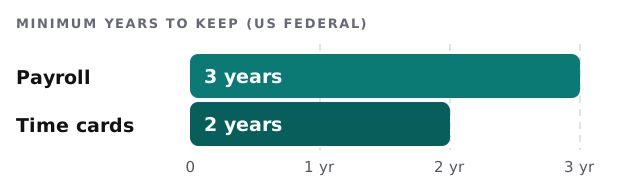
That shapes the build. The app should store each day’s hours in a form that is easy to export and hard to alter without a trace, and it should keep records for as long as you need them.
Three ways to capture time
| Method | Works for | Weak spot |
|---|---|---|
| Punch in and out | Shift workers, one site | Forgotten punches |
| Timer on a task | Jobs billed by the hour | People forget to stop it |
| Enter at day’s end | Office staff, salaried time logs | Memory, rounded guesses |
Most real businesses mix two. A crew punches in at the yard and switches a timer per job. An office team fills in a day-end form. A custom app can offer each group its own routine and still feed one report.
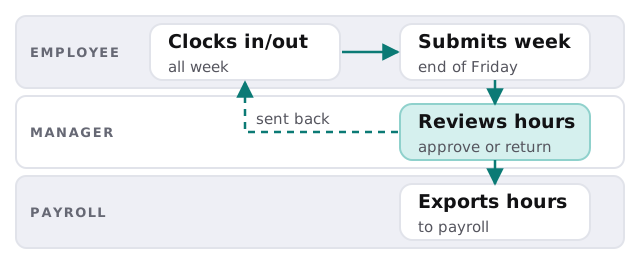
The weekly rhythm
Edge cases to settle on paper first
- Forgotten clock-outs. Who confirms the time, and how soon?
- Breaks. Are they tracked, deducted automatically or ignored?
- Rounding. Exact minutes, or a rule? Write it down and apply it the same way for everyone.
- Splitting a shift. One day across two jobs, with different rates.
- Travel. Is time between sites work time in your business?
- Corrections. Who may change an entry, and how is the change recorded?
- Leaving staff. What happens to their history when they go?
Several of these touch pay law, and we do not give legal advice. We build whatever rule your adviser confirms, and we log it so the app behaves the same way every week.
One Friday afternoon
A foreman opens the app on the yard tablet at ten to four. Six names are waiting. Five are complete, and one shows an open shift from Wednesday with a note: “forgot to clock out”. He taps the entry, sees the employee’s own message saying he left at half past three, approves the correction and watches the original punch stay visible beside it. The week closes. At five the export lands in the folder the bookkeeper checks, already grouped by job, so the labour cost for each site is ready before anyone opens a spreadsheet.
Nothing in that scene is clever. It is the same routine every week, which is exactly what makes it trustworthy when someone asks about a particular day six months later.
Signs you have outgrown the stock apps
- Hours are copied from one system to another by hand.
- You pay for features, and none of them match how your crews split a day across jobs.
- Supervisors approve in text messages.
- Job costing is a guess, because hours do not carry a job code.
What we need from you
- A copy of the timesheet or sheet you use today.
- The list of jobs, sites or cost codes people book time against.
- The format your payroll tool or bookkeeper accepts.
We start with a plan and a fixed quote. A person on our side checks the export against a real pay period with you before it is used for pay.
Payroll trusts the timesheet. Make it easy to fill in honestly and awkward to change quietly.