It is Tuesday, ten past seven, and a technician is in the cab of a van with a coffee and a phone. The day’s jobs are on that phone. So are the customer notes, the photos from yesterday and the login for the quoting tool. IT support for field teams starts from that picture, not from a desk with two monitors.
An office can survive a clumsy setup because everyone is within shouting distance of the person who fixes it. A crew cannot.
What changes when the office is a truck
| In the office | In the field | What we do about it |
|---|---|---|
| Wi-Fi is always there | Signal comes and goes | Pick tools that work offline and sync later |
| A device sits on a desk | A device is dropped, lost, stolen, rained on | Plan for loss from the start |
| A printer is down the hall | A signature happens on a tablet | Move forms and quotes onto the device |
| IT walks over | IT arrives by phone | A help line that fits the working day |
| Everyone logs in each morning | Shared tablets pass between hands | Individual sign-ins, quick to use |
Keep the data off the device
The most useful decision is also the least technical. If job photos and notes exist only on a phone, the phone is the only copy. The goal is to treat the device as a window onto the data, never the place it is stored.
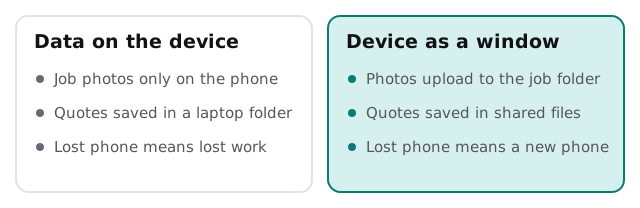
If your crews need job tickets, photos and signatures in one place, a custom field service app is one way to build that. For many teams, a well-organised set of shared folders and a good form tool does the job first.
The lost-phone plan
Every crew loses a device sooner or later. The plan decides whether that is a bad hour or a bad week.
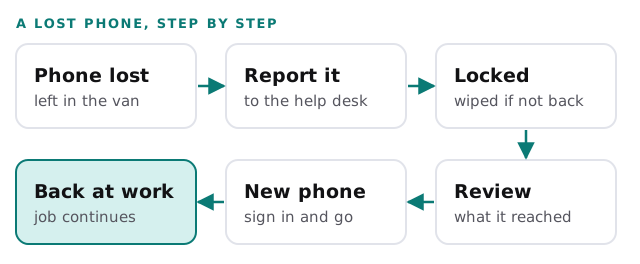
Device management tools can do the lock and wipe remotely. Microsoft’s description of its Intune wipe action is that it restores a device to its default settings and removes personal and organisational data, apps and configurations. It lists support for Android Enterprise, iOS and iPadOS, macOS and Windows. The same tools help you keep a record of which device is with whom, and that is the starting point of IT asset tracking.
Starters, leavers and seasonal hires
Field businesses grow and shrink with the season. That makes the first and last day of each person more important, not less. Each new starter needs a device, the right accounts and a short walk-through. Each leaver needs their access switched off the same day their keys come back. Our checklist for employee onboarding and offboarding IT covers the sequence, and endpoint protection for small business explains what protects the devices while they are out.
Signs your field IT needs attention
- Technicians text photos from personal phones.
- A lost device would take a week of notes with it.
- Nobody knows which crew member has which tablet.
- Passwords are shared on the truck’s clipboard.
- Support only helps between eight and five, and crews start at six.
On that last one, we can promise a reply within 1 business hour, Monday to Friday, 9am to 5pm Pacific. For crews who start earlier, tell us the pattern and we will say plainly what we can and cannot cover. For teams who work remotely rather than on the road, see IT support for remote teams.
A field team’s IT works when the technician forgets it exists. The phone opens the job; the job closes itself.
What we need from you
- A list of roles in the field and the device each one carries.
- The apps they open every day.
- One honest story about the last time something went wrong on a job.