Managed IT services for churches begin with the thing everyone sees: Sunday. The slides advance, the microphones work, the stream goes out and the children’s check-in line keeps moving. Behind that sits a smaller, quieter set of jobs that decide whether the other six days go well.
Four crews, one building
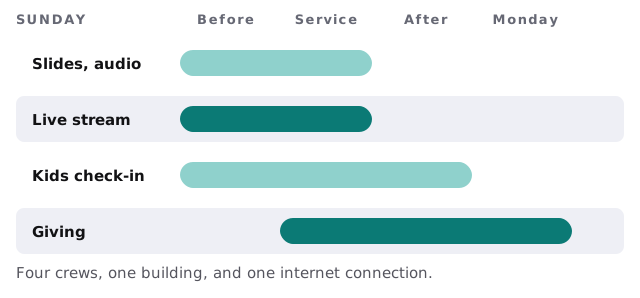
On a Sunday, several small teams use the same network at once, and most of them are volunteers.
What each crew needs
- Slides and audio. Computers that boot into the right software without surprises, and a console and projector that aren’t updated on a Saturday night.
- Live stream. A wired connection to the encoder, not Wi-Fi, and enough upload capacity to carry it while everyone else is online.
- Kids check-in. Tablets or kiosks that print labels, and a printer that isn’t also the office’s printer.
- Giving. Online and in-person gifts all landing in one ledger.
Giving is a records job
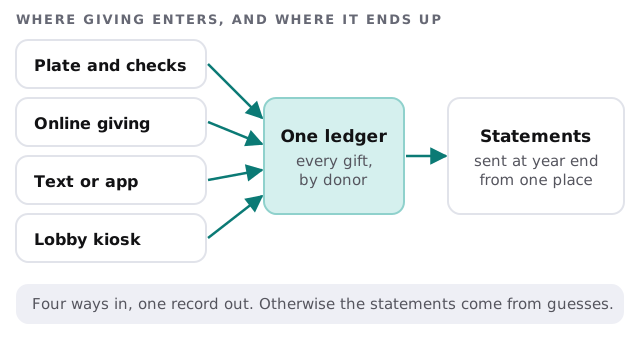
Most of a church’s financial IT is a records problem. Gifts arrive by plate, online, by text or app and at a kiosk, and every one of them should end up under the right donor.
The IRS explains why this matters in Publication 1771. A donor can’t claim a deduction for a single contribution of $250 or more without a contemporaneous written acknowledgment from the organization. A charity must help the donor by providing it. One annual summary can cover several such gifts. Separate gifts under $250 aren’t added together, so weekly offerings below that amount don’t, by themselves, trigger the requirement. The publication also has a note for religious organizations that provide only intangible religious benefits. We aren’t tax advisers, so confirm your own practice with yours.
The systems a church usually runs
| Category | What it holds | What goes wrong |
|---|---|---|
| Church management system | Members, attendance, giving, volunteer schedules | Exports into spreadsheets that become the real list |
| Online giving | Donor payments and recurring gifts | Not matched to the ledger until year end |
| Presentation and audio | Lyrics, slides, mixer settings | Software updates mid-week change the layout |
| Streaming and video | Cameras, encoder, platform account | Account owned by a volunteer’s personal email |
| Office PC and email | Budgets, minutes, bulletins | Backups never tested |
| Building access | Door codes, alarm, cameras | Codes never changed when keyholders leave |
Volunteers are users
A church’s users include a treasurer who comes in on Tuesdays, a volunteer who runs the sound board and a youth leader with a personal laptop. They aren’t employees, and they leave quietly.
- One account per person. No shared office password.
- Scoped to the ministry. The youth leader sees youth records, not giving.
- Reviewed twice a year. Take a list of accounts to the leadership team and ask who is still serving.
- Closed when someone steps down. The same week, not the next time someone remembers.
Holidays and the end of the year
Churches have two peaks beyond Sunday: the big holiday services, when attendance and streaming demand rise together, and the end of the year, when giving and statements bunch up. We plan the changes around both, so updates and migrations land in the quiet weeks and the checklist for a big service is written well beforehand.
What a quiet Sunday looks like
On Saturday, the sound computer was left alone and the giving platform’s report was already reconciled. On Sunday at 8:15 the stream test passes, the printer has labels, and the administrator has no idea anything could have gone wrong, which is the point.
Monthly care covers the access controls, backups and updates this depends on. The free IT check gives you a plan and a fixed quote.
A church’s IT succeeds when the people serving can think about the people they’re serving.