Managed IT services for home health agencies have to work where the care happens: a kitchen, a bedroom, a car in a driveway. The office is only a small part of the picture. Your most important systems run on a caregiver’s phone, in homes where signal comes and goes.
The phone is the clock, the chart and the proof
For many agencies, the phone does three jobs at once. It shows the schedule, it records the visit and it carries patient details. That makes it both your most useful tool and your biggest exposure.
What a verified visit must show
For Medicaid-funded personal care and home health care, the 21st Century Cures Act requires states to use electronic visit verification. The statute says the system must electronically verify six things about each visit, and Medicaid.gov describes the requirement as applying to personal care services and home health care services.
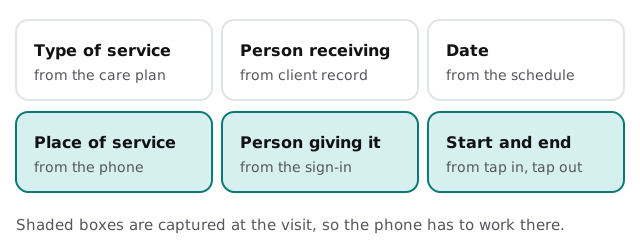
Which system you use is decided by your state and payers, so we don’t pick it for you. What we can do is keep the devices, accounts and connections underneath it dependable.
What the HIPAA Security Rule asks of the technology
If you transmit health information electronically in connection with covered transactions, you’re probably a covered entity, and the Security Rule’s safeguards apply. We explain what the rule requires. We don’t certify an agency or claim compliance for one.
- Unique user identification and emergency access. Both are listed as required technical safeguards, so each caregiver signs in as themselves.
- Automatic logoff and encryption. Listed as addressable, which means you implement them or document why an alternative fits.
- A risk analysis. Required under the administrative safeguards.
- Procedures for ending access. Termination procedures are addressable, and for a workforce with turnover they matter a great deal.
- A contingency plan. A data backup plan, a disaster recovery plan and an emergency mode operation plan are all required.
The pieces an agency runs
| Category | Used for | What goes wrong |
|---|---|---|
| Agency management or EMR | Intake, care plans, charting, billing | Slow remote access for clinicians |
| Scheduling | Matching caregivers and visits | A spreadsheet beside the real system |
| Visit verification app | Tap in, tap out, location, tasks | Outdated app, or a phone with no data |
| Payroll and timekeeping | Pay from verified hours | Hours entered twice |
| Secure messaging | Questions to the office | Patient details sent by plain text |
| Phones and laptops | Everything outside the office | Personal phones with no lock |
When a caregiver leaves
Caregiver turnover is a fact of the work, so the exit has to be a routine. On the last day: sign out the account, lock or wipe the work data on the phone, remove access to the scheduling system and confirm no patient information remains in personal photos or messages. That list is short because we’ve set it up in advance.
Clinicians and office staff have different needs
A visiting nurse or therapist charts at length, often from a laptop or tablet in a patient’s home, and needs fast access to the record. The scheduler and intake coordinator work all day in the office and need several screens at once. Billing staff work in the payer portals. Treating all three as one user type leads to either too much access or too little. We set access by role, so a scheduler can see the week’s visits without opening every chart, and a caregiver sees only the patients on their own route.
A Monday with it working
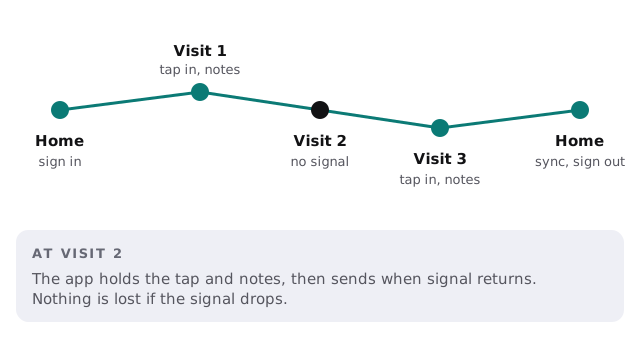
The weekend’s updates finished before anyone logged in. A caregiver whose phone died overnight signs in on a spare that was already set up. The visit in the dead-signal neighborhood syncs when the car reaches the main road. At the office, the scheduler sees every tap in and out without calling anyone, and the backup report from Sunday night is in the administrator’s inbox.
What we need from you
- Your systems, and which payers require which visit-verification tool.
- Your phones, company-owned or personal, and how many.
- Your office layout, and who administers each system.
- Your last lost device, and what happened.
Monthly care covers access controls, backups and updates. The free IT check ends in a plan and a fixed quote.
In home health the proof of a visit comes from a phone. Keeping that phone working and protected is the whole job.