Managed IT services for HVAC companies get judged on a handful of days a year. When the first heat wave arrives, the phones don’t stop, every truck is out and the dispatcher is the only person who knows where anyone is. If a tablet won’t sync or a call lands in the wrong queue, the whole day slips.
One call, five handoffs
A single service call passes through five places. Each one has its own way of failing.
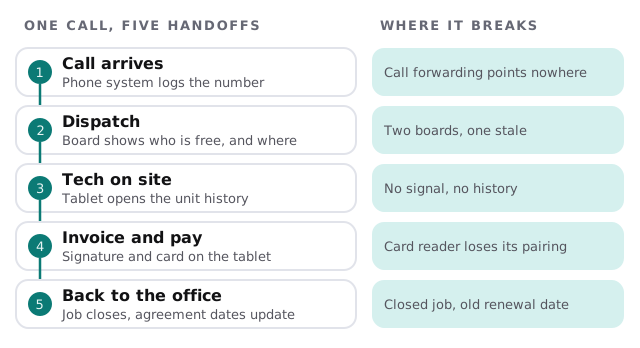
When we look at an HVAC company we trace one real call through all five and write down what each step depends on: the phone provider, the field-service software, the tablet’s data connection, the card reader. That map is what we maintain.
The truck is an office
A technician working in an attic needs the same things an office worker needs, and gets one bar of signal to find them.
| On the truck | What the tech uses it for | What goes wrong |
|---|---|---|
| Tablet or phone | Job details, unit history, photos | Offline mode never tested |
| Card reader | Taking payment at the door | Loses its pairing after an update |
| Parts lookup or van stock list | Finding the part before a second trip | Two versions of the list |
| Mobile hotspot | Backup connection | Plan data used up mid-month |
| Charger and mount | Power through a long day | Cables bought one at a time |
Keep a spare, already set up, in the shop. Swapping a tablet should take five minutes, not an afternoon.
Here is a good Tuesday in July. The dispatcher drags a no-cooling call onto a truck that finished early. The technician opens the tablet, sees that the same unit had a capacitor replaced last spring and brings one. The customer signs, pays on the reader and gets the receipt by text. By the time the truck pulls away, the job is closed and the office has nothing left to retype. None of that is clever. It only works when every piece was updated, paired and tested before the rush.
Your agreement list is the quiet engine
Maintenance agreements bring in work in the months when emergency calls don’t. They live in a list: customer, equipment, visit dates, renewal date. In many small companies that list is a spreadsheet beside the real system, edited by whoever remembers.
- One home for it. Either inside your field-service software or in a single protected file.
- Backups you’ve restored from. Not just backups that exist.
- Renewal dates that update when a job closes. If they don’t, customers are called late or called twice.
- Access limited to a few people, with a record of who changed what.
Questions to ask any IT provider
- Can you show me what happens to an incoming call if our main line goes down?
- Who gets the tablet when a technician leaves, and how is it wiped?
- How will you handle updates in June and December?
- Where are our customer records stored, and who can get to them?
A good answer is specific. A vague one is a reason to keep asking.
Choosing the quiet weeks
Cooling and heating rushes are obvious. The tune-up seasons are busy for the technicians but usually calmer for the office, and that is when updates, phone changes and new devices belong.
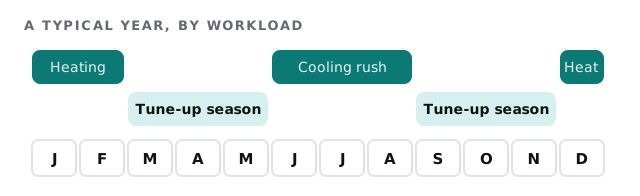
We schedule changes for the weeks between rushes and avoid touching dispatch, phones or tablets just before a forecast heat wave or cold snap. When something can’t wait, it gets a way back.
What we need from you
- Your field-service or dispatch software and who administers it.
- Your phone setup, and how calls reach the dispatcher.
- Every device that rides in a truck, with who carries it.
- Your agreement list, and where it lives today.
Monthly care covers access controls, backups and updates. The free IT check ends in a plan and a fixed quote.
A technician with a working tablet closes the job at the door. One without it makes a second trip.