Managed IT services for moving companies are tested at the worst possible moment: a customer’s front door, a truck with the engine running and a crew waiting for the phone to load. What happens in the minutes after the crew arrives depends on decisions made at the office months earlier.
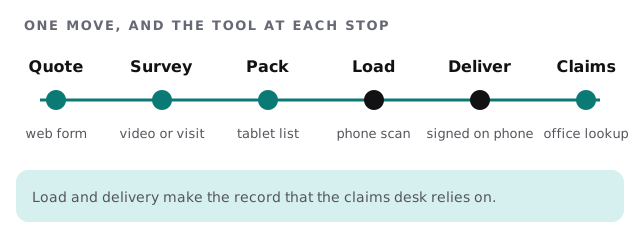
One move, six stops
Every move passes through the same stations, and each has a tool that can fail.
Three groups, three needs
The office
Dispatchers, estimators and the claims desk use scheduling or moving-specific software, quoting tools, a phone system and the accounting package. What they need is a job record they can trust. If the estimator, the dispatcher and the billing clerk see different numbers, the customer will notice at the end.
The crew
Movers and drivers need a phone that opens fast, shows the job, the stairs, the elevator booking and any special items, and lets them add photos. They do not need email, the customer list or the accounting tool. Keep their apps few. Give them a lock, a charger in the truck and a spare in the warehouse.
The customer
Customers expect a text with the arrival window, an estimate they can read and a receipt they can keep. They also hand over addresses, access codes and sometimes details about when the home is empty. That deserves care.
The inventory is evidence
When a lamp arrives cracked or a table has a scratch, the inventory is what everyone turns to.
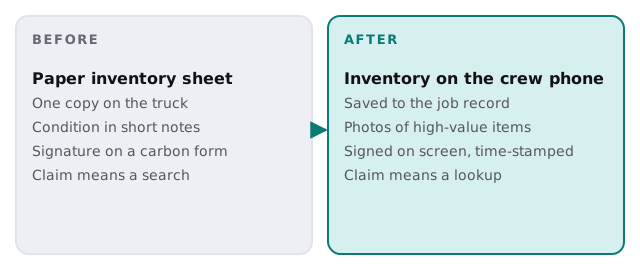
A phone-based inventory with photos of valuable or fragile items, a signature and a timestamp turns a disagreement into a lookup. It also needs backups and a rule about how long records are kept, which you set with your insurer and advisor.
Crews that come and go
Many movers hire extra hands for summer and for month ends. Treat each one like any other temporary worker:
- Create the account before day one, with the job list only.
- Use a company phone, or a locked, updated personal one.
- Set an end date at the time you create the login.
- Collect devices, keys and badges in the same conversation as the final paycheck.
- Check the active list monthly, because turnover is part of the business.
The warehouse
If you store belongings, the warehouse has its own records: who is stored where, what is billed monthly and when access was last used. Cameras, door codes and a scanner or two make up the rest. Give the cameras and recorder their own protected network, keep door codes in a list that changes when people leave, and test that footage can be retrieved before you ever need it.
Busy days, quiet weeks
We avoid changing dispatch, phones or the scheduling system before a known rush, such as month end or a peak summer weekend. Updates go in the quieter weeks, and each has a way back. In a rush, a failing app is not fixed from an office chair. It is replaced with the spare phone already set up on the shelf.
What we need from you
- Your scheduling, quoting and dispatch tools, and who administers them.
- How crews get their job list and how many devices go out.
- Where inventories and photos are saved after a job.
- Your hiring pattern across the year.
Monthly care covers access controls, backups and updates. The free IT check ends in a plan and a fixed quote.
The truck arrives with the phone. If the phone fails, the move starts late.