Managed IT services for photography studios start with a rule that sounds obvious and is often broken: until a shoot is copied twice, it exists on one memory card. Everything else, the fast storage, the calibrated screens and the client gallery, follows from taking that risk seriously.
The card is the only copy, until it isn’t
Think of a wedding Saturday. The photographer shoots for eight hours, drives home tired and plugs a card into a laptop. The copy begins, a drive is almost full and nobody notices. If this is the only set, you cannot go back.
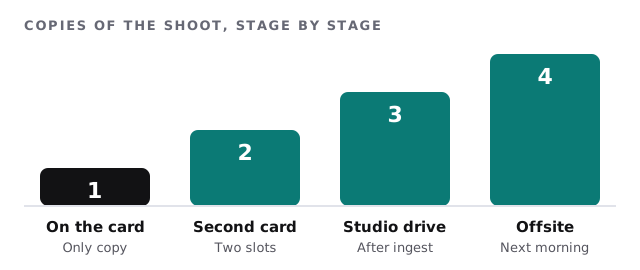
A shoot-day routine takes minutes and removes most of the danger:
- Shoot to two cards if the camera allows it.
- Copy on set or at the end of the day to a second device, before anyone reformats anything.
- Ingest to studio storage and check the file count against the card.
- Send an offsite copy the same night, using an upload or a drive that leaves the building.
- Format cards last, after the previous steps are done, not first.
Storage that matches the work
Fast storage
Editing raw files and video needs quick reads. A studio with several editors should use shared storage on a fast network, or fast local drives for the active job. Slow disks turn a morning of culling into an afternoon.
Working storage
Finished and in-progress jobs belong on redundant storage that survives the failure of a drive. This is also where projects are shared between people, so permissions matter: editors write, assistants read, and nobody deletes without a second look.
Archive
Old shoots rarely open, but when a client calls years later they open urgently. The archive needs its own backup, a catalog or naming convention you can search and a rule for what moves there and when.
Naming matters more than most studios admit. A folder called “Final_v3_REAL” works until the person who made it leaves. Agree on a pattern with the date, the client and the type of job, use it everywhere and put it in the new-hire checklist. When a bride asks for her album files three years later, you want to find them by searching, not by remembering.
Machines and screens
- Editing computers need plenty of memory and fast internal storage, with software updates scheduled between jobs.
- Monitors drift. Calibrate them on a schedule and keep a record of when, so prints match what the editor saw.
- Printers and print profiles are tied to a paper and an ink. A driver update can break a profile, so test a print after any update.
- Tethered shooting setups, with cameras cabled to a laptop in the studio, depend on cables, ports and software that behave on the day. Have a spare cable.
Delivering to clients
A gallery should become more guarded as the client moves from browsing to receiving.
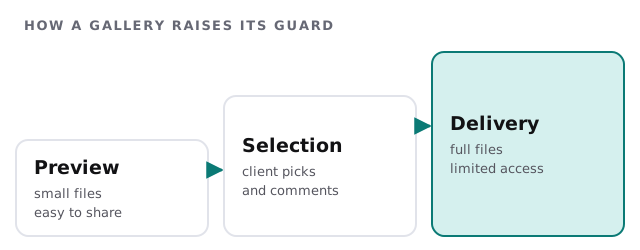
Use per-gallery passwords or private links, put expiry dates on delivery links and keep a list of what has been shared and with whom. If an assistant or second shooter works with you, give them access to the jobs they worked on, not the whole archive.
Busy seasons
Weddings, school portraits, holiday sessions and corporate headshot days all cluster. Plan changes for the quiet weeks. Before a busy stretch, check free space on every working drive, run a restore test from backup and make sure the spare laptop boots and has the software on it.
What we need from you
- Your shoot-day routine, as it is now.
- Where files live, including old external drives in drawers.
- Your editing machines and screens.
- Your gallery and delivery tools.
Monthly care covers access controls, backups and updates. The free IT check ends in a plan and a fixed quote.
A photograph that exists once isn’t safe. Make the second copy before you leave the venue.