Password manager setup for small business goes wrong in a predictable way: someone creates a personal account, shares a few logins and calls it done. A year later the founder can’t recover the accounts, and the one employee who set it up has left. A business password manager rollout is less about the tool and more about who owns what.
Why a manager beats a rule
Telling people to use strong, different passwords doesn’t survive contact with thirty accounts each. A manager does the remembering. NIST’s current authentication guidance says verifiers shall allow password managers and autofill, and that they should permit pasting. That’s the standards body saying a manager is the normal way to cope with strong passwords.
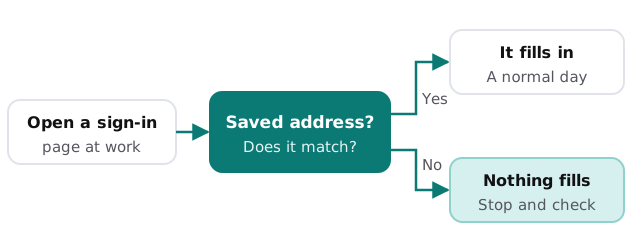
A good manager also nudges people towards safer behavior. It fills a saved login only on the address it was saved for, so a convincing fake page tends to be met with silence.
Structure first, passwords second
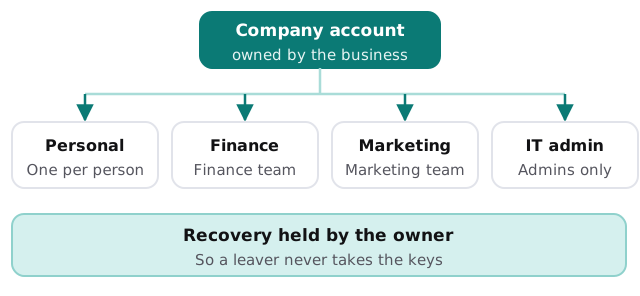
Do this before anyone imports anything. A sensible small-business layout has the business as the account owner, a personal vault for each person and a handful of shared vaults for things that belong to a team rather than an individual.
| Vault | Who has access | What belongs in it |
|---|---|---|
| Personal | One person | Their own work logins |
| Finance | The finance team | Bank, payroll and accounting logins |
| Marketing | The marketing team | Social, ad and website accounts |
| IT admin | Admins only | Router, domain, admin and licence logins |
Products such as 1Password and Bitwarden sell business plans built around this idea: an organization account, shared collections and an admin who can manage who sees what. Whichever you choose, check that the owner can remove a person’s access on their last day.
The rollout
Before launch
Name the owner. Create the organization account, turn on multi-factor sign-in for the manager itself, and set up the vaults above. Decide who holds recovery and write it down somewhere other than the manager.
Launch
Start with a pilot of two or three people. Have them install the browser extension and phone app, import their existing logins, and use it for a while. Ask what was confusing. Then roll out to everyone with a one-page guide that says three things: how to sign in, how to save a login, and who to ask.
After launch
Clear out shared logins that live in spreadsheets, shared documents and chat messages. Move them into the right vault, then delete the old copies. This is the step most rollouts skip, and without it you’ve added a manager without removing the habit.
Mistakes to avoid
- Letting one person own the account personally.
- Sharing the master password between people.
- Creating a shared vault for everything, so everybody can see everything.
- Skipping multi-factor sign-in on the manager itself.
- Leaving the old password spreadsheet where anyone can open it.
- Forgetting leavers, so access lingers long after the last day.
If you also want to protect the accounts the manager unlocks, multi factor authentication setup is the natural pair, and dark web monitoring covers what to do when a password turns up in a breach. For how our monthly care handles access day to day, see employee onboarding and offboarding IT.
What we need from you
- A rough list of shared accounts your team uses today and where the logins live.
- Who should own the organization account.
- A decision on who should be able to see which shared vaults.
Monthly care from us covers access controls, and a password manager belongs inside them. We start with the free IT check, then give you a plan and a fixed quote. A real person replies within one business hour, Monday to Friday, 9am to 5pm Pacific.
A password manager is only as good as its ownership. Put the business in charge of the account before you put a single password in it.