Booking by message is slow for everyone. The customer proposes Tuesday morning, you’re out, they get an answer that afternoon, Tuesday is gone, and round it goes. An AI appointment scheduling assistant does the negotiating for you, in plain language, and only ever offers times you’d actually accept.
A booking link versus an assistant
| Plain booking link | AI scheduling assistant | |
|---|---|---|
| How customers use it | Pick from a grid | Say what they want in their own words |
| Odd requests | “Nothing available” | Offers close alternatives |
| Travel and prep time | Needs fiddly settings | Understands the rule once |
| Cancel or move | Customer finds the link again | Replies to the reminder message |
| Unusual jobs | Not handled | Passed to a person with context |
Most small businesses start with a link, and that’s a sensible start. The assistant earns its place when your day has rules a grid can’t show.
One working day, as the assistant sees it
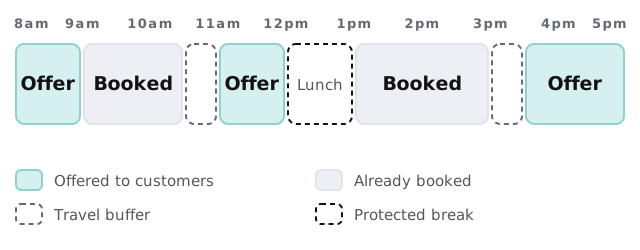
The assistant doesn’t see an empty calendar. It sees what’s free after your rules have been applied.
Rules you set once
- Hours. When each person or team is bookable, including odd days.
- Buffers. Gaps after jobs that need cleanup, travel or notes.
- Service lengths. A standard visit is one hour; a first visit is longer.
- Limits. No more than three site visits a day, none after 4pm.
- Lead time. Nothing sooner than tomorrow morning unless a person approves.
If one of these changes, you change the rule in one place instead of fixing a dozen appointments.
The life of one appointment
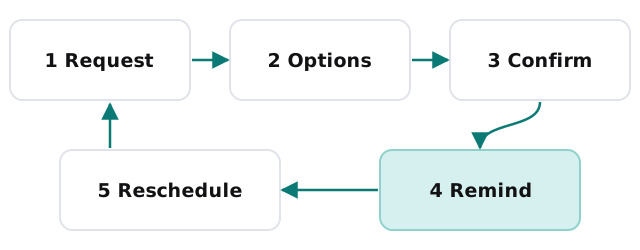
- Request. By web chat, text, email or phone, in ordinary words.
- Options. Two or three good times, not a wall of choices.
- Confirmation. The calendar entry, the customer’s confirmation and your notes are written together.
- Reminder. A message beforehand with the address, what to bring and a way to change plans.
- Change. A reply of “can we move it?” restarts the loop without anyone phoning.
When the schedule gets complicated
Two people, one visit
Some jobs need a technician and a second person, or a stylist and a particular chair. You define the combination, and the assistant offers only times when all parts are free.
Customers in different places
For mobile work, it can group visits by area on the days you’re in that part of town. That’s a rule you write, not a guess it makes.
Waiting lists
When a slot opens up after a cancellation, it can offer it to the next person waiting, and you can choose whether a person approves each offer first.
Here’s what a Wednesday text looks like
A customer texts at 9pm: “Can someone come look at the boiler before the weekend?” The assistant checks the days you’re out that way, offers Thursday at 10 or Friday at 2, and the customer picks Friday. The booking lands in the calendar with the address and the boiler details. You find all of that in the morning, rather than a voicemail you have to decode.
If the customer had asked for Saturday, which you don’t work, it would say so politely and offer the nearest alternatives. It can also say a person will confirm, and then flag the request to you.
Where it stays out of the way
A person approves what it does where it matters: unusual requests, discounts, anything that changes the price. You can read every conversation, and it never promises a time that isn’t on the calendar.
What we need from you
- The calendar you use now, and who reads it.
- Your real rules, including the unwritten ones such as “never first thing on Mondays”.
- Examples of past scheduling messages, awkward ones included.
We then test it on those scenarios before a customer sees it. If a ready-made calendar tool is already enough, we’ll say so.
Good scheduling isn’t offering more times. It’s offering fewer, better ones, and never the wrong one.