AI automation for chiropractic offices has a natural first target, and it isn’t the adjusting table. It’s the schedule. Care often runs as a series of visits across weeks, and the quiet failure of a busy office is the patient who misses the fourth visit and is simply never contacted. Nobody decided to lose them. The front desk was just on the phone.
We build small AI tools and internal tools that sit beside your practice software. The doctor decides everything clinical, and a person approves every message to a patient.
A series of visits, with the gap caught early
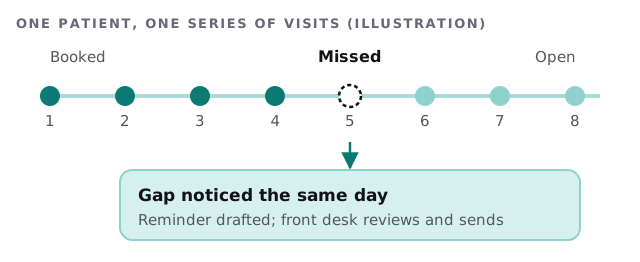
The tool compares who was booked with who was seen and builds the list each morning. For each gap it drafts a friendly, short message, not a scolding. The front desk reviews and sends. Patients who have finished their plan or told you they’re pausing are left alone.
Task by task
Intake
New patients arrive with forms. A tool can check each one for blanks or illegible entries before the visit, and list what to ask at check-in. That is one fewer clipboard at the counter.
Insurance eligibility
Before a visit, someone checks coverage and benefits. A tool can assemble the checklist, with the plan details your staff already looked up, and mark what is still unknown. A person confirms the result.
Recall
Patients who haven’t been in for a while are surfaced with their last visit and a draft message. The doctor can tell you which ones deserve a personal call.
Claims
A worklist of claims that are stuck or rejected, with the reason code in plain words, saves the biller from reading a screen of codes.
Monday morning at the front desk
The schedule opens with three lists already built. Two patients missed Friday, each with a draft message and the date of their last visit. Four new patients have forms with a blank insurance field. One claim came back rejected, with the reason in a sentence instead of a code. The front desk works down the lists between phone calls, edits a draft that sounds a little stiff, and sends the rest. Nothing was found by luck, and nothing went out unread. By ten o’clock the day’s follow-up is finished, and the office has not asked a patient the same question twice.
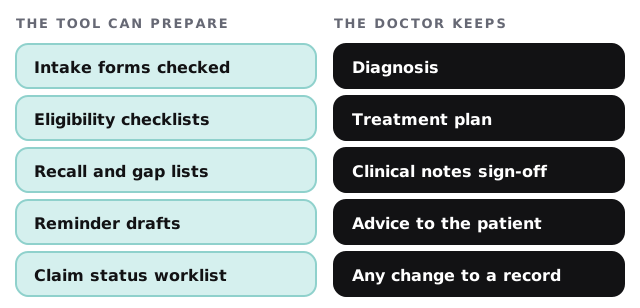
Doctor and tool, divided
A word on patient records
HIPAA’s rule text defines a covered entity to include a health care provider who transmits health information electronically, and it defines a business associate as a person who creates, receives, maintains or transmits protected health information on a covered entity’s behalf. If a tool or vendor does that for your office, the rule applies in specific ways, and your compliance adviser should say how. We make no compliance claims about any product. What we do is design each tool to see as little as it can, keep a log of what it touched, and avoid copying records into extra places.
Questions for any provider
- Which fields of the patient record will the tool read, and can it write anywhere?
- Could the same job be done without patient details?
- Where is each message held until a person approves it?
- How would I take its access away?
The software around the table
| Category | Typical examples | What a tool adds |
|---|---|---|
| Practice management | Scheduling, billing, patient records | Gap and recall lists |
| Intake | Online or paper forms | Completeness checks |
| Messaging | Text and email reminders | Drafts held for approval |
| Billing | Claim submission and status | Worklists in plain language |
Rather build a piece of this yourself first? Setting up Zapier for your team covers moving form answers into a spreadsheet or message.
How to begin
Tell us which system holds your schedule, how you recall patients today and who does it. After the free IT check we return a plan and a fixed quote. A real person replies within 1 business hour, Monday to Friday, 9am to 5pm Pacific.
The most valuable list in the office is the one of patients who are slipping away. Build it automatically, and send it to a person.