AI automation for customer service teams has an easy-to-spoil promise. Done well, agents spend their time on the customers who need a person. Done carelessly, the team ends up proofreading confident wrong answers.
The difference is design. Below is how we’d set it up for a small team, and where we would deliberately stop.
Three kinds of ticket, three treatments
Most queues sort into the same three piles. Treating them differently is most of the work.
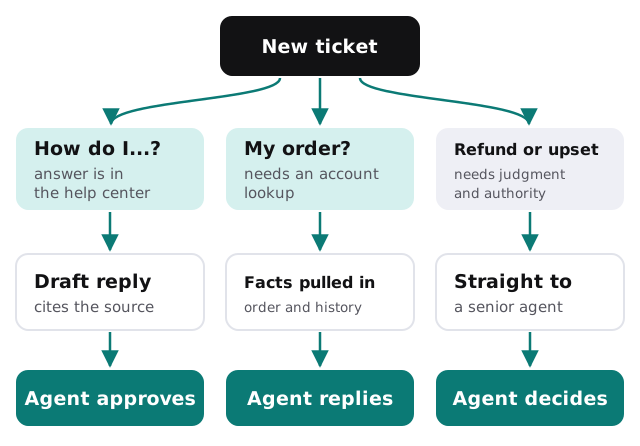
- “How do I…?” The answer exists in your help center. The tool finds the right article, drafts a short reply that links to it, and the agent approves.
- “Where is my order?” or “Why was I charged?” The answer lives in another system. The tool fetches the order, subscription or invoice and puts it beside the ticket so the agent doesn’t switch tabs.
- Refunds, complaints, cancellations. These go straight to a senior agent with a summary of the thread. No draft, because the tone and the decision are the job.
What an agent sees at 9:05
| Before | After |
|---|---|
| Open the ticket, read it twice | A two-line summary sits above the thread |
| Search the help center | Matching article already attached |
| Open the order system in another tab | Order status shown in the sidebar |
| Type the same reply for the tenth time | Draft to edit, in your team’s voice |
| Tag the ticket by hand | Suggested tags, one click to accept |
The part most teams skip
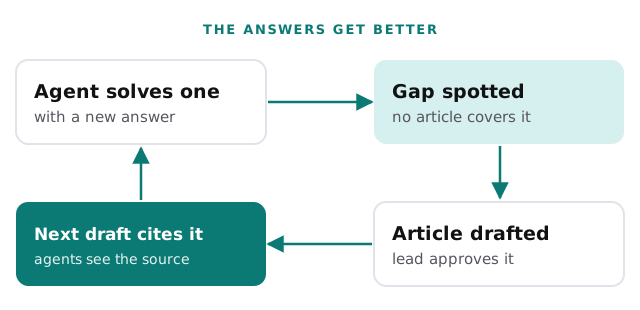
Drafts are only as good as the knowledge they draw on. So the setup needs a way to improve it:
Software it sits on top of
Teams usually run a help desk or shared inbox, a chat widget, sometimes a phone line, and a back-end system with orders or accounts. Names you may recognize include Zendesk, Freshdesk, Help Scout and Intercom. If you’re still choosing one, we’ve written setup guides for Freshdesk and Help Scout, and the built-in AI in most of them is a fine place to start before anything custom.
Custom work comes in when the answer lives in a system the help desk can’t see, such as your own order database, a booking system or an internal admin page.
Pressure points to plan for
- Launches, sales and billing dates. Volume jumps on predictable days, so test before them, not during.
- Outages. A burst of identical tickets is better answered by one approved message than fifty drafts.
- New hires. Drafts and summaries are a quiet way to onboard someone who doesn’t know the product yet, because every suggestion shows the article behind it.
- Handoffs between shifts. A thread summary means the next agent doesn’t start by scrolling through twenty messages.
Rules we’d set from day one
- The tool cites the article or record it used, so agents can check.
- If it isn’t sure, it says so and drafts nothing.
- It never promises a refund, a date or an exception.
- Every draft and every edit is logged, so a lead can review how it’s being used.
Getting started
Tell us which help desk you use, how many people share the queue and what your three most common ticket types are. On the free IT check we look at how those flow today, then give you a plan and a fixed quote. A real person replies within 1 business hour, Monday to Friday, 9am to 5pm Pacific.
The goal isn’t fewer agents. It’s agents who spend their day on the customers a template could never help.