AI automation for distributors is about the gap between what a customer sends and what your system accepts. Customers send orders the way they like: an email with a table in it, a PDF on their own letterhead, a photo of a handwritten list. Someone on your team turns each one into a clean order, and that someone is not cheap and not idle.
We build small AI tools and internal tools around your order desk, price lists and supplier notices. Inside sales approves anything that reaches the warehouse or a customer.
The order desk, reading what arrives
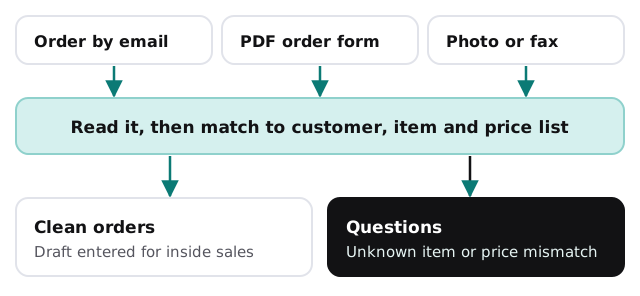
The tool reads the message, finds the customer, matches each line to your item numbers and checks the price against that customer’s price list. It then creates a draft in your system, or a file your team can import. If a description matches two items, or the unit of measure is ambiguous, it asks. That last case is where distributors lose money: a case and an each look alike on a purchase order, and a pallet of the wrong thing is expensive to take back.
Price lists and quotes
Customer-specific pricing is the part new reps never learn quickly. A tool can assemble a first quote from the right price list, note when a supplier’s cost has changed since the list was last updated, and show the margin the quote leaves. The rep adjusts and sends. We don’t set or publish prices; your people do.
When a supplier slips
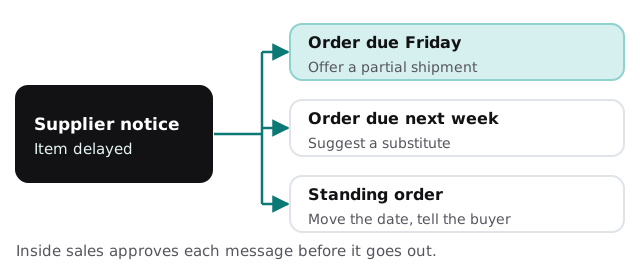
A supplier emails that an item is late. The tool finds every open order and standing release that includes it, sorts them by promised date, and drafts a note for each customer with an option your rep can approve: ship what’s in stock, substitute a similar item, or move the date. The customers hear it from you, early.
Chores that stack up
- Order acknowledgments. Drafted from the order as entered, so customers can catch a mistake the same day.
- Backorder lists. Open lines by customer and age, with a drafted follow-up for the oldest.
- Credit holds. Orders that hit a hold are flagged before picking, with the reason in plain words.
- Return requests. Return numbers, reasons and photos gathered into one record.
- Receiving mismatches. A packing slip compared with the purchase order, with differences listed.
The software it sits beside
| Category | What you may run | What a tool adds |
|---|---|---|
| ERP or distribution system | Orders, inventory, pricing | Drafts orders, never changes cost or inventory |
| Warehouse | Pick, pack and ship tools | Passes clean orders along |
| EDI and portals | Customer and supplier connections | Left alone |
| Email and shared inboxes | Where the unstructured orders land | Reads, sorts and drafts |
| Accounting | Receivables and payables | Surfaces holds and mismatches |
We don’t claim any named product is integrated. For a deeper look at how reading documents works, see extracting data from documents. If you’d rather experiment first, setting up Zapier for your team covers simple hand-offs.
A Monday morning
Forty emails wait in the order inbox, a few of them with attachments. By the time the first rep sits down, thirty-odd are drafts in the system and six have questions attached: an item number that doesn’t exist, a price that differs from the list, a quantity of “2 cs” with no case size. The rep spends the morning resolving six exceptions instead of typing thirty-six orders.
Questions for any provider
- What does the tool do when it can’t match a line to an item?
- Can it write to the order system directly, or only to a draft area?
- How do you test it against my real orders before I rely on it?
- What does the log show for a specific order?
Getting started
Send us a handful of real orders in their messy formats and tell us where they land. We return a plan and a fixed quote after the free IT check. A real person replies within 1 business hour, Monday to Friday, 9am to 5pm Pacific.
A distributor’s service is the order done right and on time. The retyping in between is a cost, not a feature.