A shared inbox like info@ or hello@ has a built-in flaw: everyone can see everything, so nobody is responsible for anything. Messages get read three times and answered once, or not at all. AI email triage for shared inboxes fixes that flaw. It sorts each message as it arrives and gives it one clear owner.
Nine-oh-five on a Monday
Over the weekend, the inbox collected a supplier invoice, two sales enquiries, a cancelled booking, a customer complaint and a lot of newsletters. Without triage, the first person in scrolls, opens a few, forwards one, and leaves the rest “for someone”. With triage, each message already carries a label and an owner, the complaint is at the top with a draft reply, and the newsletters are out of the way.
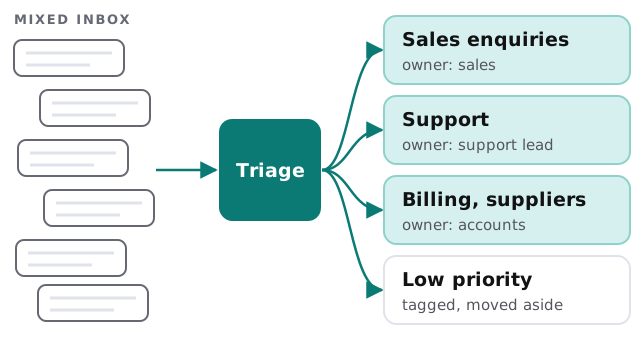
Labels that do real work
A category only matters if it changes what happens next.
Needs a reply from a person
Sales enquiries, complaints, and anything with a question in it. These get an owner and a due time, plus a drafted answer drawn from your past replies.
Needs a record, not a reply
Invoices, receipts and confirmations. They’re filed in the right place, or passed to your bookkeeping tool, and don’t clutter the inbox.
Needs nothing
Newsletters, notifications, obvious spam. They’re tagged and moved aside, never deleted, so you can recover anything misjudged.
The rules behind it
| If the message is… | Then it goes to | And |
|---|---|---|
| A new enquiry | Whoever handles sales that day | A reply is drafted from your past replies |
| A complaint | The manager | Marked urgent, tone flagged |
| From a known client | Their account owner | Linked to their record |
| An invoice or bill | Accounts | Fields extracted and filed |
| Unclear | The ‘needs a human’ list | Reviewed daily |
How one message is handled
- It arrives. The system reads the sender, subject, body and attachments.
- It’s classified. By type, urgency and who it concerns.
- It’s assigned. The owner is chosen by your rules: topic, client, rota or workload.
- A reply is drafted where one is useful, in the style of your own sent mail.
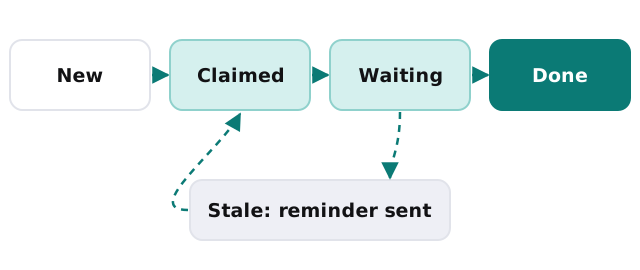
- The clock starts. If nothing happens within the time you set, a reminder goes to the owner, then to a backup.
Signs you need it
- Customers say “I emailed you last week” and nobody can find it.
- Two people reply to the same message.
- Someone has become the unofficial inbox sorter and is quietly burning out.
- You can’t say how long enquiries take to get a first answer.
What changes for the team
The person who used to sort the inbox every morning stops being its gatekeeper. People open their own list and work through it. The manager sees one board of what is waiting, for how long and with whom, which makes it obvious when somebody is swamped. Quiet days stay quiet, and busy days stop hiding behind a wall of unread mail.
Staying in control
You can see why any message was sorted the way it was. Rules are edited in plain language, a corrections log shows where the AI was wrong, and confidential mail, such as HR or legal, can be excluded from automated sorting altogether. For privacy, only the people who already have access to the inbox see the results.
Rather build it yourself?
A basic version is within reach: rules in your email system, plus a workflow tool. Our guide to drafting email replies with Zapier and AI shows how to build the reply-drafting part. Our guides to Help Scout and Freshdesk cover moving to a proper help desk. Call us when your rules need judgment, or the volume outgrows tidy folders.
A shared inbox works when every message has one owner. Everything else is detail.