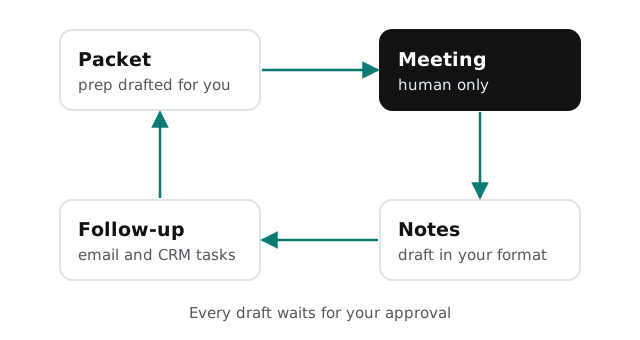
AI automation for financial advisors is easiest to explain by following one client review. Before it, someone gathers statements, notes from last time and open to-dos. During it, the advisor listens. After it, someone writes the notes, sends the follow-up, updates the CRM and files the record.
The listening is the job. Almost everything around it is a candidate for a tool.
Three moments in a review
Before
A prep packet drafted from your CRM and last meeting’s notes: life events mentioned, open action items, documents still outstanding, and questions you said you’d answer. You read it in five minutes instead of building it in thirty.
During
Nothing, unless you choose to record. If you do, the client knows and agrees, and the recording stays under your firm’s rules. Many advisors prefer to keep this part completely unautomated, and that’s a sound choice.
After
A draft of the meeting note in your firm’s format, a draft follow-up email listing what you agreed, and proposed CRM tasks with due dates. You edit and approve. The record is filed the same day, not the following week.
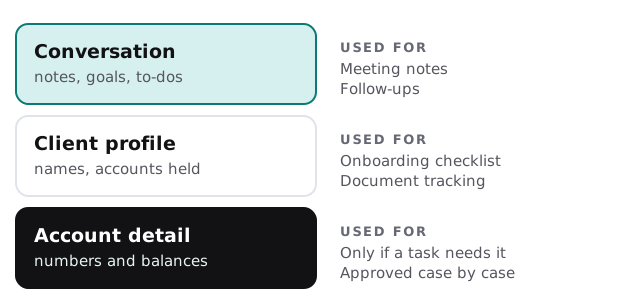
What a tool should be allowed to see
Different tasks need different data. Match access to the task, not to convenience.
Regulation S-P requires covered firms, including registered investment advisers, to keep written policies and procedures with administrative, technical and physical safeguards for customer information. Its service-provider rule also has you oversee outside providers through due diligence and monitoring. A sensible design makes that oversight easy: few tools, narrow access and a log you can show.
Onboarding a new household
- Send the packet. A checklist of forms and documents, tailored to the account types.
- Track what’s back. The tool matches returned documents to the list and flags what’s missing.
- Draft the nudge. A short, friendly reminder naming only what’s outstanding.
- Hand to the person. Your associate reviews completeness and submits to the custodian.
The software around the practice
| Category | What advisors commonly run | Where a tool helps |
|---|---|---|
| CRM | Contacts, tasks, notes | Drafts notes and tasks from meetings |
| Planning and portfolio tools | Projections, rebalancing, reporting | Left alone; you decide |
| Custodian portals | Account opening and transfers | Checklists, never logins |
| E-signature and forms | Client paperwork | Tracks what’s signed |
| Email and calendar | Scheduling and follow-up | Drafts replies and reminders |
For firm-wide drafting help without custom work, choosing an AI assistant for your team compares the main options.
A Monday after quarter-end
Six reviews are booked this week. On Monday morning each has a prep packet waiting: what the client raised last time, the two documents still missing and the question you promised to research. You skim, add a line to each and move on. By Friday every follow-up has gone out within a day of its meeting, which used to be your best week rather than your usual one.
Questions to ask any provider
- Which exact fields of client data does each task read?
- Is our data used to train a model, and can that be switched off in writing?
- Where is the log of drafts, edits and approvals, and who can see it?
- How do we cut off access, and what happens to stored data afterward?
The busy stretches
Quarter-end review cycles, tax season and year-end conversations all compress the same prep work into a few weeks. That’s when a two-hour backlog of notes turns into a two-week one.
What we need from you
Your meeting-note format, a sample prep packet, the CRM you use and the compliance reviewer’s top concerns. We return a plan and a fixed quote after the free IT check. A real person replies within 1 business hour, Monday to Friday, 9am to 5pm Pacific.
Clients hire you for judgment and trust. Software can carry the notes, and it should never carry the decision.