AI automation for law firms is a sensitive subject, and it should be. A lawyer’s name is on the work, and client confidences are the whole business. So we begin each project with what a tool must not do, and only then look at what it can.
That leaves plenty. Most hours a small firm loses aren’t spent on advice. They go on typing, tracking, remembering and reconstructing.
What the profession itself says
Bar regulators are paying attention. The State Bar of California’s 2026 practical guidance on generative AI notes that these tools can produce plausible but inaccurate output, including citations to legal authority that does not exist, and that information entered as an input may be used for learning by the tool. It says a lawyer must understand the risks and benefits of the technology used, and it addresses agentic tools that can carry out tasks without prompting.
Your own jurisdiction’s rules govern you, and your ethics counsel should read them. We design around the principle that runs through all of it: a person who is responsible reads the output before it matters.
Sort tasks by what’s at stake
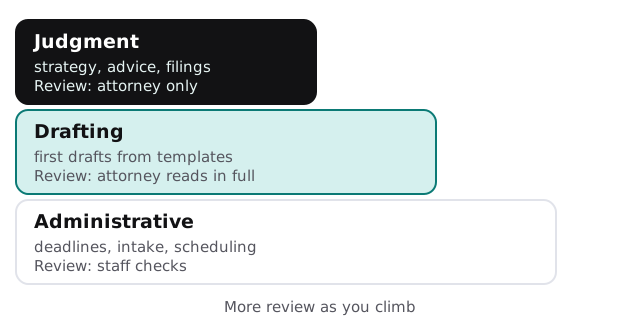
| Rung | Examples | Review |
|---|---|---|
| Administrative | Deadline lists, intake summaries, scheduling, file naming | Staff checks |
| Drafting | Engagement letters, routine correspondence, first drafts from your own templates | Attorney reads in full |
| Judgment | Strategy, advice, anything filed with a court | Attorney only |
Time that writes itself, for you to correct
The most common automation request is also the least risky. Lawyers lose billable time because they don’t record it when it happens.
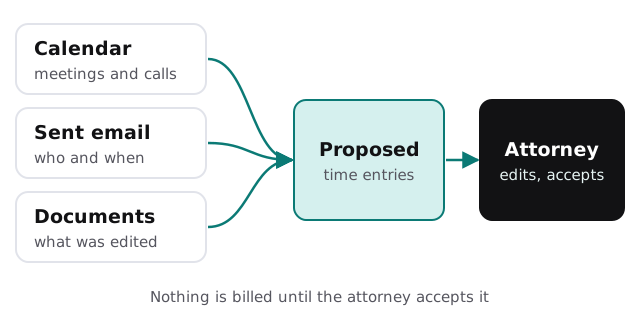
A tool reads the calendar, sent mail and document activity for the day, and suggests entries: “Call with client, 0.4” or “Drafted lease amendment, 1.2”. Nothing is recorded until the attorney accepts it. The proposal beats a blank timesheet at 6pm on Friday.
Intake that doesn’t lose the lead
- Capture. A web form, call note or email becomes a structured record.
- Summarize. A short, neutral summary of the matter type, parties and dates.
- Check. The names are run against your conflicts list, with matches flagged for a person.
- Reply. A drafted acknowledgement goes to the paralegal for review.
Deadlines and the docket
Missed deadlines are the failure everyone fears. A tool can read orders and notices, propose dates and put them in front of the responsible attorney. It doesn’t replace your docketing rules or your calendar, and a person confirms each date.
The software around the practice
- Practice management. Matters, contacts, tasks and billing.
- Document management. Where drafts and filings live, with matter-level access.
- E-billing and trust accounting. We leave these alone.
- Email and e-signature. Where most client communication happens.
If you’d like help picking a general assistant first, choosing an AI assistant for your team lays out the options.
Questions to ask any provider
- Does anything we enter get used to train a model, and is that off by contract?
- Can matters be kept apart so one client’s file never informs another’s?
- Does every draft show its source, and can we see who approved it?
- How do we remove access and delete stored data when we leave?
A Friday that goes differently
At 4:30 the associate opens a list of eleven proposed time entries from the week, edits three, deletes one and accepts the rest. Her partner gets a one-page summary of open deadlines for Monday, each with the source order attached. Neither exercise took more than ten minutes, and neither depended on anyone’s memory.
What we need from you
Your intake process, a redacted sample of a routine document, the practice management system you use and your ethics counsel’s initial position. We return a plan and a fixed quote after the free IT check. A real person replies within 1 business hour, Monday to Friday, 9am to 5pm Pacific.
A fabricated citation is a firm-ending mistake. Keep tools on the bottom rungs until you’ve earned the right to climb.