A website enquiry is the warmest lead you’ll get all week, and the most likely to be handled badly. It arrives as an email, somebody forwards it, somebody else copies it into the CRM on Thursday, and by then the person has talked to a competitor. Website form to CRM automation closes that gap: send web form leads to a CRM automatically, with the details checked on the way in.
Where form leads go missing today
- The notification email goes to a shared address nobody owns.
- The lead is copied into the CRM with half the fields blank.
- A returning customer becomes a second, separate record.
- Nobody records which page or campaign the lead came from.
- A spam submission sits in the queue with the real ones.
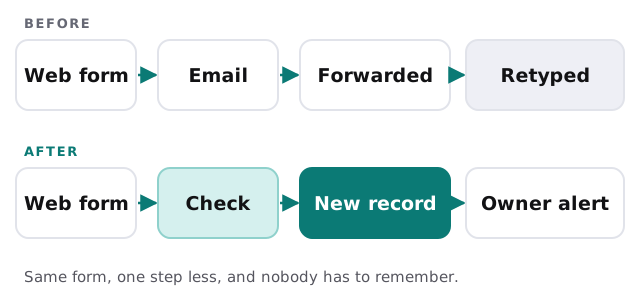
What happens to each submission
1. It’s checked
Obvious spam is dropped. Required fields are present and an email address looks like one. Phone numbers are tidied into one format.
2. It’s matched
The automation searches the CRM for the email address, and then for the company name. A match means the existing record gets updated. No match means a new contact, linked to a company if there is one.
3. It’s recorded properly
The message goes on as a note. The source goes into its own field: which page the form sat on, and any campaign tags in the link. That way your reports can say which pages actually produce enquiries.
4. It’s assigned
A rule decides who owns the lead: by service, by postcode, by round robin, or by whoever looks after that existing customer. The owner gets a task due today.
5. Somebody is told
A message goes to the owner, in the place they already look. Not to a shared inbox that everyone assumes someone else is watching.
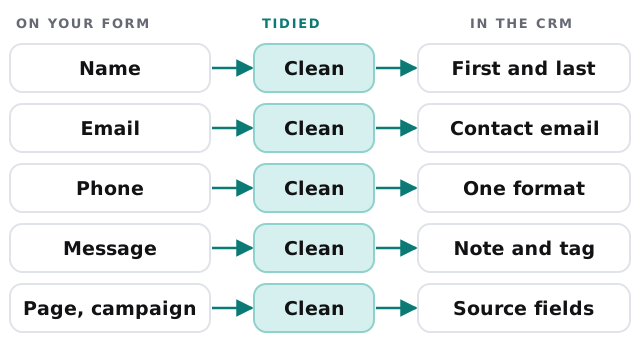
How the fields line up
| On your form | In the CRM | Why it matters |
|---|---|---|
| Name | First and last name, split | Lets emails say “Hi Priya”, not “Hi Priya Shah” |
| Contact email, used for matching | Prevents duplicate records | |
| Phone | One standard format | Click-to-call and texting work |
| “How can we help?” | Note, plus a service tag | Routes to the right person |
| Hidden page and campaign fields | Source fields | Shows what’s working |
A Friday-evening lead
Here’s what a 5:40pm enquiry looks like once this is set up. The form is submitted, the record appears with its source and a task for Monday’s first hour, and the owner gets a message on their phone. An automatic reply tells the visitor when to expect a call. Nobody had to stay late, and nothing is waiting in an inbox to be forgotten.
You decide how much of that is automatic. Some teams want the instant reply, others want the owner to write the first message personally. Either works, as long as it’s a choice you made rather than whatever the inbox happened to do.
Signs this is worth doing now
- You can’t say how many enquiries came in last month.
- Replies depend on who happened to see the email.
- Your CRM has duplicate contacts.
- You pay for ads but can’t tie leads back to them.
Rather build it yourself?
For one simple form, a connector tool may be enough. Our guides to setting up HubSpot, Pipedrive and Zoho CRM cover getting the CRM itself ready, and setting up Zapier covers the connection. Call us when you have several forms, custom routing rules, or a CRM that isn’t on the usual connector lists.
What we need from you
- Access to your website form and your CRM.
- A plain description of who should own which kind of lead.
- Three or four recent real enquiries to test with.
We make a plan and a fixed quote first. A person approves each rule, such as assignment and duplicates, before the first real lead goes through.
A lead that isn’t in the CRM within a minute is a lead that depends on someone’s memory.