A customer messages your shop on WhatsApp at 4pm on Monday asking about a delivery. Your team is out. On Tuesday at 3pm someone finally answers from the system, and it works. On Thursday they try again, to ask whether the parcel arrived, and the message is refused. Nothing is broken. The 24-hour window closed, and the rule is built into the platform. A WhatsApp business integration for small business has to be designed around that fact from day one.
The 24-hour clock
Meta’s documentation calls it the customer service window. It starts when a person messages or calls your business, and resets to 24 hours each time they do it again. While it is open you can send free-form replies, with no pre-approval. When it closes, only template messages can go out.
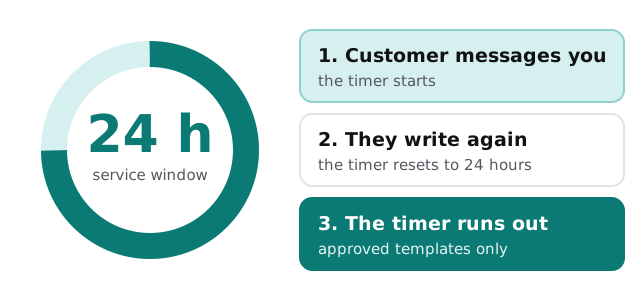
| Window open | Window closed | |
|---|---|---|
| What you can send | Free-form replies | Template messages only |
| Pre-approval needed | No | Yes, the template must be APPROVED |
| Typical use | Answering a question, sharing a booking link | Reminders, follow-ups, re-opening a conversation |
| Limits | Only to people who contacted you | Subject to messaging limits Meta sets |
Meta also says templates in other states, such as rejected or paused, cannot be sent. So a template someone forgot to resubmit can quietly stop an entire flow.
Signs you are ready for this
- Customers already message you on WhatsApp personally, and replies depend on whose phone it landed on.
- You want to send reminders or order updates, not just chat.
- Questions arrive outside office hours and sit until morning.
- Nobody can see what was said to a customer last week.
What lands in your CRM
When we connect WhatsApp to a CRM, the aim is simple: a conversation should be visible on the person’s record, whoever had it.
Matching the person
The customer’s phone number is the starting point. Number formats vary, so we normalise them before matching, and create a contact only after checking for an existing one. Where two records could be the same person, a human decides.
Logging the chat
Each exchange is added to the contact as a note or activity, with the time and the sender. A short summary is more useful than a wall of text, so we generate one, and your team can open the full thread when needed.
Keeping tidy
Opt-in status lives on the contact. A person who asks us to stop is marked so, and no flow sends to them again.
Who does what
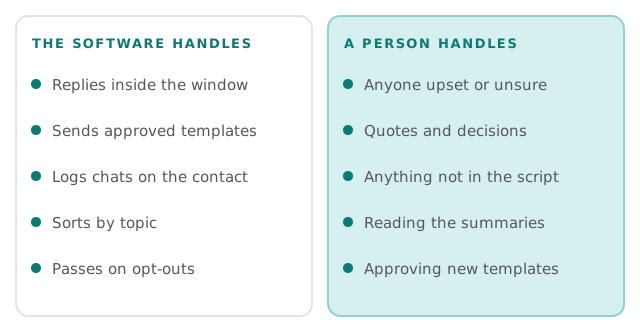
We build tools that a person approves and supervises. In practice that means a clear handover: when a message needs judgement, the system stops, tells a person, and shows them the conversation so far.
Questions to ask any provider
- How do you handle the window closing mid-conversation?
- Who writes and submits templates, and who is told when one is rejected?
- Where is opt-in recorded, and what does the customer see when they give it?
- What happens when a customer stops writing back?
- Can we read every message the system sent in our name?
Where we start
We usually pick one flow, such as order updates or booking reminders, and build it end to end before widening it. Our page on appointment reminder automation shows how we think about timing, and if you also want text messages, see our Twilio integration developer page. For the CRM side, our guide to setting up HubSpot for your team is a good primer on contacts and activities.
What we need from you
- Which questions and updates your customers message about most.
- How you collect a customer’s agreement to be messaged.
- Your CRM, and who owns the contact records.
- A named person for escalations, and when they are reachable.
On WhatsApp, the question is never just what to say. It is whether the window is still open.