Xero holds the numbers your business runs on, so anything that writes to it has to be careful. A Xero integration developer is the person who makes sure that a won deal, a paid order or a logged hour reaches your books once, correctly, and that a human hears about it when it doesn’t. If you searched for a Xero API developer or how to connect Xero to other apps, this page says what the work involves.
Where Xero usually gets connected
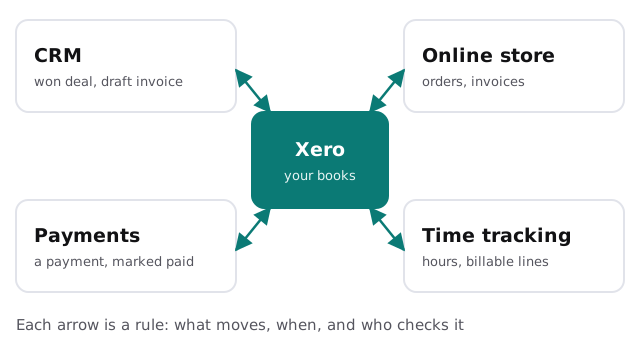
| Link | What moves | What can go wrong |
|---|---|---|
| CRM to Xero | A won deal becomes a draft invoice | The same customer is created twice |
| Online store to Xero | Orders become invoices | Refunds and partial shipments don’t map cleanly |
| Payments to Xero | A payment is recorded and matched | The payment lands against the wrong invoice |
| Time tracking to Xero | Hours become billable lines | Rounding and rates differ from the contract |
If you use a store, the same ideas appear in our page on Shopify to QuickBooks integration. Running QuickBooks instead of Xero? See QuickBooks integration developer.
Access, in plain words
Xero’s API uses OAuth 2.0. In practice that means you sign in to Xero and approve what the connection may do, and the app never needs your password. We ask for the smallest set of permissions the job requires. If a sync only creates invoices, it shouldn’t have access to everything else. Xero also publishes API limits on its developer site, so a sync that handles a rush of orders has to pace itself rather than flood the API.
Build for the failure first
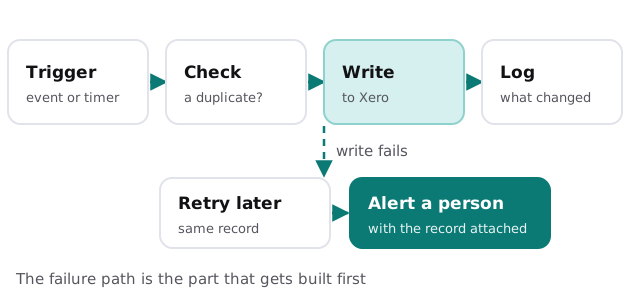
- Check before writing. Look up the contact or invoice first. Creating a duplicate in an accounting system is expensive to undo.
- Retry with patience. A failed write is tried again later, not instantly in a loop.
- Alert a person. If it still fails, someone gets the record and the reason.
- Log everything. Your bookkeeper can see what went in, when, and from which app.
- Never fail silently. A sync nobody notices breaking is worse than none.
What your bookkeeper should weigh in on
Before the first line is written, someone who understands your books should say how records ought to be coded: which account an online order posts to, how refunds appear, whether a deposit and a final payment are one invoice or two. A developer can build any of those, but only you can decide which is right. We write the choices down and show them to your bookkeeper, so the integration matches the way your accounts are already kept.
Questions to ask any Xero developer
- What happens if the same event arrives twice?
- Which direction does each record flow?
- Who gets told when a write fails?
- How do I see what the connection did last week?
- Can my bookkeeper read the log without help?
What we need from you
- A list of the tools that should talk to Xero.
- One example of each record, such as a typical invoice.
- Your bookkeeper’s view on how things should be coded.
- A test organization or a safe time to try things.
Do it yourself, or hire someone?
Plenty of small teams should start with what’s built in. Our guide to setting up Xero for your team covers the first steps, and the Zapier versus custom integration comparison helps you decide when a connector stops being enough. We start with the free IT check, then give you a plan and a fixed quote.
Accounting systems forgive nothing. Build the check and the alert before you build the sync.