Someone opens the Zapier invoice, sees the task count and wonders whether they should be paying for something else. That’s the usual start of a Zapier vs custom integration conversation. It’s a fair question, and the answer isn’t always “custom”. It depends on what your zaps do, how often they run, and what happens when they stop.
How a zap’s cost grows
Zapier says a task is any successful action that runs in a zap, and each successful action step uses one task per run. Triggers never use tasks. Neither do Filter and Paths steps, failed or halted steps, or testing in the editor. So a zap with three successful actions that fires 200 times a day uses 600 tasks a day.
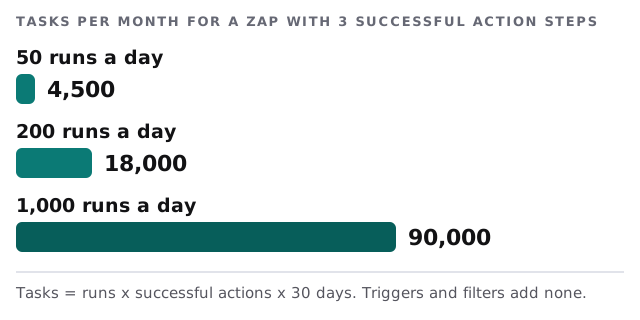
Nothing here is wrong with Zapier. Per-task billing is a sensible deal when volume is low. It just means the bill and the number of runs rise together.
Side by side
| Zapier | Custom integration | |
|---|---|---|
| Time to a first working version | Short | Longer |
| Cost shape | Follows runs and steps | Mostly up front, then steady |
| Logic | Linear, with filters and branches | Anything you can describe |
| Memory across runs | Awkward | Natural: a small database |
| Who can edit it | Anyone with account access | Someone who reads code |
| Error handling | Alerts you configure | Logs and alerts we build in |
| Data path | Through Zapier and each app | Directly between the apps and our service |
Five situations where we’d look at replacing a zap
The same job runs thousands of times
If a zap does one simple thing very often, per-run billing adds up. A small service doing the same job doesn’t care whether it runs ten times or ten thousand.
The zap has a loop inside a loop
Zapier has Looping and Code steps, and they push the limit out. Past a point, though, a zap with many branches is hard for a newcomer to read, and a short script is clearer.
The process needs to remember
“Chase an invoice three times, then escalate” needs something that keeps count between days. A database does that easily. Zaps do it only with extra storage steps.
The data is sensitive
Every extra service a record passes through is one more place it exists. If client information is involved, a direct connection between your two apps keeps the path short.
One person built it and left
That’s not a Zapier problem, but it’s often what triggers the question. If nobody can say what a zap does, writing it down comes before replacing it, and our page on Zapier expert for small business covers that clean-up.
What the custom version looks like
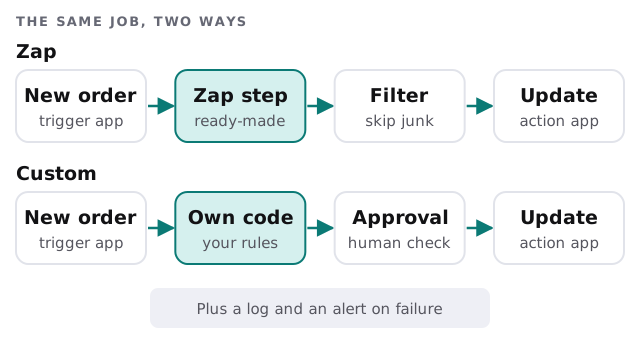
The shape is the same as the zap. What’s different is what sits in the middle and how failures show up.
A middle path
You don’t have to pick one extreme. Before commissioning code, check whether another automation tool fits better. Our guides on setting up Make for your team and setting up n8n for your team cover two alternatives, and setting up Zapier for your team is there if you want to tidy what you already have. For wider context, see custom internal tool development for small business.
What to bring to a conversation
- Your busiest zaps, with how often each runs.
- What each one touches, especially anything involving money or client data.
- The last time one failed and how you found out.
- A guess at what happens if it stops for a day.
We start with the free IT check, then send a plan and a fixed quote. A real person replies within one business hour, Monday to Friday, 9am to 5pm Pacific.
Keep the zap while it’s cheap and clear. Replace it when its cost, its logic or its data path starts to worry you.