Zapier is how a lot of small businesses get their first taste of automation. A form fills in a spreadsheet, a new client triggers a welcome email, and nobody types it by hand any more. Then the zaps multiply, nobody remembers who built which, and one quietly stops working on a Friday. That’s usually when people look for a Zapier expert for small business.
How Zapier counts what you pay for
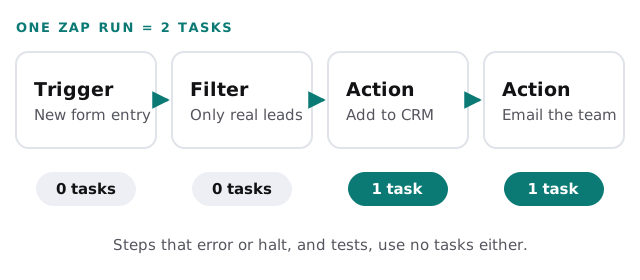
Zapier bills by tasks, so knowing what counts is the first step to keeping the bill sensible. From Zapier’s own help pages:
- Triggers never use tasks.
- Each successful action step uses one task per run.
- Filter and Paths steps don’t use tasks.
- Steps that error or halt don’t use tasks, and neither do steps skipped because of them.
- Testing doesn’t use tasks, even though a test performs the action in your app.
What an expert does differently
| Problem | What we do about it |
|---|---|
| A zap fails at 2am and nobody knows | Error alerts go to a named person, with the failed run attached |
| The same lead lands in the CRM twice | A lookup or filter checks for duplicates first |
| The task count keeps climbing | Filters move to the front, so junk never reaches paid steps |
| Nobody knows what runs where | A written list of every zap, what it does and who owns it |
| An app renames a field and things break | Test runs after app changes, and alerts when a step starts failing |
When Zapier is the wrong tool
Zapier is excellent at moving a record from one app to another when something happens. It gets awkward when:
- Volume is high. Thousands of runs a day turn per-task pricing into a real line item.
- Logic gets complicated. Loops, retries with conditions, and many-branch decisions get hard to read and harder to fix.
- The process needs memory. Anything that has to remember state across many runs fits poorly into one-off zaps.
- The data is sensitive. Every connected service is another place client information passes through.
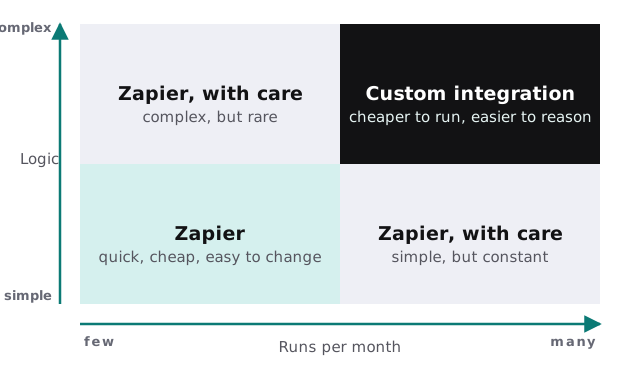
When a workflow lands in the top-right corner, a small custom integration usually costs less to run and is easier to reason about. We’ll tell you which side of the line you’re on, even when the answer is “keep the zap”.
Before you hire anyone, list your zaps
A quick audit tells you, and any expert you hire, where the risk sits:
- Export or screenshot the list of zaps in your account.
- For each one, note what it does in a sentence and who relies on it.
- Check when it last ran and whether recent runs errored.
- Look at which zaps use the most tasks.
- Mark the ones that touch money, clients or sensitive data.
What a good handover includes
Whoever builds or fixes your zaps should leave behind a written list of every zap and its purpose, a named person who gets each error alert, notes on which steps cost tasks and why, and a plain account of what would break if each connected app changed. If you couldn’t hand that list to someone new tomorrow, the work isn’t finished.
Zapier also lets you add small code steps for logic a template can’t express, which pushes the line further out. The trade-off is that code steps need someone who can read and maintain them, and they still count as steps in a zap that bills by task.
Rather build it yourself?
Plenty of small teams should. Our guide to setting up Zapier for your team covers accounts, sharing and the first zaps, and drafting email replies with Zapier and AI walks through one useful build end to end. Call us when the zaps start running something you can’t afford to have fail quietly.
The best zap is the one someone notices when it breaks. Build the alert before you build the second zap.