Most teams don’t need a grand transformation. They need Monday morning to stop eating two hours. A workflow automation consultant looks at what one team repeats, picks the tasks that are safe to hand off, and builds those first. The rest stays with your people, with a better draft in front of them.
Start with one team
A workflow is the chain of small tasks a single team runs again and again: log the enquiry, send the receipt, chase the sign-off, update the tracker. It sits inside one department, so the people who know it can sit in one room and describe it.
That makes it the right size for a first project. You can see the result within one working week, nobody has to agree with three other departments, and the mistakes are small and visible. If the work later spreads across departments, that’s a different engagement, and we cover it on our page for a business process automation consultant.
Which task goes first
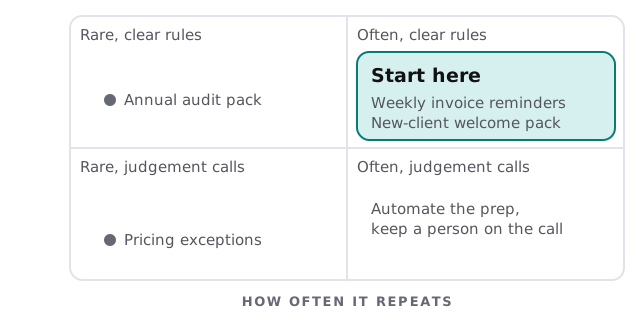
Score each task on two questions: how often does it repeat, and could you write the rules on a card? The top-right corner is where to start.
What the week looks like afterwards
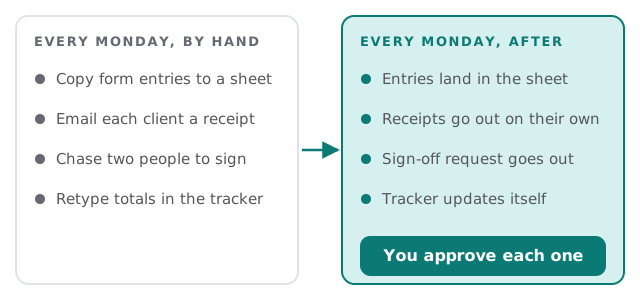
Here’s a small team’s Monday before and after. The same four jobs happen. What changes is who does the typing.
Signs a team is ready
| What you notice | What’s usually behind it |
|---|---|
| Someone says “I’ll do it Friday” every week | A task with clear rules nobody wants |
| Two people hold the same spreadsheet | A tool that should be the single source |
| Clients ask “did you get my form?” | No automatic confirmation after submission |
| The tracker is always a day behind | Updates depend on someone remembering |
| One person is the only one who knows how | A process that lives in one head |
How an engagement runs
- Sit with the team. We watch the real work for a short session, not a slide about it, and write down every step and who does it.
- Rank the tasks. We score them using the grid above and agree the first one with you.
- Build the first flow. It connects the tools you already use, with an alert to a named person when something fails.
- Run it beside the old way. The team compares results before anything switches over.
- Hand it over. You get a list of what runs, what it touches and who gets the alerts.
You get a plan and a fixed quote before we build anything, and a person approves whatever the automation does with client or money data.
The first flow is also a test of the working relationship. If it runs quietly for a few weeks and the team stops thinking about it, you’ve learned what good looks like, and the next task is easier to pick.
What we need from you
- One person who knows the task well enough to say “that’s wrong” when the draft flow is shown.
- Access to the tools involved, with the right level of permission, set up with you rather than shared in an email.
- An example of a good outcome and a bad one, such as a correct receipt and a botched one.
- A decision on who gets the alert when a step fails.
Choosing the tool
The tool matters less than the flow, but it still has to fit. If your team already lives in Microsoft 365, a Power Automate consultant may be the simplest route. If you want a hosted automation app, see our page for a Zapier expert, or for a self-hostable option our n8n consultant page. And if you’d rather try it yourself first, our guide to setting up Power Automate for your team is a good start.
Automate the task nobody argues about. Keep a person on the one everybody does.