Ask a business owner where the time goes and the answer is rarely “typing”. It’s waiting. A signed quote sits in someone’s inbox. A new hire’s laptop isn’t ordered because payroll hasn’t confirmed the start date. Business process automation is the work of finding those gaps and closing them, and it starts on paper, not in software.
A process is a chain of handoffs
A task lives with one person. A process passes through several, and each pass is a chance for the work to stall. That’s why we treat this differently from automating one team’s weekly jobs, which is what a workflow automation consultant does. Here the unit of work is the whole journey.
Two journeys come up most often in small businesses:
- Order to cash: a quote is accepted, a job is booked, the work is signed off, an invoice goes out and a payment is matched.
- Hire to first day: an offer is signed, accounts and equipment are prepared, payroll is set up and a manager is ready on day one.
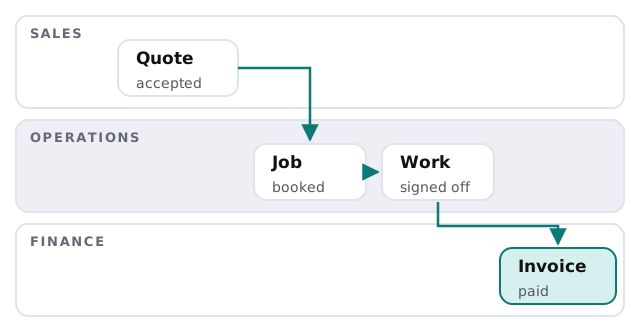
How we map it
Follow one real case
We pick a recent job or hire and trace it from the first message to the last. Not the process as it’s written in a handbook, the one that actually happened. We ask who touched it, what they typed again, and how long it waited before the next person saw it.
Mark the three kinds of delay
Every gap we find is one of three things: a wait (nobody knew it was their turn), a retype (the same facts entered in two tools) or a loss (it fell between two people). Each needs a different fix, so we label them before choosing any tool.
Decide what a machine should do
Steps with clear rules get automated: notifications, copying data between systems, creating the accounts. Steps that involve judgement, money or a client relationship get a prepared draft and a person’s approval. Our page on an AI approval workflow shows how that approval step works.
A hire, from offer to day one
Here’s the second journey drawn out. Nothing is wrong with any one step; the trouble is that each depends on someone else finishing theirs.
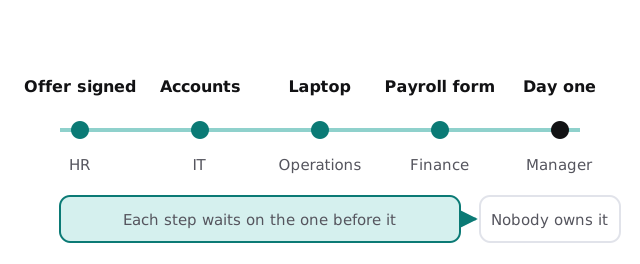
If this one is yours, our page on employee onboarding and offboarding IT covers the accounts and equipment end of it.
Where handoffs usually break
| Handoff | What goes wrong | What we build |
|---|---|---|
| Sales to operations | Accepted quote never becomes a booked job | A trigger that creates the job when the quote is accepted |
| Operations to finance | Sign-off is verbal, invoice is late | A sign-off form that starts the invoice |
| Finance to sales | Payment status is invisible to the account owner | A status shown where sales already looks |
| HR to IT | Start date changes, accounts don’t | One record that both teams read |
Questions to ask any provider
- Will you map one real case before you propose a build?
- Who owns each step once it’s automated?
- What happens when a step fails, and who is told?
- Which parts stay with a person, and why?
- What will I be left with if we stop working together?
What you get
A written map of the process as it really runs, a list of the steps we automated and the ones we left alone, an owner named for each, and an alert route for failures. You get a plan and a fixed quote before we build. If the process touches your accounting package, our work on QuickBooks invoice matching shows what the finance end can look like, and for larger gaps we may suggest a custom internal tool instead of more connections.
If nobody owns the whole process, automating the parts will not fix it. Name the owner first.