Plain ChatGPT knows a lot about the world and nothing about your business. It hasn’t seen your price list, your open jobs or your last ten emails with a customer. ChatGPT integration for small business is the work of closing that gap safely: deciding what it should be able to see, connecting it, and keeping a person in charge of anything it does with that. That’s what people mean when they ask to connect ChatGPT to business data.
Pick the route first
There’s more than one way in, and the right one depends on where the answer needs to appear.
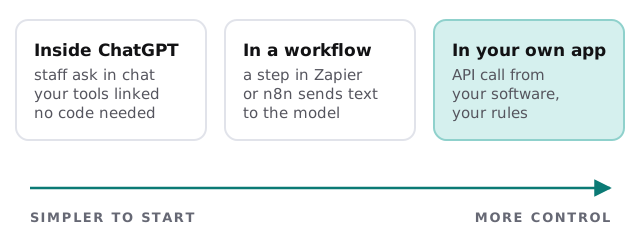
| Route | Best for | Limits |
|---|---|---|
| Inside ChatGPT | Staff asking questions, drafting, summarising | The answer stays in the chat window |
| In a workflow | A repeated task, such as sorting inbound email | Needs an automation tool and care over failures |
| In your own app | Answers inside your own software or portal | A real build, so worth it only for a real need |
OpenAI’s business page says ChatGPT can connect to the tools your team already uses through plugins, and that you can use ready-made ones or build your own for internal systems. That’s the first route. The other two use the API.
What actually leaves your systems
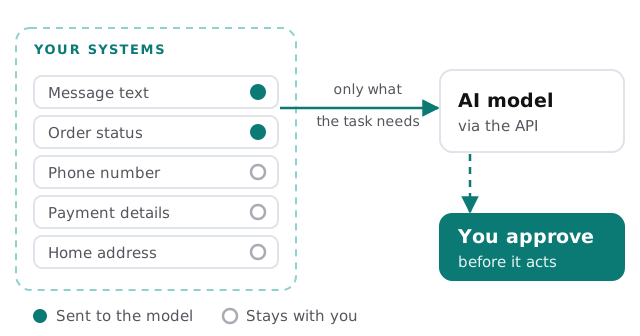
The sentence to remember is “only what the task needs”. If the job is to draft a reply to a customer message, the model needs the message and maybe the order status. It doesn’t need their phone number, card details or home address.
What the vendor says about your data
| Question | What OpenAI states | Where |
|---|---|---|
| Is business data used for training? | For ChatGPT Business: “Your data is never used for training our models” | ChatGPT Business page |
| And data sent to the API? | Not used to train or improve its models, unless you opt in | API data controls page |
| Is anything kept? | Abuse-monitoring logs are kept up to 30 days by default, unless law requires longer | API data controls page |
| Can retention be reduced? | Zero Data Retention exists, but is approval-based for eligible customers | API data controls page |
These are the vendor’s own statements and they can change, so we re-check them when we design your setup. They describe how OpenAI handles data. They don’t make your own use compliant with any law or contract, which depends on what you send.
Things we’d think twice about connecting
- Payment card data and bank details.
- Health, legal or HR records, unless you’ve decided and documented why.
- Anything under a confidentiality agreement with a client.
- Shared logins or API keys kept in documents.
How we build one
- Pick one job. “Draft replies to enquiries” and not “use AI everywhere”.
- List the fields it needs. And the fields it must never see.
- Connect read-only first. It sees; it doesn’t change.
- Write the instructions with you. Tone, what to avoid, when to hand over.
- Test on real examples. Including awkward ones.
- Add actions slowly. A person approves sends and edits until you trust it.
Rather build it yourself?
You can try the first route this afternoon. Our guide to setting up ChatGPT for your business covers choosing a plan, inviting your team and reviewing the admin and data settings, and writing an AI use policy for your small business covers the rules staff should follow. A custom integration earns its place when the answer has to appear in your own tools, or when the data needs filtering before it goes anywhere.
What we need from you
- The one task you’d most like to speed up.
- Where the data for it lives today.
- Anything the model must never see.
We start with a plan and a fixed quote. A person approves each connection and each action before it’s switched on.
The question isn’t whether ChatGPT can reach your data. It’s which parts of it you want to hand over.