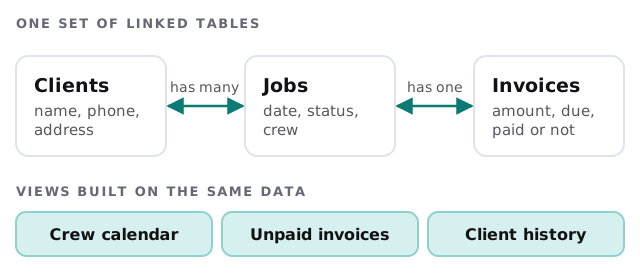
Airtable sits in the gap between a spreadsheet and custom software. It looks like a spreadsheet, but each row can link to rows in other tables, so a client can have jobs, and a job can have an invoice. An Airtable developer for small business designs that structure so it fits your work, and it’s what most people mean when they ask for an Airtable consultant: someone who builds the base and stays honest about its limits.
Spreadsheet or database?
You’ve probably outgrown the spreadsheet if:
- The same client name is typed in four places, spelled three ways.
- Someone says “don’t touch that column” about a formula.
- You keep a separate tab per month because one tab got too slow.
- Two people edit at once and one of them loses work.
- You have a “master” file nobody trusts.
These aren’t spreadsheet mistakes. They’re signs that the data has several kinds of thing in it, and a flat sheet can’t hold relationships.
The core idea: link, don’t retype
In a linked base each kind of thing gets its own table and rows point at each other. Change the client’s phone number once and every job shows the new one.
What a developer does
- Maps what you track. The things, the details of each, and how they relate. This takes more thought than anything else.
- Builds the tables and links. With the right field types: dates, single choices, links and not free text where a list will do.
- Adds the entry points. Forms for customers or staff, with required fields so records arrive complete.
- Makes the views. One for the crew, one for the office, one for you.
- Adds automations. Reminders, status changes, a message when something lands.
- Connects the rest. Email, accounting, your website form.
- Hands it over. With notes on how it works and who can change what.
Know the limits before you start
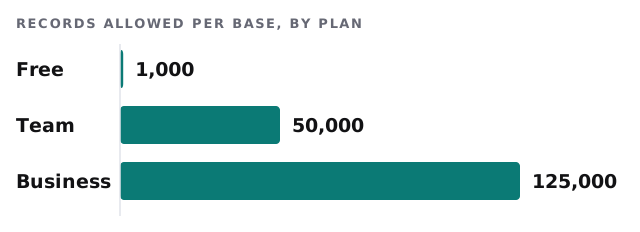
Airtable’s plans differ in how much a single base can hold, and the numbers matter more than the marketing copy. This is where cheap projects go wrong: a base that works on day one and hits a wall a year later.
| Limit | What it means for you |
|---|---|
| Records per base | Count every table together. A job log can pass 1,000 rows quickly |
| API calls per month | Plans have a monthly allowance; the Free plan lists 1,000 per workspace, Team 100,000 and Business unlimited |
| API speed | Airtable allows 5 requests per second per base. Go over and calls fail with a 429 error for 30 seconds |
| Automations and sync | Check the current plan page for what your plan includes |
The speed limit explains why a badly built integration can look fine in testing and then stall on a busy Monday. A developer batches the calls, retries politely and tells you when something failed. Plan details change, so we re-check them before quoting.
When Airtable isn’t the answer
- Your accounting needs to be the system of record. Use accounting software and link to it.
- You have hundreds of thousands of records and heavy reporting needs.
- Strict access rules apply to different people on the same record.
- The “app” is mostly a customer-facing product.
In those cases a custom build or a different tool is usually the better path, and we’d rather tell you now.
Who it suits
A small field-service firm tracking clients, jobs and crews. A studio managing projects and deliverables. A small shop keeping an inventory and supplier list. A team that wants one place to see “what’s happening this week” without paying for software built for a company ten times its size.
What we need from you
- The spreadsheets you use today, messy as they are.
- A short description of a normal week, and who touches what.
- Who should be able to see and edit each part.
We start with a plan and a fixed quote. A person on our side checks any automation that changes your data before it runs on its own.
The hard part of Airtable isn’t the software. It’s deciding what the things are and how they connect.