AI automation for nonprofits is not about replacing the warm part of the work. It is about the hours spent between the warm parts: reconciling a spreadsheet, rewriting last year’s grant narrative, finding which volunteer said yes to Saturday.
We build small AI tools and internal tools for lean teams. A person on your staff approves anything that reaches a donor, funder or volunteer.
- Executive director: signs letters, answers the board, writes the hard grants.
- Development staff: gifts, donors, appeals.
- Program staff: delivery, outcomes, stories.
- Volunteer coordinator: rosters, reminders, thank-yous.
- Bookkeeper: restricted funds, receipts.
In a small organization these may be two or three people. That’s why the repeated work matters so much.
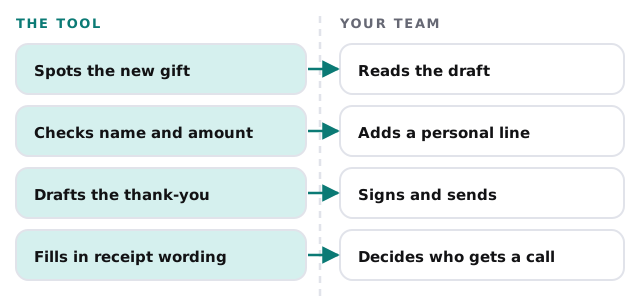
Thanking someone the day they give
Donors remember a fast, specific thank-you. They also need a written acknowledgment for larger gifts. According to the IRS, a donor claiming a deduction for a contribution of $250 or more needs a written acknowledgment from the charity, and it must include things like the organization’s name, the amount of a cash gift and whether any goods or services were provided in return. Your accountant knows the details for your case. What we can help with is making sure the paperwork doesn’t wait.
Beyond the first thank-you
Lapsed donors are the ones nobody has time to notice. A tool can list donors who gave every year and skipped this one, pair each with a short history, and draft a note for someone who knew them to personalize.
Grants, with last year’s answers
Grant writing is rarely blank-page work. Most applications reuse the same organizational facts, program descriptions and outcome numbers, reframed for each funder’s questions. A tool can search your previous applications and reports, assemble a first draft with the source of each paragraph, and show where numbers need updating.
- Gather. Funder guidelines, last year’s application and your program records.
- Draft. Answers composed from your own words, not invented ones.
- Mark. Every figure and claim is flagged for a person to verify.
- Finish. The grant writer edits, and the executive director signs.
Reports to funders work the same way, drawn from your attendance and outcome records.
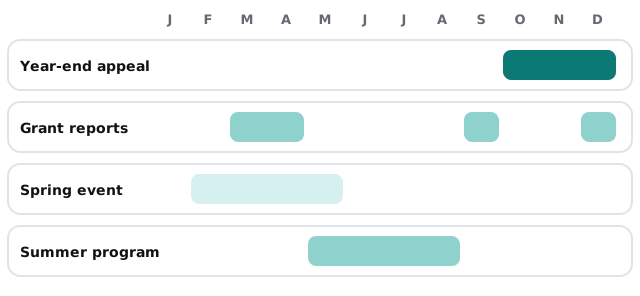
Your calendar, in lanes
Volunteers who actually show up
A volunteer coordinator spends a surprising share of the week on reminders, swaps and no-shows. A tool can send drafted reminders for each shift, notice when a Saturday is short and list the volunteers who’ve helped with that role before. Your coordinator makes the asks.
| Task | Hand-built today | With a tool |
|---|---|---|
| Shift reminders | Texts typed one at a time | Drafted per shift, approved once |
| Short-staffed days | Noticed on the day | Flagged a week out |
| Hours for a letter | Counted from sign-in sheets | Totaled from your records |
| Thank-yous | At the end of the season | Queued after each shift |
The software around a nonprofit
Typical categories are a donor management system, an online donation form and payment processor, email for newsletters, accounting software with fund tracking and a volunteer or event tool. Many small organizations also run a lot on shared spreadsheets, and a tool can work from those too.
Questions to ask any provider
- Will donor records be used to train anyone’s model?
- Can the tool work from an export, so it never touches the live system?
- Who can see what it drafted, and can we delete it?
- What happens when our staff changes?
What we need from you
A short tour of your donor system, a sample thank-you letter and one grant application. We return a plan and a fixed quote after the free IT check, and a real person replies within 1 business hour, Monday to Friday, 9am to 5pm Pacific. To start on your own, write an AI use policy for your small business is a sensible first step for a board too.
Donors give to people, not systems. Keep the people free to do what only they can, and let a tool do the filing.