AI automation for optometry practices fits an unusual business, one that’s half medical office and half retail shop. The same patient is examined at 10:00 and choosing frames at 10:40, and in between a handful of people pass along small facts that must not get lost.
We build small AI tools and internal tools for that handoff chain. Your staff approve everything a patient receives.
Two prescriptions, two rules
Optometry is one of the few fields where a federal rule sits right in the middle of the front-desk routine. The FTC’s Eyeglass Rule (16 CFR 456.2) says that after a refractive eye exam you must give the patient a copy of the prescription, whether or not they ask, and before offering to sell them eyewear. The Contact Lens Rule (16 CFR 315.3) says the prescriber must give the patient a copy after a fitting and respond to a designated person’s request for a copy, within 40 business hours, with a record of who asked and when. Your counsel or trade association can tell you how these apply in your state and setup.
A tool never decides what goes in a prescription. It can help your staff keep to their own process:
- Remind the checkout step that a prescription copy is part of every exam visit.
- Log each outside request the moment it arrives, with a visible clock.
- List requests still open at the end of the day.
- Keep the record of who was sent what and when, in one place.
The exam, as a relay
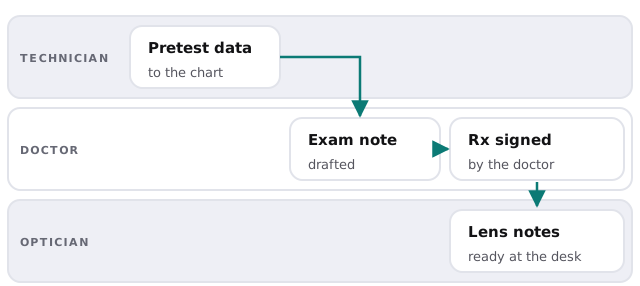
A technician records pretest numbers and a history. A tool can place those in the chart in the right order and draft the part of the exam note that simply restates them, which the doctor reads, corrects and signs. Later it gathers the lens preferences the patient mentioned so the optician isn’t asking twice.
Vision benefits, before the visit
Many patients arrive with a vision plan and no idea what it covers. Staff look up eligibility, then explain what the plan pays toward an exam, lenses and frames. A tool can check the next day’s schedule, list who has a plan on file, mark the ones with nothing recorded and prepare a message asking for an insurance card. Whoever runs your front desk verifies the details with the plan, since benefits change.
| Moment | Typical snag | What a tool does |
|---|---|---|
| Booking | No insurance details captured | Asks for them in the confirmation |
| Day before | Eligibility never checked | Lists each patient to check |
| Checkout | Questions about what’s covered | Puts the plan notes beside the order |
| After | Claim stuck on missing data | Flags claims with gaps |
When the lenses are about to run out
Contact lens wearers run on a cycle you can predict. A supply is dispensed, it’s used up and a new one is ordered, usually from whoever is easiest.
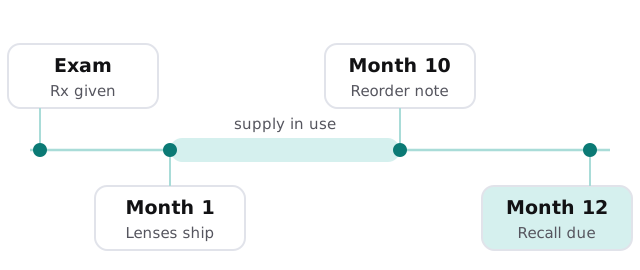
A tool reads dispensing dates, drafts a reorder note a little before the supply ends and a recall for the next exam. Your staff review the list, then send. Patients who respond get a booking link, and those who don’t are left alone after one reminder.
The optical shop’s quiet backlog
Orders to a lab, back-ordered frames and warranty swaps all live in someone’s head or on a sticky note. A board by stage, with overdue items highlighted, and drafted updates to patients, replaces the memory test.
A Monday afternoon
Your front desk starts with a list: two patients missing insurance details for tomorrow, a contact lens verification request on its first day, and four reorder reminders waiting for approval. The third item takes thirty seconds. The doctor’s exam notes are drafted. Nobody has to ask the optician where Mrs. Alvarez’s frames are.
Questions to ask any provider
- Does it read the whole chart or only specific fields?
- Can it keep a record of every request it logs and every message it drafts?
- What does it do when a patient wants a human?
- How do we turn it off?
What we need from you
Your practice management software, a description of how a patient moves through the office and a sample recall message. We return a plan and a fixed quote after the free IT check. A real person replies within 1 business hour, Monday to Friday, 9am to 5pm Pacific. If you want to test a drafting assistant yourself, set up Claude for your team is a gentle place to begin.
An optometry office wins by remembering the details that patients won’t. A tool can hold the details, and a person can hold the conversation.