AI automation for photography studios is at its best when it acts like a very organized assistant who never touches the camera. You’re the person people hire. The calls, emails and reminders that surround each job are the part that can be prepared in advance.
We build small AI tools and internal tools for studios of every size, from one photographer to a team with second shooters. You approve what clients receive.
Sunday night at nine
You shot a wedding on Saturday. Four inquiries arrived since Friday, two about dates you already have booked, one with no date at all and one that sounds ready to book. You’re tired, and the reply you send tonight may decide whether anyone books next month.
- Dates are checked against your calendar before anything is drafted.
- Replies mention the specific type of session asked about.
- The inquiry that sounds ready is listed first.
- You read, change a word, and send.
One wedding, seen as a line
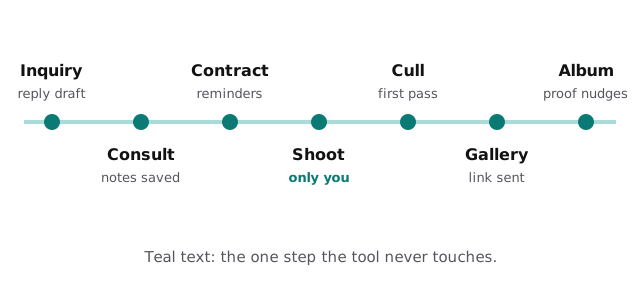
A booking is a long thread, and most of it isn’t photography. A retainer is due, a timeline questionnaire is half filled in, the venue needs a contact and the couple hasn’t said who is coming from the family. A tool can watch for the loose ends, draft a friendly nudge and show you a single list for the week.
The shoot-week routine
- Questionnaire. Responses are summarized into a one-page brief for you and any second shooter.
- Timeline. Times, locations and family groupings are pulled into a checklist.
- Reminders. The client gets a short message the day before with the details that matter.
- Gear and logistics. A list for the day is built from the brief, such as extra lenses for a dim venue.
Culling and editing, without the guilt
Culling and editing are where studios fall behind, because the shoot is fun and the thousand frames afterward are not. Culling decisions are yours. But the surrounding work is mechanical: renaming, sorting by scene, making the contact sheet for the couple and tracking who is waiting.
Delivery as a board
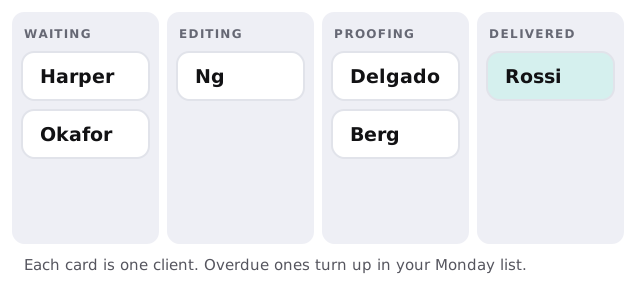
When a gallery is about to pass the date you promised, a tool drafts a short, honest update to the client for you to approve. Clients forgive a delay announced early. They remember silence.
Each type of session is a different business
| Session | Pace | Where time leaks |
|---|---|---|
| Weddings | Long lead, one big day | Planning threads and album proofs |
| Portraits and families | Many small bookings | Scheduling and reschedules |
| Mini-sessions | A burst in a few weekends | Booking floods and wave delivery |
| Commercial | Few clients, strict briefs | Licensing questions and revisions |
| Newborn | Dates move with the baby | Rescheduling and aftercare messages |
Autumn and other pressure points
Many studios see the calendar bunch up: wedding season in the warmer months, family and holiday sessions in the fall, and a slower stretch in winter. Pressure shifts with each. In the busy months the helpful tool is a fast replier and a delivery tracker. In winter it is a gentle past-client outreach list, reviews asked for and next year’s mini-session announcement drafted.
The software around a studio
Most studios run a booking and client-management tool, contracts and invoices, a gallery delivery service, a calendar and a print lab. We work alongside whichever you use and check what each allows. Where something has no connection, a spreadsheet export is often enough.
Questions to ask any provider
- Does it ever touch or upload my images?
- Can I see and edit its drafts before a client does?
- Whose name is on the messages?
- What if I switch booking software?
What we need from you
Three or four real replies you’re proud of, your session types and the software you use. After the free IT check you get a plan and a fixed quote. A real person replies within 1 business hour, Monday to Friday, 9am to 5pm Pacific. If you’d like a first experiment on your own, draft email replies with Zapier and AI is a good start.
Clients hire a photographer for how the day felt. They judge the studio by how the weeks around it felt. Let a tool handle the weeks.