Key takeaways
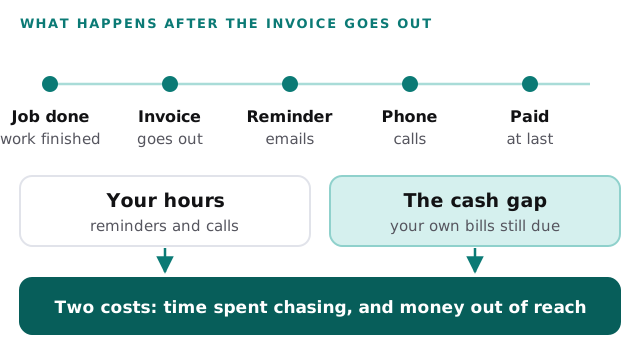
- Chasing unpaid invoices costs you twice: hours spent on reminders and calls, and a cash gap while the money is out.
- In the Federal Reserve's 2025 Small Business Credit Survey, 50 percent of employer firms named uneven cash flow as a financial challenge, and the Fed counts collecting on receivables as part of it.
- Count the hours you spend chasing in a normal week, and list every invoice that is past its due date with its amount.
- Look for a setup that shows you what is overdue and drafts the reminder, so you decide who gets a call.
Chasing unpaid invoices is a job you do in the gaps. You finish a bathroom, send the invoice and get on with the next one. Thirty days later the money has not arrived, so you send a reminder from your phone between site visits. A week after that you make a call, and the call goes to voicemail.
Each nudge takes a few minutes, which makes them easy to leave uncounted. This post helps you count the hours, put a figure on the cash gap and decide what is worth fixing first.
Two costs, not one
The first cost is time. Someone writes the reminder, finds the original invoice, makes the call, notes what was said and tries again a week later. When you run the business yourself, that someone is you, and the time comes out of quoting, site visits or sleep.
The second cost is the gap. Your crew gets paid on its own schedule. The supplier invoice for the materials falls due on its own date. The customer’s payment is what covers both, and until it arrives you cover them from somewhere else, such as your own cash or a credit line.
These two costs respond to different fixes, so count them separately.
What the Federal Reserve survey says
Every year the Federal Reserve Banks run the Small Business Credit Survey of firms with 1 to 499 employees. It is a convenience sample, not a random one, so treat its numbers as a reading of the firms that answered.
In the 2026 report, which draws on the 2025 survey, 50 percent of employer firms said uneven cash flow was a financial challenge in the prior 12 months. A footnote in the report says that “uneven cash flow” includes collecting on receivables (Federal Reserve Banks, 2026). The year before, in the 2025 report, the figure was 51 percent (Federal Reserve Banks, 2025). The 2026 report warns that its questions changed, so the two years are not directly comparable.
The 2026 report also asked what firms with financial challenges did in response. Among them, 24 percent said they made a late payment or did not pay (Federal Reserve Banks, 2026). That is how a gap can spread: one late payer can make you a late payer.
Two limits apply. The survey covers firms of all kinds, and the figures above do not break out construction or the trades. It also lumps collecting on receivables in with other cash flow problems, so it does not measure late invoices alone. For your own business, you have a better source: your own invoice list.
Count your own year
Use your accounting records and one normal week.
- List every invoice that is past its due date today, with its amount and how many days late it is.
- Add up the amounts. That total is the money waiting on other people.
- For one normal week, write down the minutes spent on reminders, calls, and looking up which invoices are open.
- Pick the cost of carrying a late invoice: the interest on your credit line for the days it is late, or a supplier’s late fee you paid because of it.
For the hourly figure, use what your own time is worth, or your office person’s wage with benefits. The example below uses $35.
The figures below are invented to show the layout. The calculator after the table takes your own.
| Line | Example | Yours |
|---|---|---|
| People who chase payments | 2 | |
| Weekly hours each on chasing | 2 | |
| Weekly hours in total | 4 | |
| Cost of an hour | $35 | |
| Chasing time for the year (4 × $35 × 50) | $7,000 | |
| Invoices a year paid late | 40 | |
| What carrying one late invoice cost you | $60 | |
| Cash gap for the year (40 × $60) | $2,400 | |
| Total for the year | $9,400 |
For the last two lines, the cost of carrying a late invoice is the overdue amount, times your yearly borrowing rate, times the days late, divided by 365. With made-up numbers, $6,000 held for 30 days at 12 percent costs about $59.
The cost nobody counts: the call you put off
The worksheet above leaves out the awkward call. Some customers are friends of friends, or repeat clients, or people you would like to work for again. Chasing them feels risky, so the call waits another week, and the invoice ages.
You cannot put a price on that from outside, but you can see it in your list. Look at the oldest invoices on it. For each, ask what stopped you from chasing it. If the answer is that you could not find the invoice, or could not tell whether you had already sent a reminder, then the delay was a problem with records and not with nerve. That kind of delay is the cheapest to fix.
Why the usual fixes disappoint
Each common fix helps with part of this. Each leaves some part on your desk.
Reminder emails from your accounting software. An automatic email on a schedule saves the first nudge. But it cannot tell the customer who is waiting on a dispute from the one who has simply forgotten. You still have to go through the list and decide who gets a call.
A weekly overdue spreadsheet. It shows you the picture on the day you build it. By midweek it is stale, and building it is itself a chore that depends on someone remembering.
A collections service or selling your invoices. These remove the chasing, and they come with a fee. They also put a third party between you and a customer you may want to keep. Whether that is a fair trade is your decision, and it is worth pricing against your own worksheet.
Stricter terms and deposits. These help, and they apply to the jobs you quote from now on. They do nothing for the invoices already out.
None of these is a mistake to buy. They solve one step at a time. Our page on an AI invoice tracking tool covers how this kind of tool is put together.
What to ask for instead
A better setup answers one question quickly, which is what is overdue and what has already been tried. It leaves the decision about each customer to you.
| Ask for | Instead of |
|---|---|
| A live answer to “what is overdue, and how much?” | A list you rebuild each week |
| A reminder drafted for you to approve | A message sent without you seeing it |
| A record of what was sent and when | Searching your inbox before each call |
| You decide who gets a call | A rule that treats every customer the same |
| A trial on your open invoices first | Switching every process on day one |
A month later, track your chasing hours for a week again. Hours saved, times your hourly cost, times 50, is what the change is worth. For more on this kind of business, see our page on trades and contractors.
An assistant that answers questions about cash
We built an AI executive assistant and operations dashboard. It drafts inbox replies for one-tap approval and answers questions about sales, orders and cash. It is a working demo, shown here on sample data.
It isn’t an invoicing tool. We show it because of the pattern: you ask a question about your money and get an answer, and a drafted reply waits for you to approve it before anything goes out. That is the same shape as the fix above, a fast answer to what is owed and a draft you control.
What is worth seeing up close is where the assistant gets its facts and how the approval step works, which is easier to watch than to describe.
Behind the scenes
Want a behind-the-scenes walkthrough of a real build?
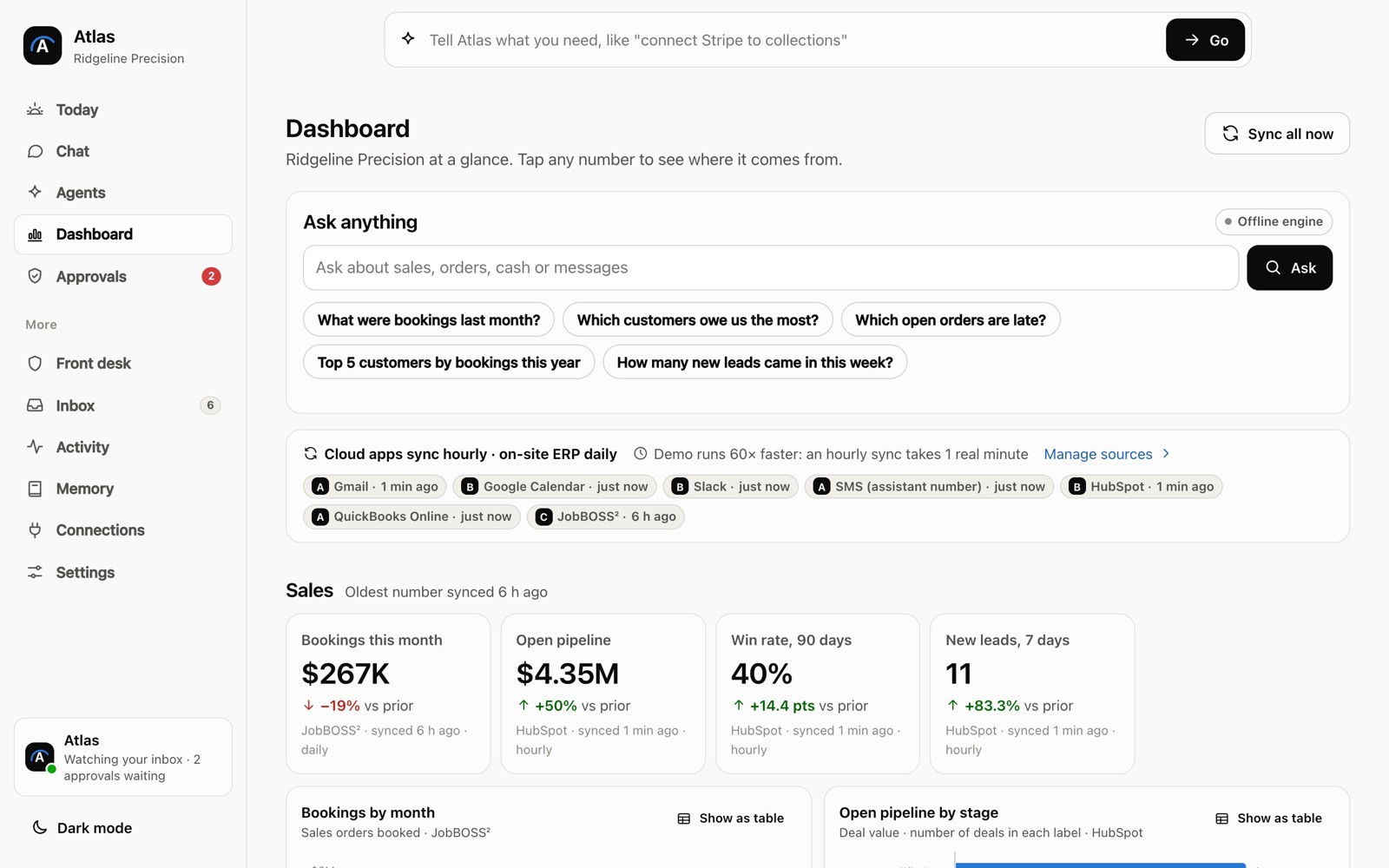
We will take you through it screen by screen: what each person sees, how a record moves through it, and why we built it that way. Then we can talk about the task that costs you most.
Frequently asked questions
How do I work out what the cash gap costs me?
Take the amount that is overdue, multiply it by your borrowing rate for a year, then by the number of days late and divide by 365. If you pay no interest, use what the delay forced you to do instead, such as a supplier's late fee or a job you turned down.
What should I track to see how bad slow payment is?
For each invoice, write down the date it went out, the due date, the date it was paid and the amount. A short list of the late ones, with their totals, shows you how much money is waiting at any moment.
Is a reminder email enough, or do I need to call?
That depends on the customer and the amount, so it is your call. What you can do is keep a record of what you sent and when, so the next step is a decision and not a search through your inbox.
Sources
About the author
Andy Kang, AI Partner Team. Andy Kang writes the blog for AI Partner Team, which builds AI tools and internal apps for small businesses alongside managed IT and IT projects. The blog shows the math and the reasoning behind that work, so you can check it against your own business.
- Every fact links to the page it came from, listed under Sources.
- Example numbers are labelled as examples, and you can swap in your own.
- Builds are shown on sample data, with no client names or client figures.