Domain and DNS management for small business is one of those jobs that nobody owns until something breaks. The website goes down on a Saturday, or the mail stops, or a renewal notice goes to an address that left in 2021. Then it turns out the domain was bought by a former web designer, the records are edited from a login nobody has, and the bill is on a card that expired.
Three layers, often owned by three people
A domain name is really three things stacked together.
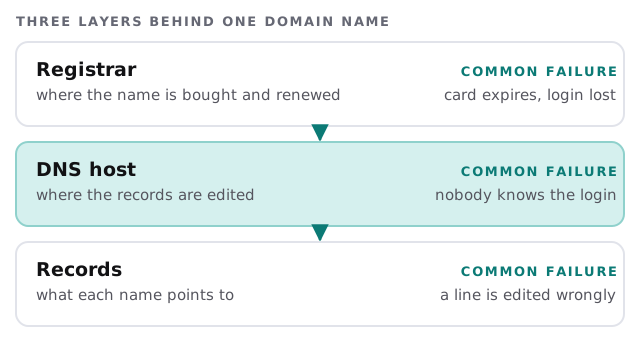
The registrar is where the name is registered and renewed. The DNS host is where its records are edited, and that can be the registrar or a separate service. The records are the instructions, and they’re the part everything else relies on.
What the records actually do
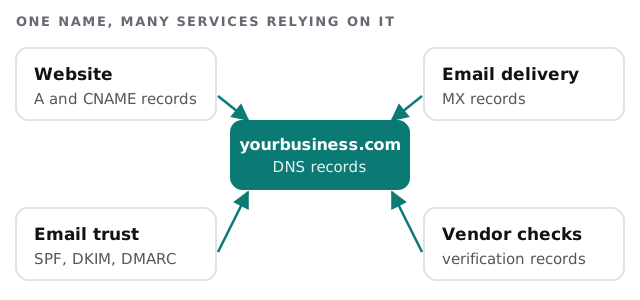
| Record | Job | If it’s wrong |
|---|---|---|
| A or CNAME | Points your name at the website | Site shows an error or an old page |
| MX | Says where your email is delivered | Mail bounces or goes to the wrong place |
| SPF, DKIM, DMARC | Tell receivers your mail is genuine | Messages land in spam |
| Verification records | Prove you own the domain to a vendor | A service stops working until it’s re-checked |
Google’s published sender guidelines, for example, ask senders to set up SPF and DKIM, plus DMARC for bulk senders, so mail from your own domain is trusted. A well-kept DNS zone is the thing that makes your email look like yours.
What ICANN’s rules mean for you
ICANN’s transfer policy is where the rights of a domain holder are set out, and it explains several things that surprise owners.
- A recent registration can’t always move. The policy lets a registrar deny a transfer requested within 60 days of the domain’s creation date.
- You’re entitled to the authorization code. Registrars must provide it to the registered name holder, and each code is unique to a domain.
- A lock is for you to control. A registrar may only set the transfer lock at registration or on request.
- Money disputes don’t change this. A payment dispute isn’t a valid reason to withhold the code or the unlock.
None of this means a transfer is instant. It does mean that if your domain is stuck, there’s a clear standard to point to.
What a good setup looks like
- The registrant is your business, not an individual who may move on.
- The registrar login uses a shared role address and has multi-factor authentication switched on.
- Auto-renew is on, with a payment method someone checks.
- The registrar’s transfer lock is on and the auth code isn’t floating around in old emails.
- Every record in the zone has a known owner, and the unknown ones are investigated, not deleted in a hurry.
A quarterly habit
- Confirm the login. Sign in to the registrar and the DNS host and see that it still works.
- Check the expiry date and the payment method behind it.
- Read the records against a written list of what should be there.
- Test mail by sending to and from the domain.
- Update the notes, including who can reset the registrar account.
Where we start
On a first look we make a one-page map: the registrar, the DNS host, every record and what depends on it. It’s often the first time anyone has seen the whole picture. From there we fix the ownership gaps, then tidy the records. If your records are in decent shape, we simply document them and set a reminder.
What we need from you
- Whatever you know about who registered the domain.
- Access to the registrar and DNS host, or the email address they’d write to.
- A list of the services that use your domain: website, email, booking, invoicing.
- Permission to make changes one at a time, outside busy hours.
A domain you can’t log in to is a domain you don’t control, however long you’ve paid for it.