Email security for small business is about more than a spam filter. Email is where invoices arrive, passwords get reset and requests to “update the bank details” turn up. That makes it the easiest place for someone to impersonate a supplier, a boss or a client. Good protection assumes some messages will get through and makes sure that doesn’t turn into a loss.
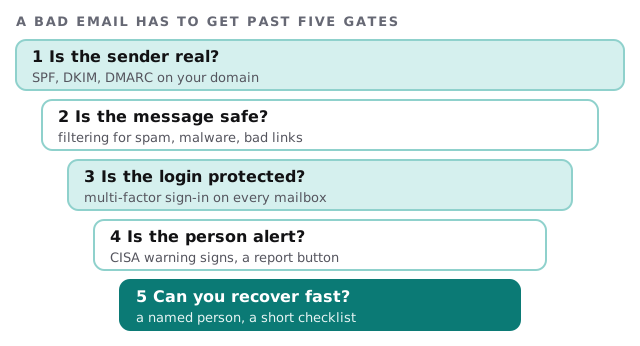
The gates, one at a time
Is the sender real?
SPF, DKIM and DMARC are records on your domain that let receiving servers check whether mail claiming to come from you really did. Google’s published guidelines name all three as requirements for bulk senders, those sending more than 5,000 messages a day to Gmail, and say DMARC’s policy can be set to none to start. A small office isn’t a bulk sender, but the records protect your name from being used on forged mail. They live in your domain’s DNS, so they’re only as good as whoever manages it. Our page on domain and DNS management covers that side.
Is the message safe?
Filtering looks at attachments, links and sender reputation before a message reaches the inbox. We check what your plan already includes before suggesting anything extra, because many office suites come with more than people have switched on.
Is the login protected?
A phished password only helps an attacker if the account lets them in with nothing else. Multi-factor sign-in on every mailbox, including the shared ones, changes that. If you haven’t done this yet, it’s worth doing before anything else on this list.
Is the person alert?
Staff are the last filter, and a good one if you give them an easy move. CISA’s signs are in the table below. A report button beats a group chat that says “does this look weird?”
Can you recover fast?
If someone does click, the next hour decides the outcome. We write the checklist beforehand so nobody improvises.
Signs CISA tells people to watch for
| Sign | Example |
|---|---|
| Urgent or emotionally charged language | “Pay today or your account closes” |
| Requests for personal or financial information | A “supplier” asking for new bank details |
| Untrusted shortened links | A link that hides where it goes |
| Incorrect email addresses or links | A domain one letter off from the real one |
| Clean writing that proves nothing | AI can produce error-free text |
When one gets reported
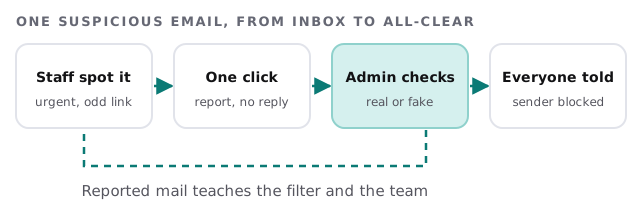
- Don’t reply, don’t click. CISA’s advice for the person is to report, then delete.
- Check through a second channel. If the message claims to be your accountant, phone the accountant on a number you already have.
- Look for the same message elsewhere. Search every mailbox for the sender and subject.
- Block and warn. Block the sender, then send two lines to the team saying what to look for.
If someone clicked
- Change the password and sign the person out of everything.
- Look for forwarding rules or new devices on the account.
- Check whether the person was asked for payment or details, and who got them.
- Tell your bank straight away if money was involved.
A Monday that goes well
At 9:10 a message arrives that appears to be from your landlord, with a new payment address. The person who opens it spots the urgency, clicks report, and goes back to work. By 9:30 the admin has seen it, found two other copies in other inboxes, and blocked the sender. Nobody lost anything and nobody lost an afternoon.
What we need from you
- Admin access to your email platform and to your domain’s DNS.
- A list of mailboxes, including shared ones and the ones used by software.
- The name of the person who gets reports.
- The sort of payments and requests that arrive by email, so we can tune the checks.
Email security isn’t a wall. It’s several small doors, each one cheap to close.