A FileMaker to web app migration is a different job from moving a spreadsheet. The thing you’re replacing isn’t a pile of records. It’s a working application, often built by one person over many years, with its own screens, its own rules and its own habits. Replacing a FileMaker database means moving the data, and then deciding which of those rules still deserve to exist.
What’s inside the file
A single FileMaker file usually holds several things at once:
- Tables and fields, which are the records themselves.
- Layouts, the screens people click through every day.
- Scripts, the steps that run when someone presses a button.
- Value lists and relationships, which quietly keep entries consistent.
- Accounts and privileges, deciding who sees what.
Only the first of those is plain data. The rest is behavior, and it’s what people mean when they say “the system does it automatically.”
Every script gets a verdict
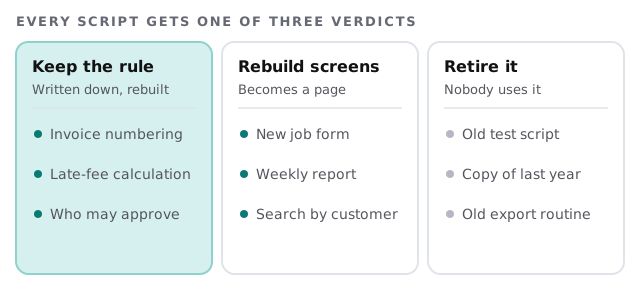
We open each script and write down what it does, in a sentence anyone could check: “when a job is marked complete, create the invoice and email the customer.” Then each gets one of three verdicts. A rule is business logic that continues in the new app. A screen is something people click that becomes a page or button. The rest are retired, and that list is usually longer than the owner expects.
Getting the data out
Claris publishes the formats FileMaker Pro can use. Most of them work in both directions, and that’s what makes a migration practical.
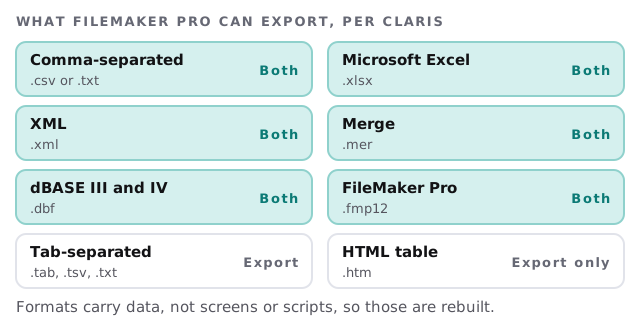
Claris is clear about one limit: most formats support data conversion only, so formatting like fonts and colours doesn’t come along. That’s no loss for the records, but it’s a reminder that the look of the app has to be rebuilt.
Three ways to switch over
| Approach | How it works | Best when |
|---|---|---|
| One weekend | Freeze FileMaker, load everything, start Monday | The app is small and the rules are few |
| Side by side | Both run for a while, data copied across, staff compare results | Money or customer records are involved |
| In stages | One area moves at a time, such as orders first, then reports | Different teams use different parts |
For most small businesses we suggest side by side, because it gives people time to find the thing nobody remembered.
The order we work in
- Take a copy of the file and export every table in a standard format.
- List the layouts and scripts, with a note of who uses each.
- Interview the heaviest users about what they’d miss if it vanished.
- Design the new database, keeping field names people already know.
- Rebuild the rules and screens that survived the audit.
- Load the data and compare counts and totals with the originals.
- Run in parallel, then switch FileMaker to read-only.
A morning check
On the first day of the parallel period, someone creates a job in both systems. The invoice total should match to the cent, the customer email should look the same, and the report should show the same line. If they differ, the script that was missed has just introduced itself.
What we need from you
- A copy of the FileMaker file, or admin access to the server where it runs.
- Time with the people who use it daily.
- Whoever built it, if they’re reachable, even for a short call.
- A list of anything outside FileMaker that depends on it, such as exports or a website.
The data is the easy part. The scripts are where your business has been writing its rules down.