Managed IT services for architecture firms have to be built around how a design office actually works. Most of the firm’s value sits in a few very large files that many people edit at once, and the rest of the technology exists to keep those files open, current and safe.
Three kinds of machine
Workstations that do the heavy lifting
Modeling, rendering and walkthroughs push a computer harder than almost any other office work. A workstation’s graphics card, memory and storage decide how the day feels. These machines also age in a particular way: they don’t fail, they become slow enough to cost a designer an hour a day. We keep an inventory with purchase dates, so replacements are planned instead of discovered.
The project server
Active projects live on a file server or a cloud-synced project space, and often both. The failure modes differ. A server fills up. A sync client stalls on a file somebody renamed. A license server goes down and every seat of software stops opening. Each of those needs an owner and a monitor, not a hopeful glance.
Plotters and print
The large-format printer is a networked computer with a driver problem. When it breaks at 4:30 on submittal day, it is the only machine anyone cares about. We keep its drivers, its queue and its network address documented.
Where the files go
A drawing set doesn’t stay inside the firm. It travels to the structural engineer, the mechanical engineer, the civil consultant, the contractor, the owner and, at the end, the plan reviewer.
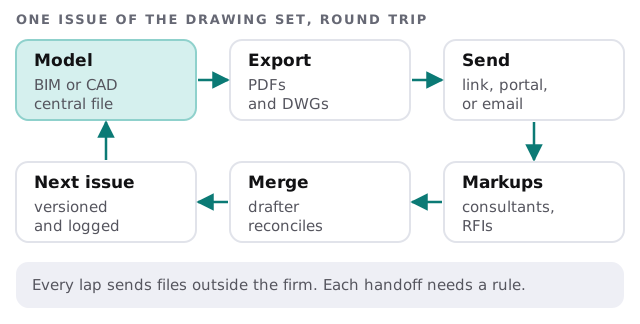
Email attachments are the usual weak link. Two consultants mark up different versions, and nobody knows which one is current. A project link or portal with a folder per project and per party solves that, and it also makes closing out a job simple: you switch off every outside person’s access on one date.
Deadline weeks
A design office’s strain isn’t spread evenly across the year. It moves with the project: concept work leans on rendering, drawings on model sync, and permit and bid dates on plots and outside sharing.
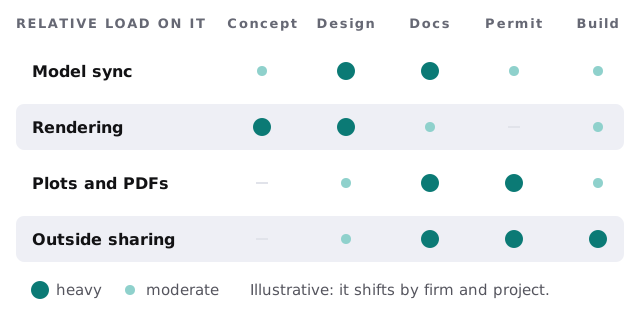
We plan around those weeks. Updates and changes wait until after a submittal. Backups are checked the week before. A restore of the active project folder is tested on a quiet day, because the first time you learn how long a restore takes should not be when the folder is gone.
Site visits and working from home
Architects leave the office. They walk sites with a tablet, mark up PDFs in a client’s lobby and open the model from a kitchen table. Each of those needs the same three things: a device that’s encrypted and managed, access that works without exposing the whole server, and a way to get a lost tablet off the project. Monthly care covers the access controls, backups and updates behind all three, so a site visit doesn’t open a new hole.
Questions to ask a provider
- Have you supported a BIM or CAD workstation fleet, and what do you do about driver and graphics updates?
- How do you protect and restore multi-gigabyte project folders?
- What’s your plan for the license server?
- How would you give a consultant access to one project and nothing else?
- Who do I call when the plotter dies on submittal day?
On the free IT check we draw your project file map with you, then send a plan and a fixed quote.
Architecture IT is mostly about timing. Heavy changes go in the quiet weeks and the whole office feels the difference.