Managed IT services for associations look different from managed IT for a company, because an association’s technology is run by a small staff, steered by a board that changes, and powered by volunteers who aren’t employees and never will be. Most of what goes wrong is about access and handover, not hardware.
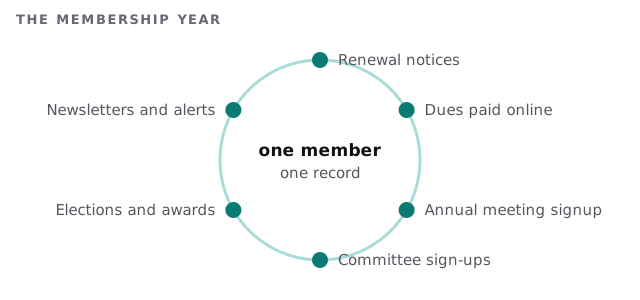
One member, one record
Everything an association does points back to the member. Dues, event registrations, committee sign-ups, ballots, newsletters and certificates all hang off the same name. When that record is split across an association management system, a spreadsheet and the website’s own login, members get the wrong renewal notice and staff spend renewal week reconciling lists.
The systems an association runs
| Category | What it holds | A familiar problem |
|---|---|---|
| Association management system | Members, dues, renewals, event registration | Exports to a spreadsheet that quietly becomes the real list |
| Website and content management | Public pages, member-only areas, job board | One staffer is the only person who can publish |
| Email marketing | Renewal reminders, newsletters, alerts | Messages to members flagged as spam |
| Shared files | Minutes, bylaws, committee documents | Old board members still on the sharing list |
| Meetings and webinars | Annual conference, chapter calls | Accounts tied to a personal email |
Terms end. Accounts should too.
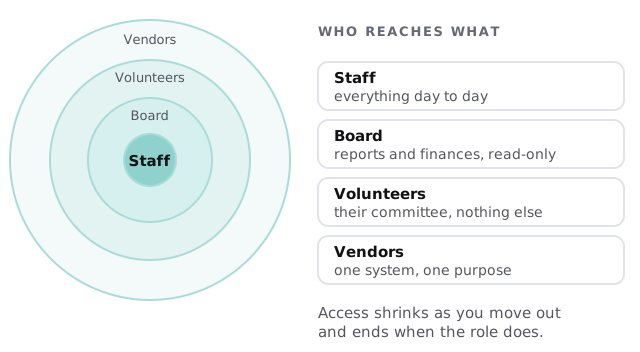
Boards turn over on a schedule. Volunteers come and go with the projects. Each of them gets a login and, too often, keeps it. Associations rarely suffer from an attacker so much as from a long tail of accounts nobody remembers granting.
- List everyone with access. Staff, board, committee chairs, vendors and the volunteer who built the website years ago.
- Match access to role. Each group gets what its job needs and no more.
- Add an end date. A term ends, and so does the account, without anyone having to remember.
- Move association business off personal email. A role-based address stays with the role when the person changes.
- Review each year. Do it at the board transition, when turnover has just happened.
The week that matters most
Annual meetings and renewal drives create a spike: payments, registrations and mailings all at once, run by a few people. We plan the changes around it. Software updates, mailbox changes and migrations don’t happen the week before a conference. The week after is when they go ahead.
Handover day for a new board chair
On the first Monday of a new term, the outgoing treasurer’s access to the accounting system and the bank portal view is closed. The incoming treasurer gets their own account, set to their role, along with a short page that says where the files live and who to call. The president’s mailbox forwarding is checked, so the old address doesn’t keep receiving member messages.
None of this takes long when it’s a routine. It takes weeks to untangle when it isn’t.
What we need from you
- A list of every system staff and volunteers log in to.
- Your board and committee calendar, so we know when access changes.
- The name of the one person who knows how the website works, and a second who should.
Rather than buy another tool first, we’d start with the list. Monthly care covers the access controls, backups and updates this depends on, and the free IT check gives you a plan and a fixed quote.
Aim for a setup where a new staff member can find any member’s record, any committee’s folder and any vendor’s login without asking the person who set it up.
An association’s most important system is its member list. Protect that first and the rest gets easier.