Managed IT services for auto repair shops have to work in rooms that don’t look like offices. The tablets live in a bay, the laptop that reads codes is on a cart, and the person who answers “who runs the computers” is usually the owner, between customers.
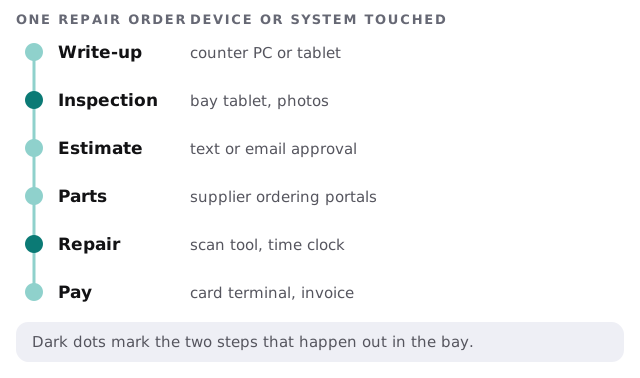
Follow a repair order
Every job touches the same set of tools, and the trouble starts when one of them is out of reach of the others.
The bay isn’t an office
A tablet that works perfectly on a desk can fail in a garage. The difference is physical.
- Wireless coverage. Lifts, tool boxes, concrete and vehicles all weaken a signal. One router at the counter isn’t enough for four bays.
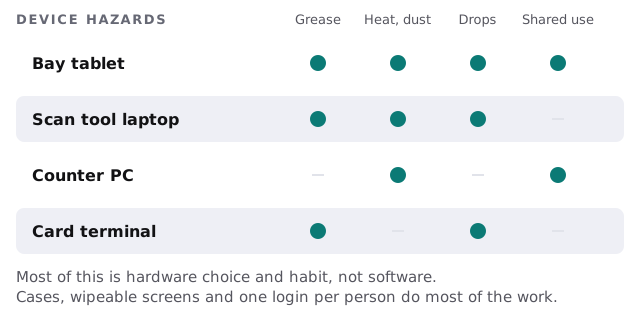
- Hands and hazards. Grease, drops and heat shorten a device’s life. Rugged cases and wipeable screens cost less than replacing a tablet each year.
- Shared devices. A bay tablet gets passed between technicians. That’s how a single login becomes the norm.
- Dust and cold. A computer on the shop floor needs a place to sit, not a bench corner.
What a shop runs
| Category | What it does | Where it goes wrong |
|---|---|---|
| Shop management software | Customers, vehicles, estimates, invoices, history | Runs on one PC with no tested backup |
| Digital inspection | Photos and notes sent to the customer | Tablets lose the connection mid-inspection |
| Estimating and parts lookup | Labor guides, supplier catalogs, ordering | Supplier logins held by one person |
| Diagnostics | Scan tools, vehicle-specific software | Laptop and software versions drift apart |
| Payments | Card terminal, invoicing, text-to-pay | Terminal shares a network with everything else |
| Phones and messaging | Calls, customer texts, reminders | Business texts living on someone’s personal phone |
Customer details matter here too. A shop holds names, phone numbers, addresses, vehicle records and payment history for every customer you’ve served. Treat that list like the asset it is: individual logins, a backup you’ve restored, and a way to remove a former employee in one step.
Three things that break most
- The network at the far bay. It drops, the tablet loses the inspection, and a technician retypes it at the counter.
- The shop software’s backups. Customer history and invoices sit in one system. If it’s on a PC in the office with no tested copy, a failed drive takes the history with it.
- The diagnostic laptop. It’s updated seldom, because nobody wants to risk it before a job. The result is a laptop that fails at the worst time.
What a good week feels like
Monday, the tablets sign in without anyone typing a long password. A customer approves an estimate by text from the waiting room and the approval lands on the repair order. The parts portal login still works because someone owns the supplier list. Friday evening, the backup finishes and sends a short report. Once a quarter somebody restores a customer record just to prove it.
Monthly care covers the access controls, backups and updates behind that. On the free IT check we walk the shop with you, from the counter to the farthest bay.
Busy days
Saturday mornings and the first cold snap bring a rush of drop-offs, and a slow tablet or a dead card terminal costs real money. We schedule updates for the evening before a day off, not the morning of a rush, and we recommend keeping a spare terminal and a spare tablet configured, so a failure means a swap, not a project.
What we need from you
- Which shop management software you use and who supports it.
- A list of the devices in the bays, and who uses each.
- Your supplier portals and who holds the logins.
- Where you’ve seen the Wi-Fi fail.
A shop’s IT works when it works in the bay. Start your review there.