Managed IT services for childcare centers are shaped by the clock. Twice a day, nearly every family passes through the front door in a short window, and every system the center runs has to keep up. The rest of the day is quieter, and that is when the records, the access and the backups get tended to.
The shape of a center’s day
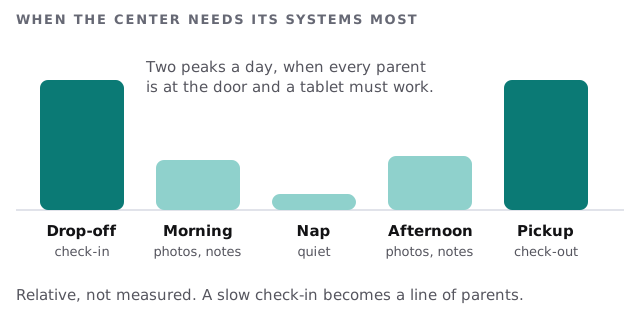
At drop-off a staff member checks in a child, notes who dropped them off and sometimes records a health note. At pickup the reverse happens, with an extra check that the person at the door is on the approved list. A slow tablet or a dropped Wi-Fi signal at either moment makes a line, and a line makes parents unhappy.
Whose eyes see what
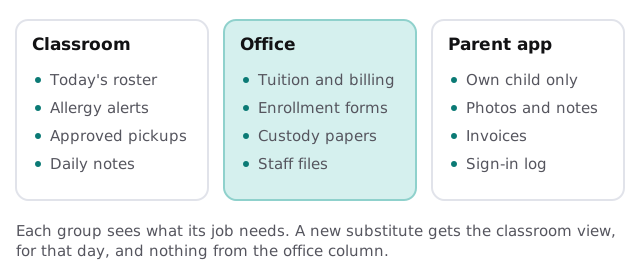
A center holds records most businesses never touch: a child’s allergies, medical notes, authorized pickups and sometimes custody paperwork. Different people need different slices.
Shared tablets are the weak point
Classroom tablets are shared, handled by small hands and left on shelves. Three habits make that workable:
- Tablets sign in to the center’s app only, with no email or browsing, and lock themselves after a short time.
- Each teacher uses their own PIN or login, so notes carry a name.
- A lost or broken tablet can be locked from the office, and nothing sensitive is stored on it.
What a center typically runs
| System | Who uses it | What goes wrong |
|---|---|---|
| Check-in and parent app | Front desk, teachers, parents | The tablet at the door loses its connection at pickup |
| Billing and tuition | Director, office staff | Billing exports sent to personal email |
| Staff scheduling | Director | One person holds the only copy |
| Cameras, if used | Director | Footage access never reviewed |
| Phones and email | Everyone | Parents’ messages going to a former employee’s inbox |
When staff turn over
Every staff change is an account to open or close. A teacher who leaves should lose access to the roster, the parent app and the center’s email on their last day. A substitute needs the classroom view and nothing else. New hires should get their access before their first morning, not partway through it.
A pickup, when it’s set up right
A grandmother who has never picked up before arrives. The staff member at the door opens the child’s record, sees that her name was added by the parent that morning, and checks the photo ID against it. The tablet answers in a second because it sits two meters from an access point, not at the edge of the signal. The check-out is stamped with the staff member’s name.
If the tablet had failed, a printed roster refreshed that morning would have carried the same check by hand.
What we need from you
Walk us through the front door and one classroom. Tell us which check-in or parent app you use, who administers it, and who has an account today. Monthly care covers the access controls, backups and updates behind all of it, so we start by finding out what’s already there.
What to ask a provider
- How would you keep the check-in tablets working during the pickup rush?
- How do you keep a substitute out of billing and enrollment records?
- What happens to our records and accounts if we change check-in apps?
- Who do we call, and how quickly will someone reply?
We answer them on the free IT check and follow up with a plan and a fixed quote.
A childcare center’s IT earns its keep at drop-off and pickup. The quiet hours are for getting ready.