Managed IT services for real estate offices have to solve a problem most small offices don’t have. Your most important work happens away from the office, on phones and laptops you may not own, and the most expensive mistake is a bank transfer sent to the wrong account.
A deal’s paper trail
Each transaction creates a stack of documents and messages: offer, contract, disclosures, inspection reports, lender letters, closing figures. In most offices they pass through email, an e-signature account and a transaction management system or shared folder, and several people see them along the way.
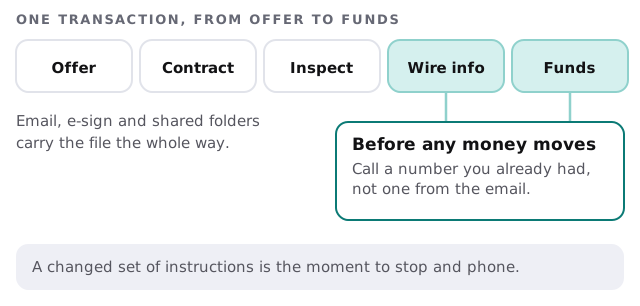
The wire-fraud habit
The FBI’s Internet Crime Complaint Center describes business email compromise in general terms: scammers target legitimate transfer-of-funds requests. Its advice applies to closings as much as to any other business. Verify requests to change account information through a separate channel, and check that sender addresses and links match the organization they claim to come from. Never reply to an email with login details.
On the IT side, we set up multi-factor sign-in on every mailbox, filtering that flags lookalike domains, and alerts when a mailbox suddenly forwards mail somewhere new. The phone call stays human.
What a calm closing day looks like
The escrow officer’s email arrives with wire details. The agent doesn’t reply to it. She phones the escrow office on a number saved in the contract weeks earlier, confirms the details, and tells her buyer to do the same. Meanwhile the mailbox filter has already held back a lookalike message that used the lender’s name with one letter changed.
Neither safeguard is clever. Both are on by default in an office that has been set up properly.
Whose device is it?
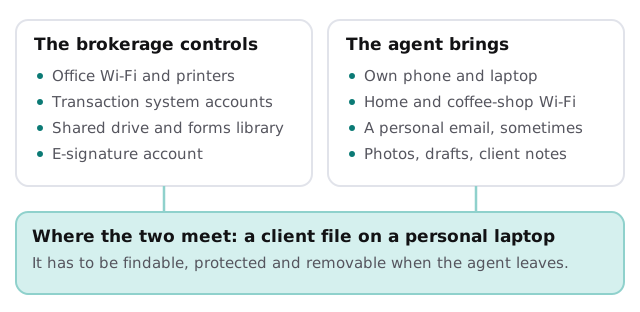
Agents are often independent, work from home and drive between showings. That’s a normal way to run a brokerage. It only works if you decide what belongs to the office and what doesn’t.
| When an agent… | The IT work |
|---|---|
| Joins | Accounts in the transaction system, e-signature and email; a phone set up to keep office data in managed apps |
| Changes brokerages | Access closed the same day; files they worked on stay in the office system |
| Loses a phone | Remote lock and wipe of the office data, nothing else |
| Hires an assistant | Their own login, never the agent’s |
What your office probably runs
- A transaction management system or shared folders for every file.
- A CRM for leads and past clients.
- E-signature and form libraries.
- MLS and showing tools, often paid for by the agent personally.
- Website and listing feeds, usually run by a vendor.
None of these need replacing. They need a list of who has access to each, and somebody who notices when a login goes stale or an agent’s subscription lapses in the middle of a listing. On the free IT check we build that list with you and send a plan and a fixed quote for anything that needs fixing.
Questions for any provider
- How would you protect agents’ phones without reading their personal messages?
- What do you do when an agent forwards a suspicious email at 4:45 on closing day?
- Can you show us how you’d remove a departing agent’s access?
- Which of our agents’ own tools do you need to know about?
The most valuable thing an IT provider gives a brokerage is a checklist that runs the same way for every agent, every time.