Managed IT services for salons look different from an office’s, because a salon has three kinds of worker at one front desk: employees, booth renters and the owner. Each needs a different amount of access. Add a booking app, a card reader and a phone full of client photos, and the IT is mostly about who can see and change what.
Three kinds of people at the front desk
| Who | What they need | What to hold back |
|---|---|---|
| Owner or manager | Prices, reports, payroll, every calendar | Nothing, but protected by a second sign-in step |
| Employee stylist | Their own calendar, clients and sales | Other stylists’ takings, price changes |
| Booth or chair renter | Their own calendar and clients | The salon’s reports and settings |
Many salons give everyone the owner’s password because it was quick. It is also why nobody can say who refunded a service or deleted a booking.
The booking that shows up
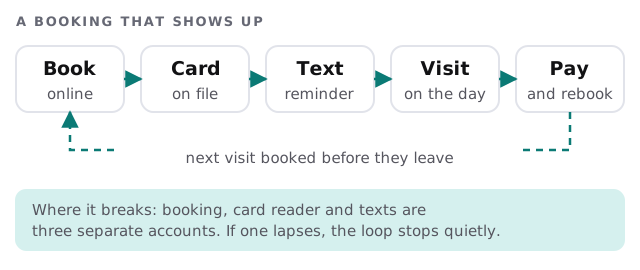
A salon’s income begins with a booking and ends with a payment. Between them sit three separate accounts: the booking tool, the card reader and the text-message service.
What lives on the stylists’ phones
Stylists photograph finished work and keep notes and formulas. Often the only copy sits on a personal phone. We aren’t asking anyone to give up their phone. We suggest a salon-owned place for the shared items, such as formulas, with the booking app as the obvious choice, and a lock on any phone that holds client details.
A salon day, in three checks
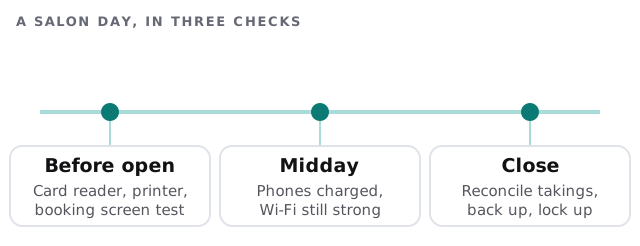
Small routines beat clever setups.
Photos, portfolios and the salon’s feed
Before-and-after photos sell the next appointment, so they get taken constantly, on whichever phone is nearest. That raises three plain questions. Do clients know their photo may be posted? Where is the original kept? Who has the password to the salon’s account if the person who posts leaves? Write the answers down and keep the account login with the owner, with other people added as managers by name.
Slow Tuesdays are for updates
Salons have quiet hours, and that is when the register tablet should install its updates, the card reader should restart and the Wi-Fi gets looked at. Pick a standing slot, such as Tuesday before opening, and keep it. When something needs changing on a Saturday, there should be a very good reason.
When a stylist leaves
- Decide what moves with them before they go, ideally in writing.
- Remove their login from the booking app and the card system.
- Transfer their upcoming bookings to someone else or contact those clients.
- Change the shared Wi-Fi password, if they knew it.
- Check the salon’s social accounts, in case they hold the only admin access.
Small things that cause big mornings
- Music and the tablet often share a plan, a router and a battery, so one dead charger takes both.
- A receipt printer with no paper at 5pm on a Friday.
- A card reader that needs a software update the moment a queue forms.
- Guest Wi-Fi that is the same network as the booking tablet.
What we need from you
- The booking app and the payment system you use.
- A list of everyone with a login, employee or renter.
- Who owns the salon’s social media accounts and where the passwords are kept.
- Your busiest days, so updates never land on them.
Monthly care covers access controls, backups and updates. The free IT check ends in a plan and a fixed quote.
A salon runs on trust and a calendar. Give each person their own key to both.