Network monitoring for small business is the difference between hearing “the internet’s down” from a client and hearing it from a message on your phone. Office network monitoring doesn’t fix faults. It shortens the gap between a fault starting and someone who can act on it knowing about it.
What gets watched
A small office doesn’t need a wall of dashboards. It needs a short list of things that, when they stop, stop the business.
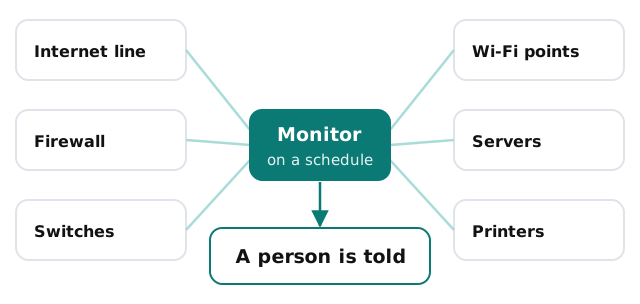
- The internet line. Is it up, and is it behaving like it did last week?
- The firewall or router. Is it reachable, and is its software current?
- Switches and Wi-Fi access points. Is each one answering?
- Servers and storage, where you have them. Is there free space, and is the backup job reporting in?
- Printers and other shared devices. Mostly for the one that jams the queue for everyone.
Alerts worth having
The mistake is alerting on everything. A monitor that sends a message every time a laptop sleeps teaches people to ignore it.
Wake someone up for these
A line that’s down, a firewall that has stopped answering, or a server running out of space. These stop work now or soon.
Collect these for a weekly look
A device that keeps dropping and reconnecting, a switch with a warning, or an access point that has been restarting. They aren’t urgent, but they’re the early signs of the faults that are.
Don’t alert on these at all
Anything nobody would act on. If the answer to “what would we do about it?” is “nothing”, it’s noise.
The point in time that matters
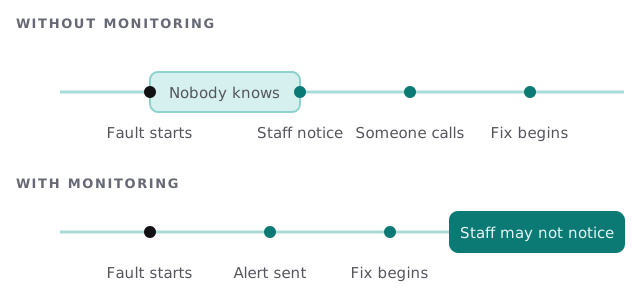
Set the thresholds with the people who live with the network. A receptionist who says the card machine stalls every afternoon has just told you what to watch.
Who gets which alert
| Alert | Who should see it | What they do |
|---|---|---|
| Internet line down | The person who calls the provider | Check the line, then open a ticket with the carrier |
| Firewall unreachable | Whoever manages the network | Check power and cabling, then connect remotely |
| Storage nearly full | Whoever looks after the server or backups | Clear space or plan an upgrade |
| Access point offline | Whoever manages Wi-Fi | Power cycle it, then check the cable |
| Repeated minor warnings | Reviewed weekly | Decide if it’s a pattern |
If monitoring is part of a managed arrangement, the provider receives those alerts. If you run it yourself, the table is a decent checklist for who in your office that is.
What monitoring won’t do
It won’t stop an attack, patch a computer or restore a backup. It tells you a link is slow, not why a staff member clicked a bad email. Keep it next to business Wi-Fi security and endpoint protection, not in place of them. And it can only watch what it knows about, so a current device list, as in IT asset tracking, makes the monitor better.
Questions to ask whoever sets it up
- What exactly is being watched, and what isn’t?
- Who receives each alert, and what do they do with it?
- What do we see afterwards: a note saying what happened and what changed?
- How do you avoid sending alerts nobody needs?
- What do we keep if we change provider?
What we need from you
- A list of what’s connected: the line, firewall, switches, access points and any servers.
- The names of the people who should receive alerts.
- A sense of what a bad day looks like, so we know what to treat as urgent.
Monthly care from us covers access controls, backups and updates, and the free IT check shows what you have and what would be worth watching. You get a plan and a fixed quote, and a real person replies within one business hour, Monday to Friday, 9am to 5pm Pacific.
Monitoring that nobody acts on is just a quieter way of waiting for a client to call.