Most owners who ask for a small business cybersecurity assessment don’t want a lecture on threats. They want an answer to a simple question: are we in decent shape, and if not, what do we fix first? A useful assessment answers exactly that, in words a non-technical person can repeat to a partner or an insurer.
Assessment, scan, test: not the same thing
| What it is | What you get | |
|---|---|---|
| Vulnerability scan | Software looking for known weaknesses on devices and networks | A long automatic list |
| Penetration test | A person trying to break in | A story of what got through |
| Assessment | A review of how your business is set up and run | A ranked list and a plan |
All three have a place. For a small business, the assessment is usually the right first step because it covers people and habits as well as machines, and it’s a sensible way to learn whether the other two are worth doing.
Six questions, taken from NIST
NIST published a Small Business Quick-Start Guide for its Cybersecurity Framework 2.0 in February 2024. It’s aimed at small and medium businesses with modest or no cybersecurity plans in place, and it organizes the work into six functions. We turn each one into a plain question.
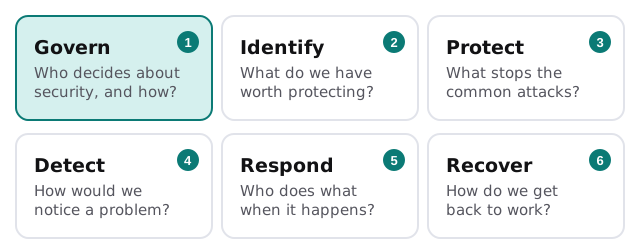
CISA’s Cyber Essentials covers similar ground in its own words: leaders, staff, systems, surroundings, data and crisis response. Between them, the two give an assessment a structure you can point to, so findings don’t depend on one consultant’s opinions.
What we actually look at
- Accounts: who has admin rights, whether multi-factor sign-in is on, and whether former staff still have access.
- Devices: what you own, what’s updated, and which are personal devices used for work.
- Email: how it’s protected against lookalike senders and stolen passwords.
- Backups: what’s copied, where the copy lives, and whether anyone has tested a restore.
- Vendors and software: who else holds your data or has a way into your systems.
- People: who’s trained, who reports problems, and who decides what happens next.
None of this involves attacking your systems. We ask, look at settings you give us access to, and write down what we see.
What you get back
The report is built to be used, not filed.
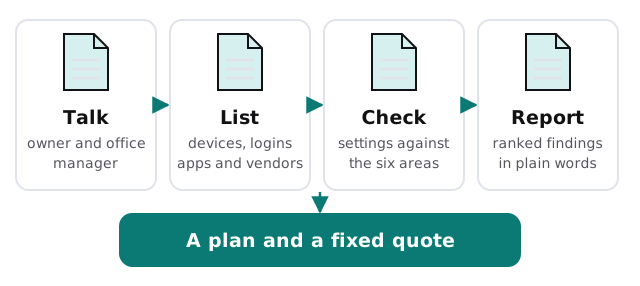
Each finding says what we saw, why it matters in one sentence, how big a job the fix is, and who in your business owns it. The ranking puts quick, high-value fixes first. A missing second sign-in step on the owner’s email will usually outrank a software upgrade.
What it won’t tell you
An assessment is a snapshot of one moment. It doesn’t prove nobody has already broken in, it doesn’t certify you for anything, and it doesn’t replace the habits that keep you safe: updates, backups, access reviews and training. It tells you which of those to start with.
Before we start
- Name one decision-maker. Findings need someone who can say yes.
- Gather the obvious lists. Staff, devices, software subscriptions, and who your IT vendors are.
- Tell us about any contract or insurer questions. If a client or insurance application asked you security questions, bring them. We’ll map the findings to those questions.
- Pick one admin account to share. Read-only access is plenty.
We start with the free IT check, then send a plan and a fixed quote for anything the findings turn up. A real person replies within one business hour, Monday to Friday, 9am to 5pm Pacific.
A good assessment makes the next step obvious. If you finish reading it and don’t know what to do on Monday, it wasn’t a good assessment.