Here is the trap. A developer wires Stripe to QuickBooks in an afternoon, every test payment appears, and the demo looks perfect. Three months later the books are out by a few hundred dollars and nobody can say why. Stripe to QuickBooks automation fails in the gaps between the happy path and what Stripe really sends. If you want to sync Stripe payments to QuickBooks and trust the result, those gaps are the project.
What Stripe records, and what QuickBooks needs
Stripe’s documentation says every movement of funds in or out of your account creates a balance transaction, and each one has a type. Four of them cover most small-business bookkeeping.
| Stripe type | What it is | What the books need |
|---|---|---|
charge |
A payment from your customer | Income, matched to the invoice or sale |
refund |
Funds returned to a customer | A reduction, linked to the original sale |
stripe_fee |
A fee Stripe took | An expense, kept apart from income |
payout |
Money moved to your bank | A deposit that matches the bank feed |
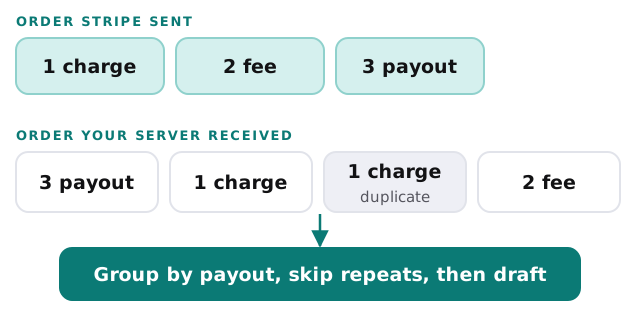
A payout is the awkward one. Stripe says automatic payouts follow your payout schedule and can include funds from many transactions, so the bank shows one number for a pile of charges, refunds and fees.
Three ways events misbehave
They arrive twice
Stripe’s webhook page says endpoints might occasionally receive the same event more than once. Its advice is to log the event IDs you have processed and not process them again. A sync without that check can create two invoices for one payment.
They arrive out of order
Stripe says events are not delivered in any promised order, and tells developers not to rely on a specific one. A refund can show up before your system has seen the charge it belongs to.
They arrive late, or not at all
For live events, Stripe retries delivery for up to three days with exponential back-off. Past that, you need a way to ask Stripe what you missed. Stripe says its handler must also return a success status quickly, before any slower work such as updating an accounting system.
The flow we build
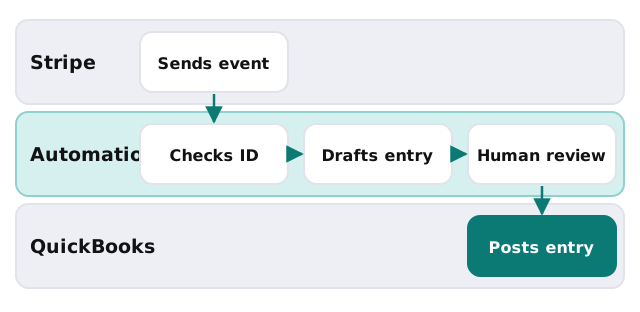
- Receive and verify. Check the Stripe signature on each event so a forged request cannot create an entry.
- Return quickly. Acknowledge first, then do the slow work from a queue.
- Check the event ID. If it has been seen, stop.
- Group by payout. Charges, refunds and fees are collected under the payout that carried them.
- Draft the entries. Income, fee expense and the deposit, ready for QuickBooks.
- Wait for review. A named person approves the batch.
- Post and record. The QuickBooks entry ID is stored against the Stripe ID, so a retry finds it.
Intuit’s connector or something custom
Intuit’s own Stripe Connector is worth trying first. According to its help article it imports sales, refunds, payouts and adjustments, records fees to a Stripe Fees expense account, and creates a bank deposit for each payout. It also has limits worth knowing:
- Items that match nothing in QuickBooks default to “Stripe Sales”.
- You cannot refresh the sync on demand.
- Multiple Stripe integrations cannot run at once.
- Payment received transactions must be confirmed before payout transactions.
Custom work makes sense when you need invoice-level matching, several Stripe accounts, or rules the connector does not offer. We also use it when the payment belongs to an invoice raised elsewhere, as in QuickBooks and CRM integration. For a store with Shopify in front of Stripe, see Shopify to QuickBooks integration.
Before anything runs
- Decide whether you use automatic or manual payouts. Stripe says it cannot tell which transactions a manual payout contains.
- Name the QuickBooks accounts for income, fees and refunds.
- Agree what counts as a match, and what goes to a person.
- Pick a start date for history.
Chasing late payers is a different job
If your pain is unpaid invoices, not reconciling Stripe, our page on an AI invoice tracking tool covers reminders and replies. If you are still choosing QuickBooks plans and users, setting up QuickBooks for your team is a good start.
Reconcile to the payout, not the charge. The bank only ever sees payouts.