The bookkeeper’s Monday starts the same way. She opens the CRM, finds the deals marked won, and retypes each customer into QuickBooks before raising the invoice. Mistyped names produce duplicates, and a deal marked won twice produces two invoices. QuickBooks and CRM integration removes that Monday ritual, if it is built around one idea: every record has exactly one system in charge of it.
Settle who owns what first
Before any connection is made, you decide which system is the boss of each piece of data. Without that, sync tools become arguments between your systems.
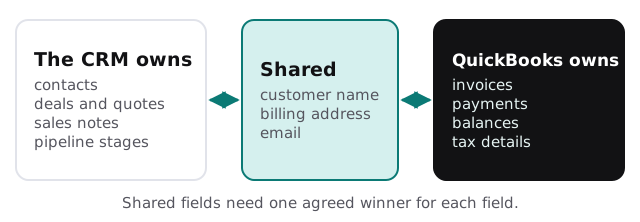
| Data | Usually owned by | Why |
|---|---|---|
| Contacts and notes | The CRM | Sales staff update them daily |
| Deal value and stage | The CRM | It is the sales team’s working record |
| Invoices and payments | QuickBooks | Your accountant relies on them being right |
| Customer billing details | Decided case by case | Both teams edit them |
Here is what Monday looks like once it is set up. The bookkeeper opens a short list of draft invoices that appeared over the weekend, each with its deal attached. She checks the amounts, approves them, and the ones with an uncertain customer match sit at the top with a note saying why. The retyping is gone, but her judgement stays in the loop.
A won deal, step by step
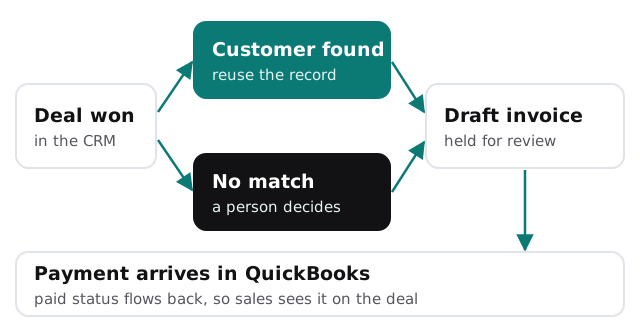
- A deal is marked won. That, and nothing else, is the trigger.
- We look for the customer. By a stored identifier first, then by email or company number, never by name alone.
- If there is one match, we use it. If there are none, we create the customer. If there are several, a person chooses.
- We draft the invoice. Line items come from the deal, and the draft waits for someone in finance to approve it.
- We store both IDs. The CRM deal remembers the invoice, so a second trigger can’t create a second one.
- Payment flows back. When it is recorded in QuickBooks, the deal shows paid.
One way or two ways
One-way flows
The CRM sends customers and deals to QuickBooks, and nothing comes back except payment status. This is the safest starting point and covers most small businesses.
Two-way flows
Both systems can change shared fields. It works when each field has a clear winner and conflicts are logged. It breaks when two people edit the same address in the same hour and nobody knows which one stuck.
Traps we plan for
- Names that nearly match. “Smith & Co” and “Smith and Company” must not become two customers.
- Tax and currency. The sync should carry what your accountant needs, not guess it.
- Edited invoices. Changing an invoice after it is sent should alert someone rather than silently update the deal.
- Bulk imports. An old customer list uploaded into the CRM can fire the sync a thousand times.
- Disconnections. Connections between apps can expire, so we alert when one fails instead of waiting for someone to notice.
Rather build it yourself?
For a handful of customers a month, a connector between the two apps and a checklist may be enough. Our guide to setting up QuickBooks for your team covers the accounting side. For the wider picture of linking sales and finance tools, see ERP and CRM integration for small business, and if you don’t yet have the right CRM, a custom CRM for small business compares build and buy. AI invoice tracking is a useful companion once invoices flow.
What we need from you
- Which edition of QuickBooks you use, and which CRM.
- A sample of ten recent deals and the invoices they became.
- Who approves invoices, and when an invoice should be raised.
We start with a plan and a fixed quote, and a person in finance signs off the matching rules before the first live invoice.
The sync is the easy part. Deciding which system is right when they disagree is the real work.