Sales works in one system and operations works in another, and the customer falls between them. A rep closes a deal in the CRM, then emails the back office, who retypes the details into the ERP. Weeks later the price in one system is different from the price in the other, and nobody can say which is right. ERP and CRM integration for small business exists to stop that. When people ask how to connect ERP to CRM, the real question is simpler: who owns what?
One field, one owner
The best integrations are not clever. They are strict. Every shared piece of data gets one system that is allowed to change it, and the other system only reads it.
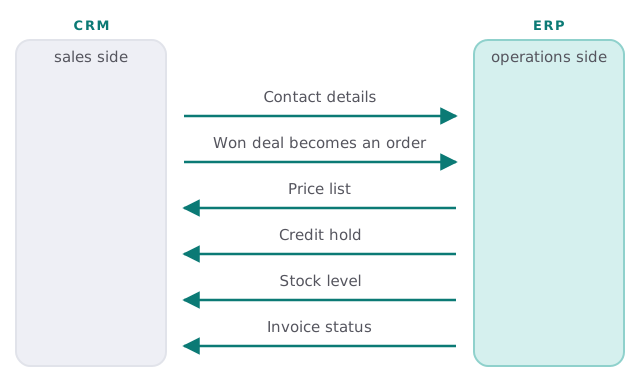
Three patterns we choose from
| Pattern | Good for | Careful about |
|---|---|---|
| One-way push | A won deal creating an order | Duplicates if matching is weak |
| One-way pull | Stock, prices and balances shown to sales | Showing stale figures, so say when they were fetched |
| Two-way sync | A single field both teams must edit | Conflicts, so pick a winner in advance |
Most small teams need the first two. The third is a last resort.
Matching comes first
An integration lives or dies on whether it can tell that “Smith & Sons Ltd” in the CRM and “Smith and Sons” in the ERP are the same customer. Typing them identically is not realistic. Instead we agree on a shared identifier, such as an account number created once and copied to both, and we flag near matches for a person to merge, instead of guessing.
When a write fails
Connections break. The ERP is down for maintenance, a required field is missing, or a password expires. The design question is what happens next.
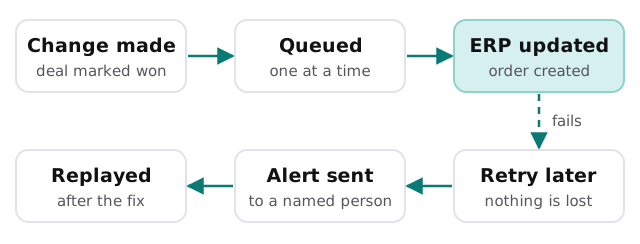
One order, end to end
A rep marks a deal won at 2pm. Within a minute the ERP has a draft order against the matched customer, with the agreed price pulled from its own price list. The warehouse sees it on their screen, not in an email. When the invoice is raised, its status flows back, so the rep can tell the customer it has been sent without ringing the office. If the customer is on a credit hold, the CRM shows a banner before the rep promises a delivery date. None of that needs a person to retype anything, and each step leaves a record you can look at later.
How we approach it
- Map the journey. Follow a customer from enquiry to paid invoice and note every place a person retypes something.
- Decide ownership. Fill in the field list above, one owner per row.
- Check how each side can be reached. An official interface is best, files are second, and screen scraping is a last resort we would flag.
- Build the flows one at a time. Contacts first, then orders, then the status flowing back.
- Test on copies. Compare results with what a person would have entered.
- Switch on with an alert. A named person is told when anything stalls.
Questions before you sign
- Which of my systems will you read from, and which will you write to?
- What does a duplicate customer look like, and who sees it?
- Where can I see a list of failed updates?
- What breaks if the ERP is upgraded?
- Can the connection be switched off without losing data?
Related reading
If you are only linking enquiries into a CRM, our page on website form to CRM automation covers the front end of the same journey. Do that first, since a clean CRM makes the ERP link simpler.
What we need from you
- Read access to both systems, or a test copy of each.
- One typical customer’s path from enquiry to invoice.
- The person who knows why the ERP fields are set up the way they are.
We start with a plan and a fixed quote, and a person approves the matching rules before the first live order is written.
Two systems agree when each fact has one home. Everything else is copying.