A computer at work starts behaving oddly: pop-ups, a slow machine, files that won’t open, a message demanding payment. The instinct is to run a scan and hope. That’s rarely enough, because the real question isn’t whether the virus is gone. It’s what it did first, and who else’s data it touched.
What to do before anyone calls us
- Disconnect it from the network. Unplug the cable or turn off Wi-Fi. Don’t shut it down unless you can’t disconnect it.
- Stop using it. No more logging in to email or banking on that machine.
- Tell one person. Whoever manages IT, so the work isn’t duplicated.
- Don’t wipe it yet. The evidence of what happened may still be on it.
- Use another way to talk. A phone call or a different device, not email from the infected machine.
CISA’s ransomware guide supports the first and last of these: isolate immediately, treat power-down as a fallback because it can lose evidence in memory, and coordinate by channels the attacker can’t see.
How the work runs
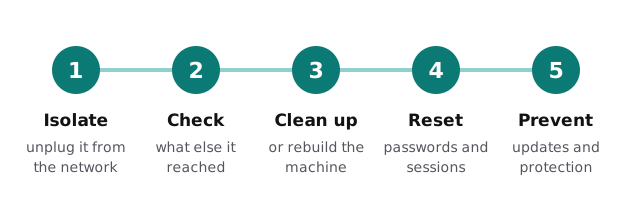
1. Isolate
If it isn’t already off the network, we take it off. If several machines look affected, we look at the network side too, so a shared connection doesn’t spread the problem.
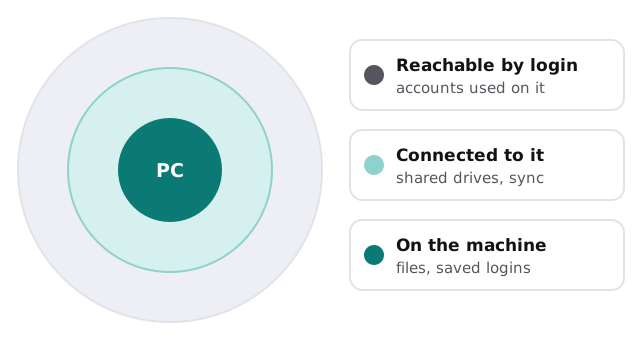
2. Check what else it touched
CISA’s checklist asks you to review your detection and logging tools for signs of other affected systems, and to identify the accounts involved, including email accounts. We follow the same logic on a smaller scale: which files and shared folders could this PC reach, and which accounts were signed in?
3. Clean or rebuild
| Situation | Usual answer |
|---|---|
| Adware or a browser add-on, nothing else odd | Clean up and verify |
| Ransomware | Rebuild from a known-good image |
| A remote-access tool nobody installed | Rebuild |
| Unknown cause, behaviour still strange | Rebuild |
Rebuilding means reinstalling the system and your approved software, then restoring files from a backup you’ve checked. That’s where a good backup earns its cost, and why our page on backup and recovery matters before any of this happens.
4. Reset passwords
CISA says to issue password resets for affected systems once the environment is fully cleaned and rebuilt, including the accounts connected to them. Resetting before the machine is clean just hands the new password to the same malware. We also end active sessions, so old sign-ins stop working.
5. Prevent a repeat
This is the part people skip, and it’s what the first four steps are for. We find how it got in: an out-of-date program, a phishing email, a USB stick. Then we fix that.
What we ask you for
A short account of what you noticed and when, the names of the people who use the machine, and a list of the accounts and shared folders it normally connects to. The more precise your list, the less we have to guess when we check the reach.
Closing the gap
- Protection that watches every machine. See endpoint protection.
- Updates that actually happen. See patch management.
- Sign-in that survives a stolen password. See multifactor authentication setup.
- Staff who recognise the bait. See phishing training.
You get a plan and a fixed quote for the cleanup and the prevention work. We can’t promise a timeline for a job we haven’t looked at, but we’ll tell you what we find and in what order we’d do things.
The scan tells you what’s on the machine. The check tells you what the machine told someone else.