AI automation for contractors works best where the job leaves your hands: the site, the truck, the kitchen table at 9pm. That’s where details are said out loud and then lost, and where a good share of a job’s profit goes missing.
We build small AI tools and internal tools around how a job actually runs. A person in your office approves anything a customer or subcontractor sees.
A Thursday on a remodel
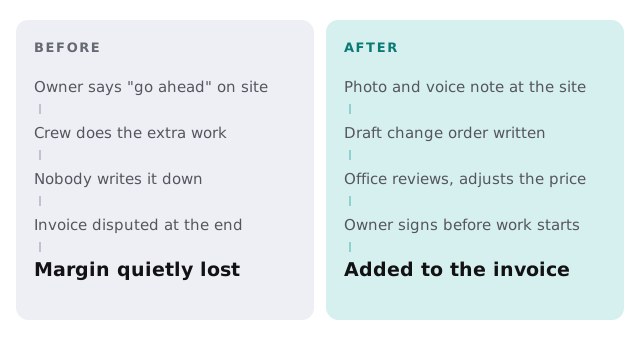
The framer finds rot behind the bathroom wall. The superintendent photographs it, says “Rot in the north wall, about eight feet, needs replacing before drywall,” and puts the phone away.
By the time he’s back at the truck, a draft change order is waiting for the office: the photo, a description in plain language, labor and material lines pulled from the original estimate’s pricing, and a space for the owner’s signature. The office manager adjusts one line, sends it, and the homeowner signs on her phone before dinner. The crew starts Friday with the extra work already approved and priced.
That’s the whole idea. Nothing exotic, just the paperwork keeping up with the work.
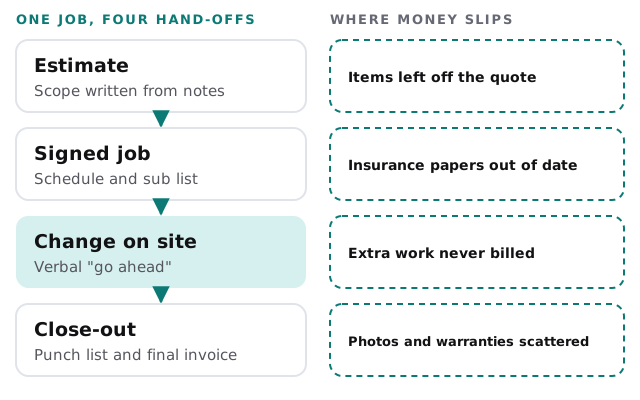
Where a job loses money
What the office could stop doing by hand
- Typing estimates from notes. Describe the scope, upload the plans or photos, and get a first draft built from your own price list and past jobs.
- Chasing subcontractor paperwork. Keep a list of who is on which job, when their insurance paperwork expires, and a draft nudge ready for the ones coming due.
- Writing weekly updates. Daily logs and photos become a short progress note for the customer, ready for the project manager to edit.
- Building the closing package. Punch list items, warranties, manuals and the final invoice, gathered into one draft.
- Answering “when are you coming?” Draft replies from the schedule, which the office confirms before sending.
The software it sits beside
| Category | What you might already use | What the AI tool adds |
|---|---|---|
| Job management and scheduling | A construction platform or field service app | Reads the schedule, drafts customer messages |
| Estimating | Spreadsheets or takeoff software | A first-pass estimate from your own prices |
| Accounting | QuickBooks or similar | Matches invoices and change orders to the job |
| Photos and files | Phone cameras, shared drives | Sorts them to the right job, captions them |
| Texts and email | Everyone’s own phone | Pulls decisions out of threads into the job record |
If your company is small, the first step may just be setting up Zapier for your team to move information between the apps you already pay for. We can help you decide whether a custom build is worth it beyond that.
Busy seasons set the order
Bid season and the weeks before weather turns are the worst time to try something new. Put tools in during the slower weeks, run them next to the old way for a few jobs, then drop the old way. Start with the leak that costs you most, which for many contractors is unwritten change orders.
Signs it’s time
- Your office manager reconstructs what happened on a job from texts.
- Your estimates go out days after the walkthrough.
- You’ve written off extra work because nothing proves you agreed to it.
- You can’t say quickly which subs are covered this month.
How to start
The free IT check looks at the systems the office, the crew and the owner use, and we come back with a plan and a fixed quote. A real person replies within 1 business hour, Monday to Friday, 9am to 5pm Pacific.
The most profitable automation in a contracting company is the one that writes the change order before the work begins.